Dd form 2758-2026

Get Form
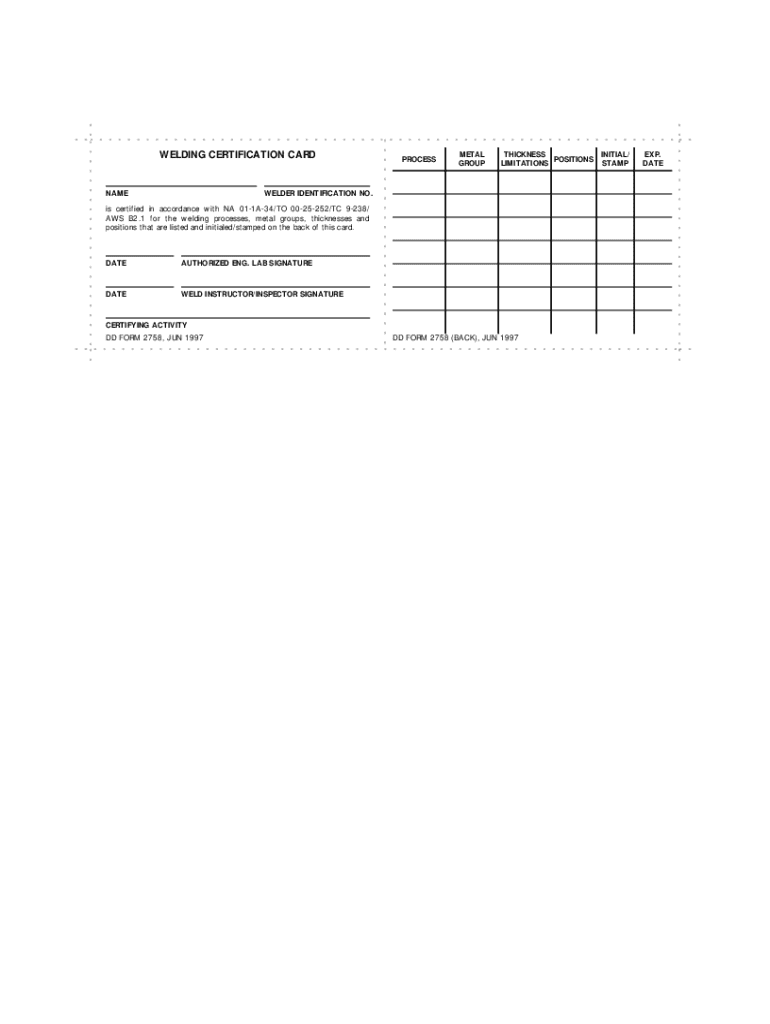
welding certification card Preview on Page 1

Here's how it works

01. Edit your welding certification card online
Type text, add images, blackout confidential details, add comments, highlights and more.
02. Sign it in a few clicks
Draw your signature, type it, upload its image, or use your mobile device as a signature pad.
03. Share your form with others
Send dd form 2757 via email, link, or fax. You can also download it, export it or print it out.

How to use or fill out dd form 2758 with our platform

Form edit decoration
9.5
Ease of Setup
DocHub User Ratings on G2
9.0
Ease of Use
DocHub User Ratings on G2
  1. Click ‘Get Form’ to open the dd form 2758 in the editor.
  2. Begin by entering your name in the designated field at the top of the form. This identifies you as the certified welder.
  3. Next, specify the welding process you are certified in. This is crucial for clarity on your qualifications.
  4. Fill in the metal group and thickness fields. These details are essential for understanding the materials you can work with.
  5. Indicate any limitations or positions relevant to your certification. This ensures compliance with safety standards.
  6. Enter your welder identification number, which serves as a unique identifier for your certification.
  7. Finally, ensure that all signatures are obtained from authorized personnel, including the welding instructor/inspector and certifying activity.

Start using our platform today to fill out your dd form 2758 online for free!

See more dd form 2758 versions

We've got more versions of the dd form 2758 form. Select the right dd form 2758 version from the list and start editing it straight away!
Versions Form popularity Fillable & printable
1997 4.9 Satisfied (341 Votes)
be ready to get more

Complete this form in 5 minutes or less

Get form

Got questions?

We have answers to the most popular questions from our customers. If you can't find an answer to your question, please contact us.
Contact us
Where do I find my DD Form 1299 and 1797? DD Form 1299 (Application for Shipment and/or Storage) and DD Form 1797 (Counseling Checklist) can be printed by logging into your DPS account. Once logged in, click the Self-Counseling tab, locate the correct orders number and click the printer icon in the Action column.
The report of separation form issued in most recent years is the DD Form 214 (dd214, dd 214, dd-214, dd form 214), Certificate of Release or Discharge from Active Duty.
It is important for service members to keep their DD Form 93 updated to ensure benefits docHub the intended beneficiaries in a timely fashion. To update your form, call or visit your personnel center.

Security and compliance

At DocHub, your data security is our priority. We follow HIPAA, SOC2, GDPR, and other standards, so you can work on your documents with confidence.

Learn more
ccpa2
pci-dss
gdpr-compliance
hipaa
soc-compliance
be ready to get more

Complete this form in 5 minutes or less

Get form