Nrca mch 02 a 2026

Get Form
nrca mch 02 a Preview on Page 1

Here's how it works

01. Edit your nrca mch 02 a online
Type text, add images, blackout confidential details, add comments, highlights and more.

02. Sign it in a few clicks
Draw your signature, type it, upload its image, or use your mobile device as a signature pad.

03. Share your form with others
Send nrca mch 03 a via email, link, or fax. You can also download it, export it or print it out.

How to use or fill out nrca mch 02 a with our platform

Form edit decoration
9.5
Ease of Setup
DocHub User Ratings on G2
9.0
Ease of Use
DocHub User Ratings on G2
  1. Click ‘Get Form’ to open the nrca mch 02 a in the editor.
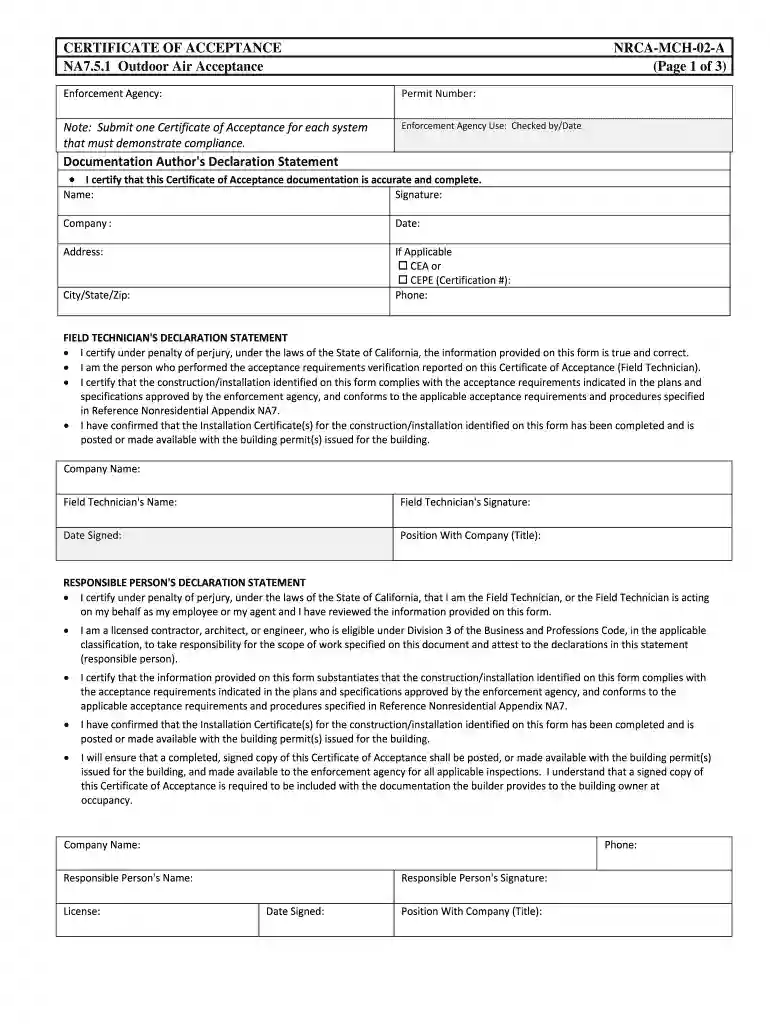
  2. Begin by filling in the 'Enforcement Agency' and 'Permit Number' fields at the top of the form. Ensure that you have all necessary documentation ready for submission.
  3. In the 'Documentation Author's Declaration Statement', enter your name, signature, company name, date, and address. If applicable, include your certification number and phone number.
  4. Proceed to the 'Field Technician's Declaration Statement'. Fill in your company name, technician's name, signature, date signed, and position with the company.
  5. Complete the 'Responsible Person's Declaration Statement' by providing your company name, phone number, responsible person's name, license number, signature, date signed, and position with the company.
  6. For testing sections related to airflow readings and system types (VAV or CAV), ensure accurate measurements are recorded as per instructions provided in each section.

Start using our platform today for free to streamline your document editing and form completion!

See more nrca mch 02 a versions

We've got more versions of the nrca mch 02 a form. Select the right nrca mch 02 a version from the list and start editing it straight away!
Versions Form popularity Fillable & printable
2016 4 Satisfied (39 Votes)
2013 4.7 Satisfied (65 Votes)
be ready to get more

Complete this form in 5 minutes or less

Get form

Got questions?

We have answers to the most popular questions from our customers. If you can't find an answer to your question, please contact us.
Contact us

If you frequently deal with documents stored in your Google Drive, DocHub is a perfect option for you to easily and quickly fill out, adjust, and approve them. This editor integrates properly with Google apps, so you can export your nrca mch 02 a from your Google Drive to the editor without downloading and re-uploading it. Right-click on your document, choose Open With → DocHub PDF Sign and Edit. In our editor, add and assign Signature Fields for all people involved, then click on the Menu button above → Send → choose how you want to share your form.

You may get and edit your nrca mch 02 a online with the help of DocHub. Its straightforward yet feature-rich design enables you to begin effective work immediately after you sign up your account. Create your profile and add your file, and then our user interface will guide you via our stress-free form completion experience.

Using the Do-It-Yourself Takeoff Tools is simple: all you need to get started is to provide a user name, a valid email and a password, and you are ready to create your first project. Take a test drive, create a new Project!
Pass the appropriate two-part (Multiple Choice and ACM Modeling) CEA Exam for Residential and/or Nonresidential. Have verified experience and/or education and other certifications related to Title 24 compliance work. Participate in a Professional Practices Workshop (PPW), sponsored by CABEC.
Title 24 essentially requires smart thermostats in new buildings or additions. It mandates the use of programmable settings that help minimize energy consumption. An example includes automatically turning down the heat or air conditioning at certain times of the day or when fewer people are in the building on weekends.

Security and compliance

At DocHub, your data security is our priority. We follow HIPAA, SOC2, GDPR, and other standards, so you can work on your documents with confidence.

Learn more
ccpa2
pci-dss
gdpr-compliance
hipaa
soc-compliance
be ready to get more

Complete this form in 5 minutes or less

Get form

People also ask

As the last phase of the testing process, following system testing, acceptance testing determines whether a given software is acceptable for delivery or not. Acceptance testing can be carried out by an in-house team of users that werent involved in the development of the software.
Q: What is Title 24? Title 24 California Building Standards Code is a broad set of requirements for energy conservation, green design, construction and maintenance, fire and life safety, and accessibility that apply to the structural, mechanical, electrical, and plumbing systems in a building.
This type of Acceptance Testing, also known as Alpha Testing, is performed by members of the organization that developed the software but who are not directly involved in the project (Development or Testing). Usually, it is the members of Product Management, Sales and / or Customer Support.
A suite of interactive tools to help you understand the compliance process, required forms, installation techniques and energy efficiency regulations applicable to building projects and appliances in California.
The field technician is responsible for performing and documenting the results of the acceptance procedures on the certificate of acceptance documents. The field technician must sign the certificate of acceptance to docHub that the information provided on the certificate of acceptance is true and correct.

Related links