




Here's how it works



How to use or fill out Notice of Intent to Permanently Transfer Entry Permit - Alaska with DocHub

- Click ‘Get Form’ to open it in the editor.
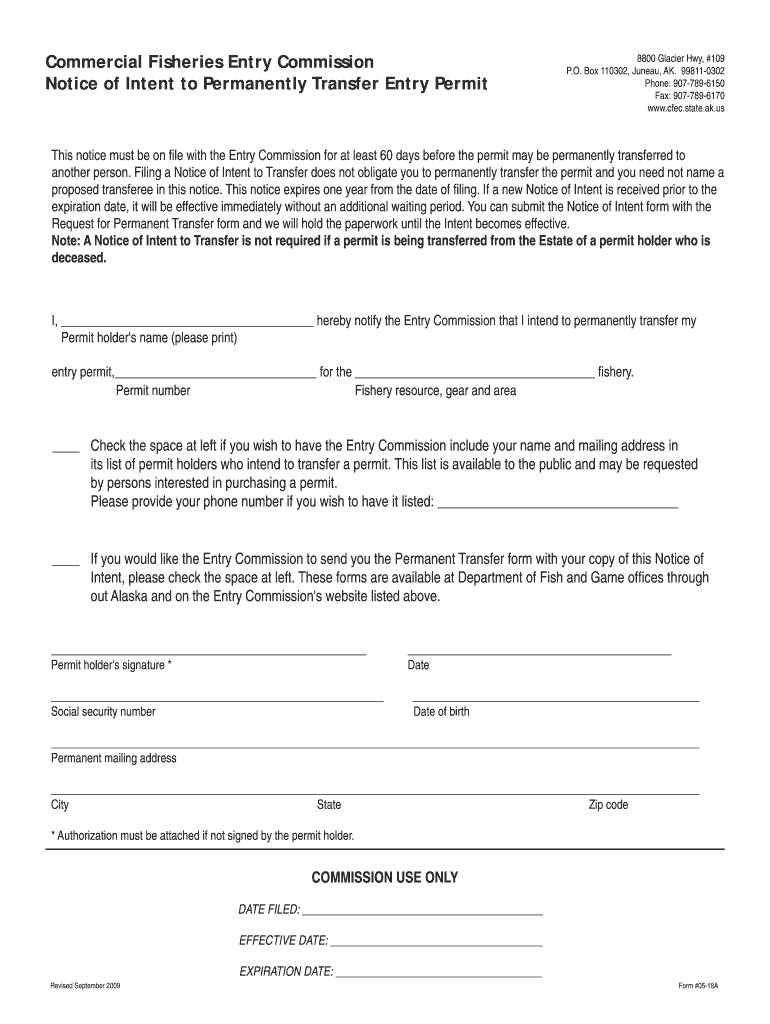
- Begin by entering your name in the designated field for the permit holder. Ensure that you print clearly for accurate processing.
- Next, fill in your permit number and specify the fishery resource, gear, and area related to your entry permit.
- If you wish to have your name and mailing address included in the public list of permit holders intending to transfer, check the appropriate box and provide your phone number.
- Indicate if you would like to receive the Permanent Transfer form by checking the corresponding box.
- Sign and date the form where indicated. If someone else is signing on your behalf, ensure that authorization is attached.
- Finally, review all entered information for accuracy before submitting through our platform.
Start using our platform today to streamline your document editing and submission process for free!
It's free
See more Notice of Intent to Permanently Transfer Entry Permit - Alaska ... versions
Got questions?
Can I draw my electronic signature to approve my Notice of Intent to Permanently Transfer Entry Permit - Alaska ...?
Of course, electronically drawing your signature is acceptable, but only if you use a tool that complies with industry regulations and policies. Try DocHub, which ensures eSignature validity under ESIGN and UETA requirements. All you need to eSign your Notice of Intent to Permanently Transfer Entry Permit - Alaska ... is an account with DocHub and an internet connection. Once you open your file in our editor, click Sign and select the Draw tool.
How do you edit Notice of Intent to Permanently Transfer Entry Permit - Alaska ... on Android?
Document editing with DocHub is equally convenient on desktop and mobile devices. You only need an internet browser to modify your Notice of Intent to Permanently Transfer Entry Permit - Alaska ... on Android. Open our website and sign in to access the instruments you require. Add your file and introduce your intended changes. After that, you can keep your form in your file storage or send it out right away.
What happens if I fish without a license in Alaska?
What is the Limited Entry Act in Alaska?
What is the fishing limit in Alaska 2025?
Security and compliance
At DocHub, your data security is our priority. We follow HIPAA, SOC2, GDPR, and other standards, so you can work on your documents with confidence.
Learn more




