Form a 2026

Get Form
form 29 secp sample Preview on Page 1

Here's how it works

01. Edit your form 29 secp sample online
Type text, add images, blackout confidential details, add comments, highlights and more.
02. Sign it in a few clicks
Draw your signature, type it, upload its image, or use your mobile device as a signature pad.
03. Share your form with others
Send form 29 secp via email, link, or fax. You can also download it, export it or print it out.

How to use or fill out form A with our platform

Form edit decoration
9.5
Ease of Setup
DocHub User Ratings on G2
9.0
Ease of Use
DocHub User Ratings on G2
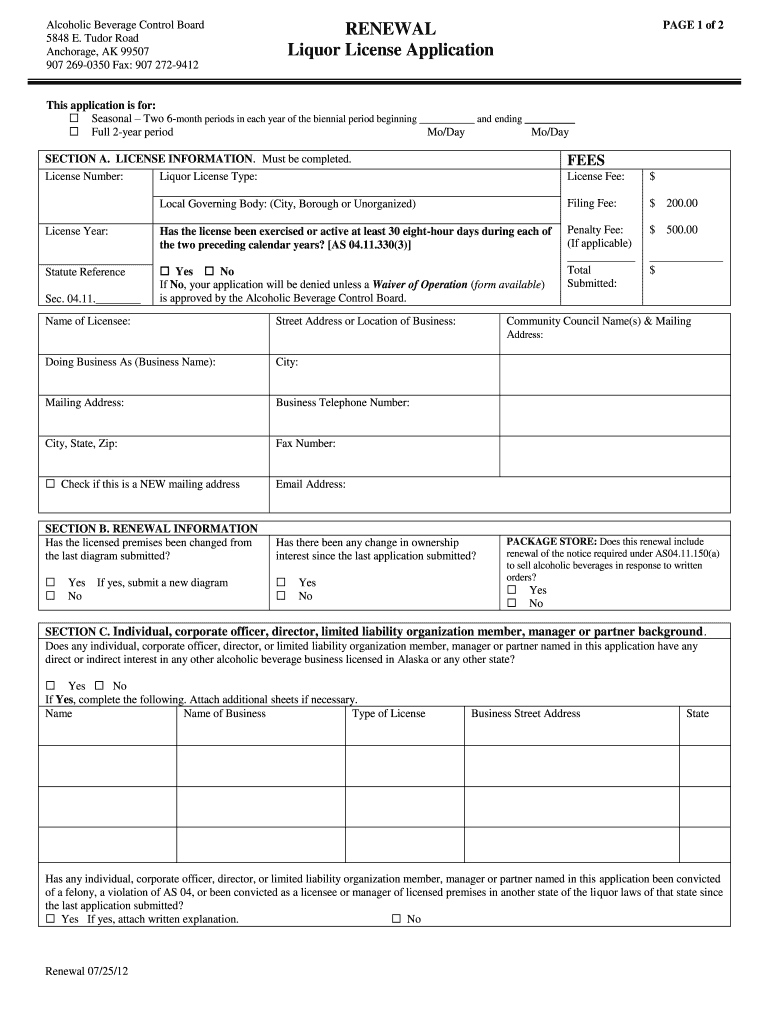
  1. Click ‘Get Form’ to open the Liquor License Renewal Application in the editor.
  2. Begin with SECTION A. LICENSE INFORMATION. Fill in your License Number and select the Liquor License Type from the options provided.
  3. Complete the Fees section by entering the License Fee, Filing Fee, and any applicable Penalty Fee. Ensure you calculate the Total accurately.
  4. In SECTION B, answer whether there have been changes to the licensed premises or ownership since your last application. Attach a new diagram if necessary.
  5. Proceed to SECTION C. Here, provide details about any individuals with interests in other alcoholic beverage businesses and any felony convictions if applicable.
  6. For ENTITY OWNERSHIP, enter information about your corporation or LLC, including compliance status with Title 10 of Alaska Statutes.
  7. Finally, review all sections for accuracy before signing and submitting your application through our platform.

Start filling out your Liquor License Renewal Application today for free!

See more form a versions

We've got more versions of the form a form. Select the right form a version from the list and start editing it straight away!
Versions Form popularity Fillable & printable
2012 4.9 Satisfied (40 Votes)
be ready to get more

Complete this form in 5 minutes or less

Get form

Got questions?

We have answers to the most popular questions from our customers. If you can't find an answer to your question, please contact us.
Contact us
A Form A is a court form in family proceedings setting out the applicants notice of (or intention to proceed with) an application for a financial order.
Form A Application. To file an annual return through Form A you can visit the SECP website and download the form online. Download SECP Form A by clicking the provided link. Form 29 Application. To report changes in your company, you need to submit Form 29.
Form A. It is an application form designed by Central Bank of Nigeria to pay for service transactions (invisible trade) that allows customers to make payment for services such as School fees, Technical fees, Dividends, Airline Tickets, Loans repayment, Judgment debt, Personal Home Remittance, PTA, BTA etc.
The Form A is the first application to court in obtaining a legally binding financial order. Divorcing couples are encouraged to do this as it means that there can be no further claims to finances in the future.
If you or anyone in your family receives a Form 1095-A from the Marketplace, you will use the information on the form to complete a Form 8962 to reconcile any advance payments of the premium tax credit or to claim the premium tax credit. Do not file these forms with your tax return.

Security and compliance

At DocHub, your data security is our priority. We follow HIPAA, SOC2, GDPR, and other standards, so you can work on your documents with confidence.

Learn more
ccpa2
pci-dss
gdpr-compliance
hipaa
soc-compliance

People also ask

Form A is one of the most regularly filed SECP Forms. Form A shows the status of the company as of a particular date as a snapshot of the status. Form A SECP is the document that every company has to file as an annual return under the Company law other than those whose particulars have not changed.
FORM A. REGISTRATION OF BUSINESS NAME - SOLE PROPRIETORSHIP(Sections 2) REGISTRATION OF BUSINESS NAMES ACT, 1962 (ACT 151)

form 29 secp download