Dnr 3300 227 form-2026

Get Form
dnr 3300 227 form Preview on Page 1

Here's how it works

01. Edit your form online
Type text, add images, blackout confidential details, add comments, highlights and more.
02. Sign it in a few clicks
Draw your signature, type it, upload its image, or use your mobile device as a signature pad.
03. Share your form with others
Send it via email, link, or fax. You can also download it, export it or print it out.

How to use or fill out dnr 3300 227 form with our platform

Form edit decoration
9.5
Ease of Setup
DocHub User Ratings on G2
9.0
Ease of Use
DocHub User Ratings on G2
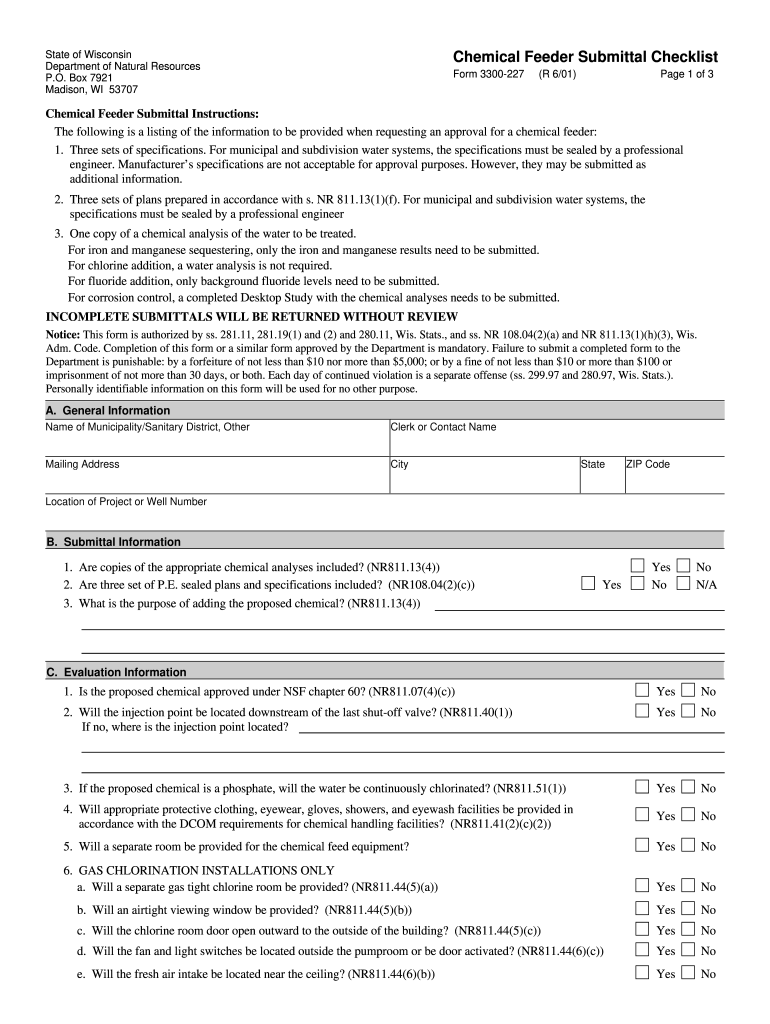
  1. Click ‘Get Form’ to open the dnr 3300 227 form in the editor.
  2. Begin by filling out Section A: General Information. Enter the name of your municipality or sanitary district, along with the contact person's name, mailing address, city, state, and ZIP code.
  3. Proceed to Section B: Submittal Information. Answer the questions regarding chemical analyses and plans. Ensure you check 'Yes' or 'No' as applicable.
  4. In Section C: Evaluation Information, respond to each question about chemical approval and safety measures. Make sure to provide detailed answers where necessary.
  5. Complete Section D: Specifications by entering details about the chemical feeder, including manufacturer information and proposed settings.
  6. Fill out Section E: Calculations with relevant data for well pump capacity and chemical usage calculations. Attach any additional documents if needed.
  7. Finally, review all sections for accuracy before signing in Section G. Use our platform's tools to ensure everything is complete and correct.

Start using our platform today for free to streamline your document editing and submission process!

See more dnr 3300 227 form versions

We've got more versions of the dnr 3300 227 form form. Select the right dnr 3300 227 form version from the list and start editing it straight away!
Versions Form popularity Fillable & printable
2001 4.9 Satisfied (414 Votes)
be ready to get more

Complete this form in 5 minutes or less

Get form

Got questions?

We have answers to the most popular questions from our customers. If you can't find an answer to your question, please contact us.
Contact us
by calling DNR customer service from 7 a.m. to 10 p.m. at 1-888-936-7463; or. by visiting a DNR service center during their regular scheduled hours.
If you are a Wisconsin resident 18 years or older and do not have a Wisconsin drivers license, please call the DNR Call Center at 1-888-936-7463 for assistance setting up your customer account.
Requesting DNR records Email is the preferred and most efficient way to submit public records requests. Requests can be submitted to DNRRecordsResponse@wisconsin.gov. You can find suggestions below on Making efficient requests. The DNR also has many records available online. See below for links to online databases.
You can obtain a DNR Customer ID Number: by using our online web site to obtain your DNR customer ID number; by calling DNR customer service from 7 a.m. to 10 p.m. at 1-888-936-7463; or.
Email us: info.dnr@state.mn.us Call us: 651-296-6157 or 888-MINNDNR (646-6367) DNR information center (St. Paul) DNR license center (St. Paul) DNR local offices (statewide) In-person services are available again but may have limited hours depending on staff availability. Additional information:

Security and compliance

At DocHub, your data security is our priority. We follow HIPAA, SOC2, GDPR, and other standards, so you can work on your documents with confidence.

Learn more
ccpa2
pci-dss
gdpr-compliance
hipaa
soc-compliance
be ready to get more

Complete this form in 5 minutes or less

Get form