Printable warrants 2013 form-2026

Get Form
printable warrants 2013 form Preview on Page 1

Here's how it works

01. Edit your form online
Type text, add images, blackout confidential details, add comments, highlights and more.

02. Sign it in a few clicks
Draw your signature, type it, upload its image, or use your mobile device as a signature pad.

03. Share your form with others
Send it via email, link, or fax. You can also download it, export it or print it out.

How to use or fill out printable warrants 2013 form with our platform

Form edit decoration
9.5
Ease of Setup
DocHub User Ratings on G2
9.0
Ease of Use
DocHub User Ratings on G2
  1. Click ‘Get Form’ to open the printable warrants 2013 form in the editor.
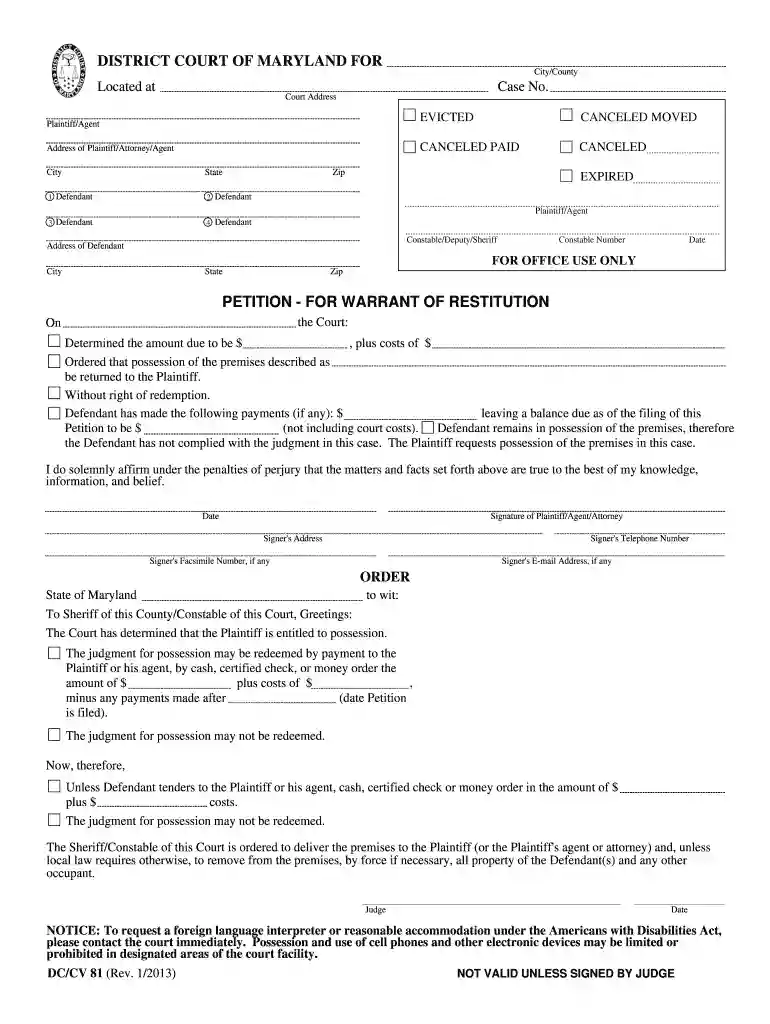
  2. Begin by entering the 'District Court of Maryland' and the specific 'City/County' where the case is filed. Fill in the 'Case No.' and 'Court Address' as required.
  3. In the section for 'Address of Plaintiff/Attorney/Agent', provide complete details including city, state, and zip code. Repeat this for each defendant listed.
  4. Specify the amount due and any costs associated with it in the designated fields. Ensure accuracy as this information is crucial for court proceedings.
  5. Complete the signature section by entering your name, address, telephone number, and email address if applicable. This affirms that all provided information is true.
  6. Review all entries for completeness and accuracy before saving or printing your filled form.

Start using our platform today to fill out your printable warrants 2013 form easily and for free!

See more printable warrants 2013 form versions

We've got more versions of the printable warrants 2013 form form. Select the right printable warrants 2013 form version from the list and start editing it straight away!
Versions Form popularity Fillable & printable
2014 4.8 Satisfied (81 Votes)
2013 4 Satisfied (42 Votes)
be ready to get more

Complete this form in 5 minutes or less

Get form

Got questions?

We have answers to the most popular questions from our customers. If you can't find an answer to your question, please contact us.
Contact us

You should use only reliable software solutions with strong data protection compliance to sign your paperwork electronically. DocHub is just the type of service you need! It stores data on Amazon Web Servers and complies with all necessary security standards and eSignature regulations, so it’s a reliable way to electronically sign your printable warrants 2013 form or other forms with this tool.

In addition to a comprehensive toolset for editing PDFs on mobile devices, DocHub enables you to sign your printable warrants 2013 form along the way. Open our editor in your web browser, make changes using DocHub’s toolset, and complete your editing by eSigning the finished form.

Yes. Under New Mexicos Inspection of Public Records Act (NMSA 1978, 14-2-1 to - 12), non-confidential government records such as warrants are generally open unless explicitly stated. Consequently, individuals may submit queries to agencies that maintain warrant records.
Citizens can access New Mexico criminal court records online by: Completing and submitting an Online Request Form. Searching the New Mexico Courts Case Lookup portal. Using the Secured Odyssey Public Access.
The Inspection of Public Records Act (IPRA), NMSA 1978, 14-2-1 to 12, is a New Mexico state law that provides the public access to public records. The law requires open access to almost all public records in state and local government, with a few exceptions.

Security and compliance

At DocHub, your data security is our priority. We follow HIPAA, SOC2, GDPR, and other standards, so you can work on your documents with confidence.

Learn more
ccpa2
pci-dss
gdpr-compliance
hipaa
soc-compliance
be ready to get more

Complete this form in 5 minutes or less

Get form

People also ask

NJ Law: Issuance and Execution of a Search Warrant In order for the police to obtain a search warrant, the applicant must appear before a judge and must present facts, either through direct testimony or an affidavit, that establishes grounds for issuance.
The Department of Law Enforcement in Florida offers a free searchable database to find active warrants in the State. Members of the public may access this database through the FDLEs Crime Information Center to look up outstanding arrest warrants.
When a warrant is issued, it means the court has given the police permission to take action, like arresting someone or searching a place. This happens when a judge believes there is enough reason, called probable cause, to do so. Once the warrant is issued, the police can act on it.
If a warrant for your arrest has been issued, you are subject to being taken into custody at any time by a law enforcement officer. You may address a warrant in the Customer Service lobby of the courthouse. You will face a $100 administrative warrant fee, and the judge who issued the warrant may also require a bond.

Related links