Fill abc ksrevenue search 2026

Get Form
kansas monthly report Preview on Page 1

Here's how it works

01. Edit your kansas monthly report online
Type text, add images, blackout confidential details, add comments, highlights and more.

02. Sign it in a few clicks
Draw your signature, type it, upload its image, or use your mobile device as a signature pad.

03. Share your form with others
Send kansas phone via email, link, or fax. You can also download it, export it or print it out.

How to use or fill out fill abc ksrevenue search with our platform

Form edit decoration
9.5
Ease of Setup
DocHub User Ratings on G2
9.0
Ease of Use
DocHub User Ratings on G2
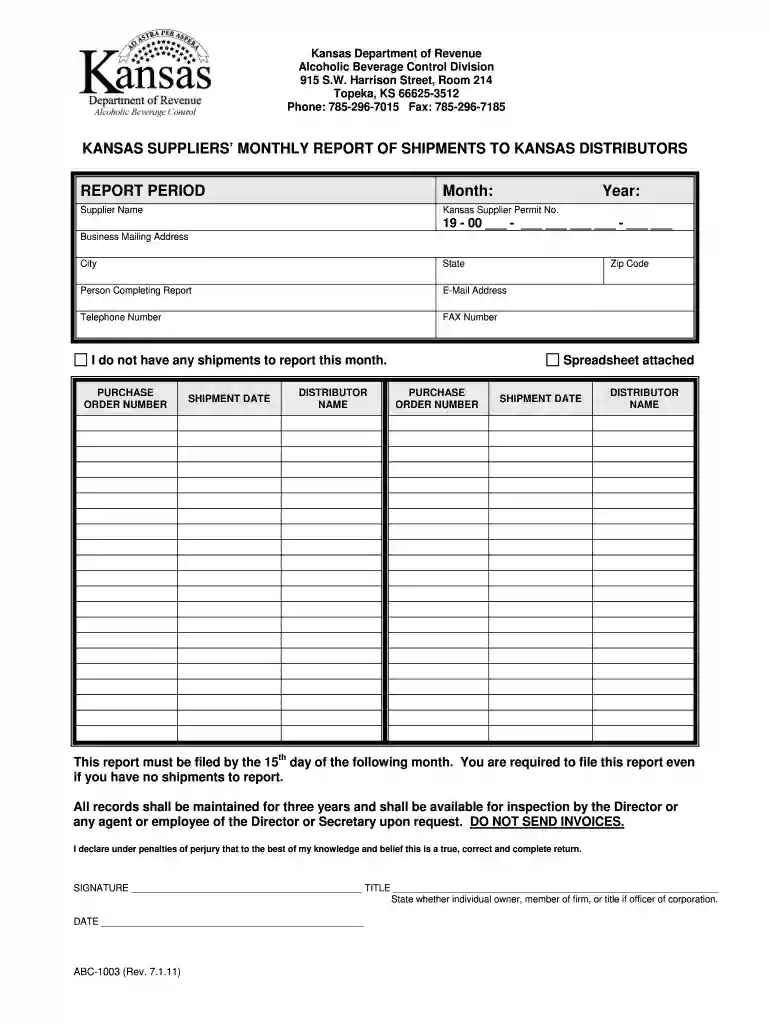
  1. Click ‘Get Form’ to open the fill abc ksrevenue search in the editor.
  2. Begin by entering the report period. Fill in the month and year for which you are reporting shipments.
  3. Provide your Supplier Name and Kansas Supplier Permit Number, ensuring accuracy for compliance.
  4. Complete your Business Mailing Address, including city, state, and zip code.
  5. Fill in the contact details of the person completing the report, including their email address and telephone number.
  6. If applicable, indicate if you have no shipments to report this month by checking the relevant box.
  7. For each shipment, enter the Purchase Order Number, Shipment Date, and Distributor Name as required.
  8. Finally, sign and date the form at the bottom to certify its accuracy before submission.

Start using our platform today to streamline your form completion process for free!

See more fill abc ksrevenue search versions

We've got more versions of the fill abc ksrevenue search form. Select the right fill abc ksrevenue search version from the list and start editing it straight away!
Versions Form popularity Fillable & printable
2022 4.8 Satisfied (125 Votes)
2011 4.8 Satisfied (202 Votes)
be ready to get more

Complete this form in 5 minutes or less

Get form

Got questions?

We have answers to the most popular questions from our customers. If you can't find an answer to your question, please contact us.
Contact us
Kansas operates as an open state, meaning private entities handle the sale and distribution of alcoholic beverages under state regulation. The Kansas Division of Alcoholic Beverage Control (ABC) oversees all aspects of the industry, including licensing, enforcement, and regulatory compliance.
How to Get a Liquor License in Kansas Research Local and State Requirements. Identify the Appropriate Liquor License for Your Restaurant. Gather Necessary Documentation. Submit Your Application. Pay Application Fees. Wait for Approval. Stay Compliant and Renew Your License.
Types of Liquor Licenses in Kansas Retail Liquor License Required for selling alcohol to consumers for off-premises consumption (liquor stores, grocery stores). Restaurant Liquor License Allows restaurants to serve alcohol with food purchases. Bar or Tavern License For establishments primarily serving alcohol.

Security and compliance

At DocHub, your data security is our priority. We follow HIPAA, SOC2, GDPR, and other standards, so you can work on your documents with confidence.

Learn more
ccpa2
pci-dss
gdpr-compliance
hipaa
soc-compliance
be ready to get more

Complete this form in 5 minutes or less

Get form