Type text, add images, blackout confidential details, add comments, highlights and more.
02. Sign it in a few clicks
Draw your signature, type it, upload its image, or use your mobile device as a signature pad.
03. Share your form with others
Send how to get adoption papers via email, link, or fax. You can also download it, export it or print it out.
How to use or fill out Certificate of Adoption - Arizona Department of Health Services - azdhs with our platform
Ease of Setup
DocHub User Ratings on G2
Ease of Use
DocHub User Ratings on G2
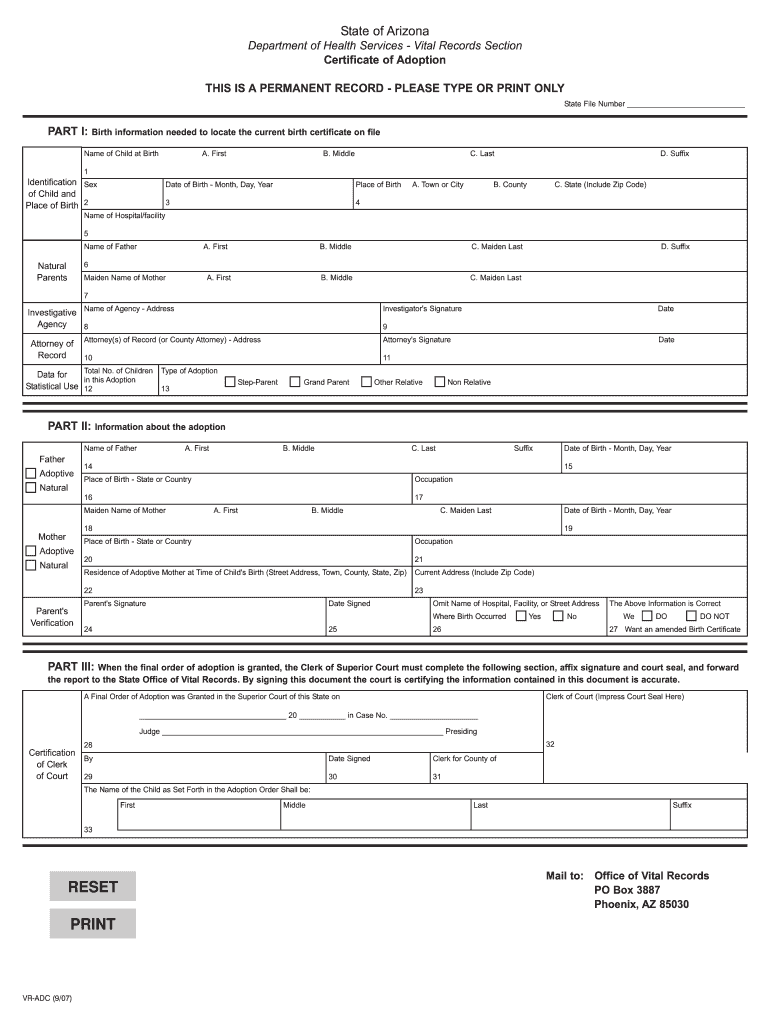
Click ‘Get Form’ to open the Certificate of Adoption in the editor.
Begin with Part I, where you will enter the child's name at birth. Ensure that you type this information exactly as it appears on the registered birth certificate.
Next, provide details about the child's birth, including date and place of birth. This section is crucial for locating the original birth record.
In Part II, adoptive parents must verify and sign the information provided. Make sure all names and dates are accurate as they will appear on the new birth certificate.
Finally, Part III must be completed by the clerk of court. Confirm that all information is correct before submission to ensure a smooth process.
Start using our platform today to easily complete your Certificate of Adoption for free!
Fill out Certificate of Adoption - Arizona Department of Health Services - azdhs online It's free
See more Certificate of Adoption - Arizona Department of Health Services - azdhs versions
We've got more versions of the Certificate of Adoption - Arizona Department of Health Services - azdhs form. Select the right Certificate of Adoption - Arizona Department of Health Services - azdhs version from the list and start editing it straight away!
Arizona Department of social ServicesAzdhs License lookupAzdhs mmj portal loginAzdhs EMS LoginAzdhs phone numberDepartment of health and Human Services PhoenixAzdhs licensing portalMaricopa County health Department complaint
Security and compliance
At DocHub, your data security is our priority. We follow HIPAA, SOC2, GDPR, and other standards, so you can work on your documents with confidence.
The State of Arizonas Rural Health Transformation Program
In this role, it will manage the Rural Health Workforce Development and Training Program, in coordination with ADHS, AHCCCS, and the Governors Office. ToRead more
Apply for a Birth Certificate After Adoption; Register a Foreign-Birth Adoption; Original Pre-Adoptive Certificate; Putative Father Registry/Notice of Claim ofRead more
Cookie consent notice
This site uses cookies to enhance site navigation and personalize your experience.
By using this site you agree to our use of cookies as described in our Privacy Notice.
You can modify your selections by visiting our Cookie and Advertising Notice.