




Here's how it works

01. Edit your crb annual return online
Type text, add images, blackout confidential details, add comments, highlights and more.

02. Sign it in a few clicks
Draw your signature, type it, upload its image, or use your mobile device as a signature pad.

03. Share your form with others
Send crb registration form via email, link, or fax. You can also download it, export it or print it out.
How to use or fill out crb with our platform

- Click ‘Get Form’ to open the crb in the editor.
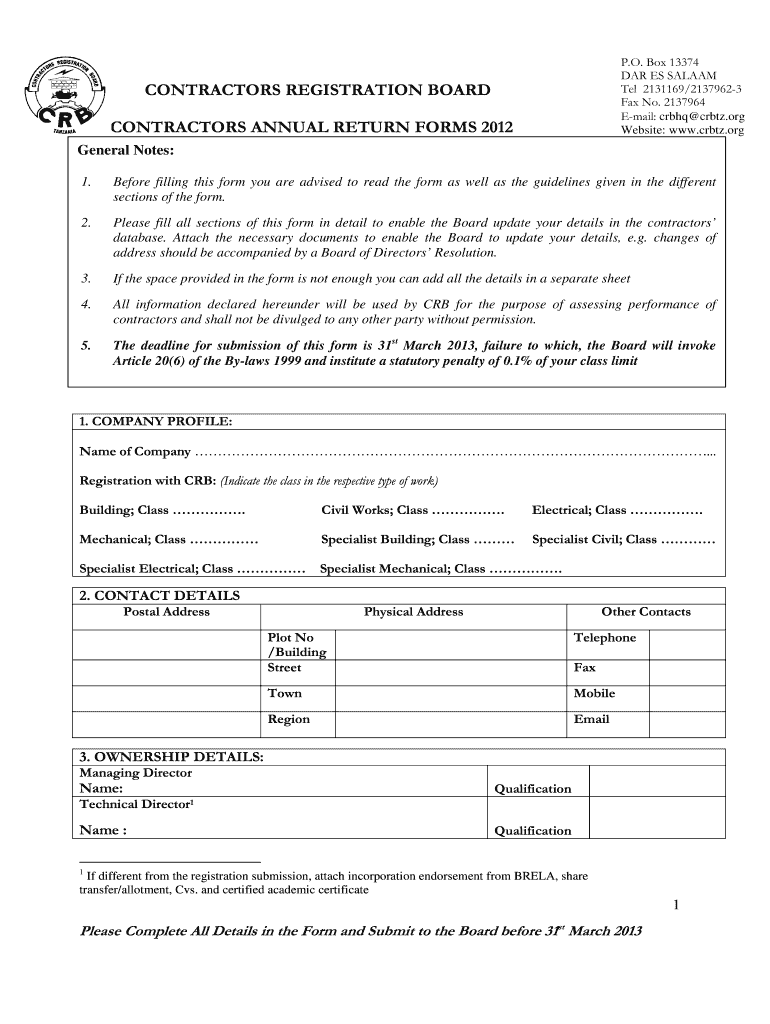
- Begin with the COMPANY PROFILE section. Fill in your company name and indicate your registration class for various types of work, such as Building or Civil Works.
- Move to CONTACT DETAILS. Provide your postal and physical addresses, along with other contact information like telephone and email.
- In OWNERSHIP DETAILS, list the names and qualifications of key personnel, including the Managing Director and Technical Director.
- For FINANCIAL DETAILS, indicate whether you have audited accounts for the previous year and provide your estimated annual turnover.
- Complete the HUMAN RESOURCES section by detailing your staff composition, including technical staff and unskilled laborers employed during 2012.
- Fill out WORK OPPORTUNITIES by indicating if your company undertook any projects in Tanzania during 2012 and provide details on tenders submitted.
- Address OCCUPATIONAL HEALTH AND SAFETY (OHS) by confirming if you have an OHS policy and providing details on safety training provided to staff.
- In PLANT AND EQUIPMENT, list major construction equipment acquired or leased during 2012, specifying their condition.
- Finally, complete PROJECTS EXECUTED by detailing all projects undertaken in 2012 along with their values and completion status.
Start filling out your crb form today using our platform for free!
Fill out crb online
It's free
It's free
See more crb versions
We've got more versions of the crb form. Select the right crb version from the list and start editing it straight away!
| Versions | Form popularity | Fillable & printable |
|---|---|---|
| 2012 | 4.8 Satisfied (102 Votes) |
Security and compliance
At DocHub, your data security is our priority. We follow HIPAA, SOC2, GDPR, and other standards, so you can work on your documents with confidence.
Learn more


