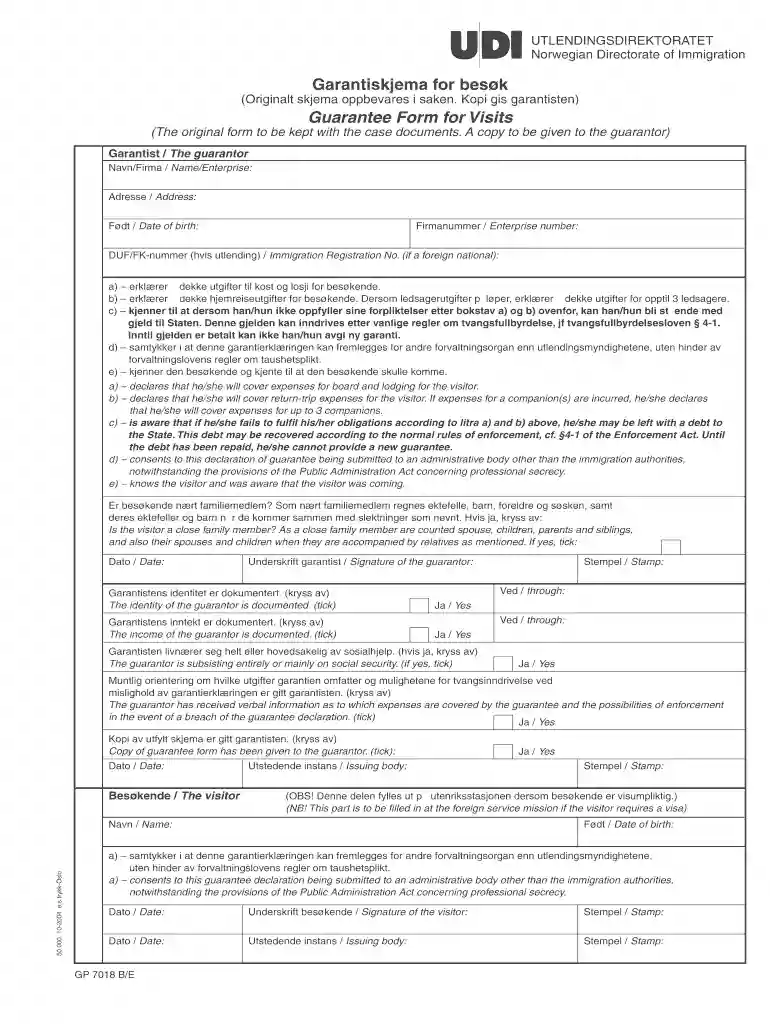
garantiskjema udi Preview on Page 1

Garantiskjema bes k 2026

Here's how it works

  • 01. Edit your garantiskjema udi online

    Type text, add images, blackout confidential details, add comments, highlights and more.

  • 02. Sign it in a few clicks

    Draw your signature, type it, upload its image, or use your mobile device as a signature pad.

  • 03. Share your form with others

    Send udi garantiskjema via email, link, or fax. You can also download it, export it or print it out.

How to use or fill out garantiskjema bes k with our platform

Form edit decoration
9.5
Ease of Setup
DocHub User Ratings on G2
9.0
Ease of Use
DocHub User Ratings on G2
  1. Click ‘Get Form’ to open the garantiskjema bes k in the editor.
  2. Begin by filling in your personal details as the guarantor, including your name, address, date of birth, and enterprise number if applicable.
  3. In section a) and b), declare your commitment to cover expenses for the visitor's board, lodging, and return trip. Ensure you check the box for any companions if necessary.
  4. Acknowledge your understanding of potential debts to the State by checking the relevant box in section c).
  5. Confirm your consent regarding submission of this declaration to other administrative bodies by ticking section d).
  6. Indicate whether the visitor is a close family member by checking the appropriate box.
  7. Complete all required fields and ensure you sign at the bottom as the guarantor before submitting it along with necessary documentation.

Start using our platform today for free to streamline your document editing and form completion!

See more garantiskjema udi versions

We've got more versions of the garantiskjema udi form. Select the right garantiskjema udi version from the list and start editing it straight away!

VersionsForm popularityFillable & printable
20044.8 Satisfied (198 Votes)

be ready to get more

Complete this form in 5 minutes or less

Got questions?

We have answers to the most popular questions from our customers. If you can't find an answer to your question, please contact us.

With DocHub, you can quickly sign your garantiskjema bes k or any other paperwork on iOS, even without installing additional applications. You can access your DocHub account from any web-connected browser and fill out and sign your document in any way you like with just a couple of clicks.

You can get and edit your garantiskjema bes k online by using DocHub. Its simple but feature-rich design allows you to begin effective work immediately after you register your account. Create your profile and add your document, and then our user interface will guide you via our stress-free form completion experience.

Security and compliance

At DocHub, your data security is our priority. We follow HIPAA, SOC2, GDPR, and other standards, so you can work on your documents with confidence.

Related links

IMT Nuremberg Archives H-4716 International Court of

Dec 1, 2021 Studentene ved Universitetet i Oslo blir overfrt til en srlig leir i. Tyskland. 2. De kvinnelige studenter blir permittert fraRead more

Learn more
If you believe that this page should be taken down, please follow our DMCA take down process here