Type text, add images, blackout confidential details, add comments, highlights and more.

02. Sign it in a few clicks
Draw your signature, type it, upload its image, or use your mobile device as a signature pad.

03. Share your form with others
Send dmv pull notice codes via email, link, or fax. You can also download it, export it or print it out.

How to use or fill out dmv pull notice with our platform
Ease of Setup
DocHub User Ratings on G2
Ease of Use
DocHub User Ratings on G2
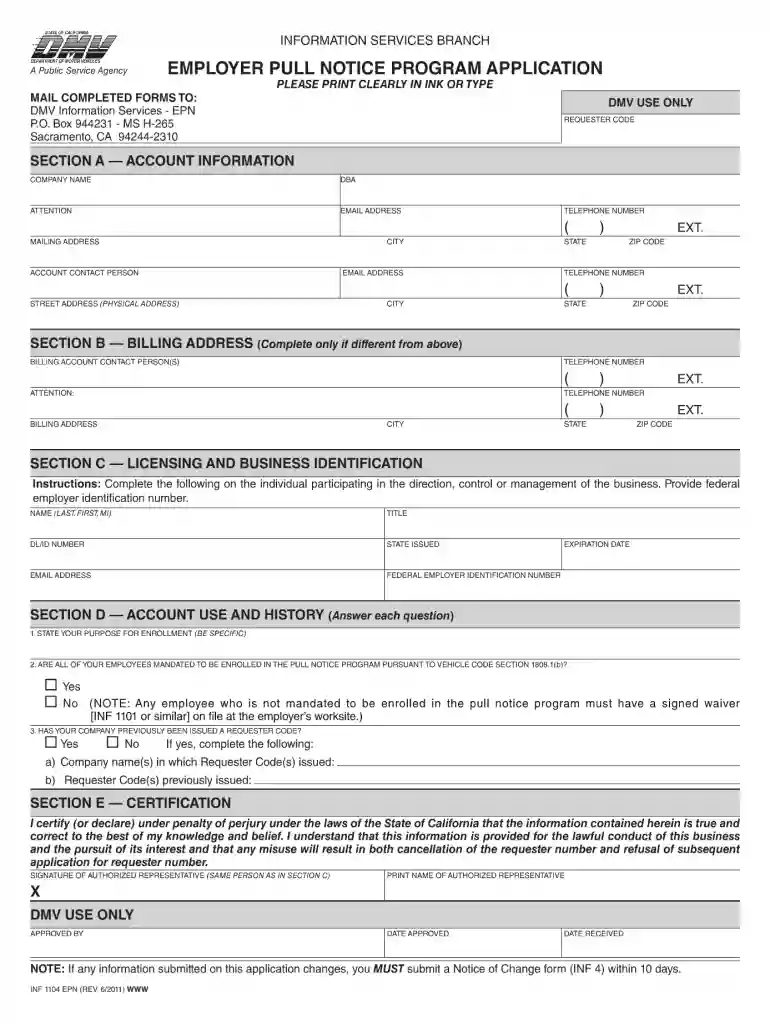
Click ‘Get Form’ to open the DMV Pull Notice application in the editor.
Begin with Section A — Account Information. Fill in your company name, DBA (Doing Business As), and attention contact. Ensure you provide a valid email address and telephone number for communication.
Complete the mailing address fields, including city, state, and zip code. If applicable, include the street address of your physical location.
If your billing address differs from the account information, proceed to Section B and fill in the billing account contact person(s) along with their telephone number and billing address details.
In Section C, provide details about the individual managing your business. Include their name, title, driver's license or ID number, email address, and federal employer identification number.
Answer questions in Section D regarding your purpose for enrollment and employee mandates under Vehicle Code Section 1808.1(b).
Finally, complete Section E by certifying that all information is accurate. Sign as the authorized representative and print your name.
Start using our platform today to streamline your DMV Pull Notice application process for free!
Level I (Warning Letter) You will receive a warning letter if you have accumulated a certain number of points within a time period. Note You might also receive a warning letter when a major conviction is added to your drivers record.
How do I add a driver to a pull notice?
To obtain a driver record on a prospective employee you may submit an INF 1119 form. To add this driver to the EPN Program you must submit the applicable forms: INF 1100, INF 1102, INF 1103, INF 1103A form. You may obtain forms at our website at .dmv.ca.gov/otherservices, or by calling 916-657-6346.
Who needs an EPN?
The Employer Pull Notice (EPN) program enables commercial and government organizations to monitor the driving records of employees who drive for them. By monitoring their employees driving records, organizations can: Ensure that each driver has a valid drivers license. Recognize problem drivers or driving behavior.
What is the new rule for California drivers?
How to clean up your driving record Take a defensive driving course. Many states will remove points or minor infractions from your driving record if you complete a defensive driving course. Dispute errors on your driving record. Contest your ticket. Fix minor issues immediately. Expunge your record. Seek a deferment.
employer pull notice program
DMV Pull Notice form pdfHow to get DMV Pull NoticeDMV Pull Notice phone numberDMV Pull Notice form 1101How to read a CA DMV Pull NoticeDMV Pull Notice Authorization formDMV Pull Notice form 1100DMV Pull Notice codes
dmv epn
2018 Self-Driving Safety Report Appendix A
We continue in-car training and each AVT is enrolled in the state. DMVs electronic pull notice (EPN) program, which continuously monitors the integrity of
Enhanced DMV Digital Employer Pull Notice Service Much
Mar 18, 2024 The DMV now offers a faster way for businesses to check that their employees have clean driving records using the new online Employee Pull Notice (EPN) Service.
Cookie consent notice
This site uses cookies to enhance site navigation and personalize your experience.
By using this site you agree to our use of cookies as described in our Privacy Notice.
You can modify your selections by visiting our Cookie and Advertising Notice.