01. Edit your dod initial orientation and awareness training online
Type text, add images, blackout confidential details, add comments, highlights and more.

02. Sign it in a few clicks
Draw your signature, type it, upload its image, or use your mobile device as a signature pad.

03. Share your form with others
Send dod initial orientation and awareness training answers via email, link, or fax. You can also download it, export it or print it out.

How to use or fill out mv210 form montana 2010 with DocHub
Ease of Setup
DocHub User Ratings on G2
Ease of Use
DocHub User Ratings on G2
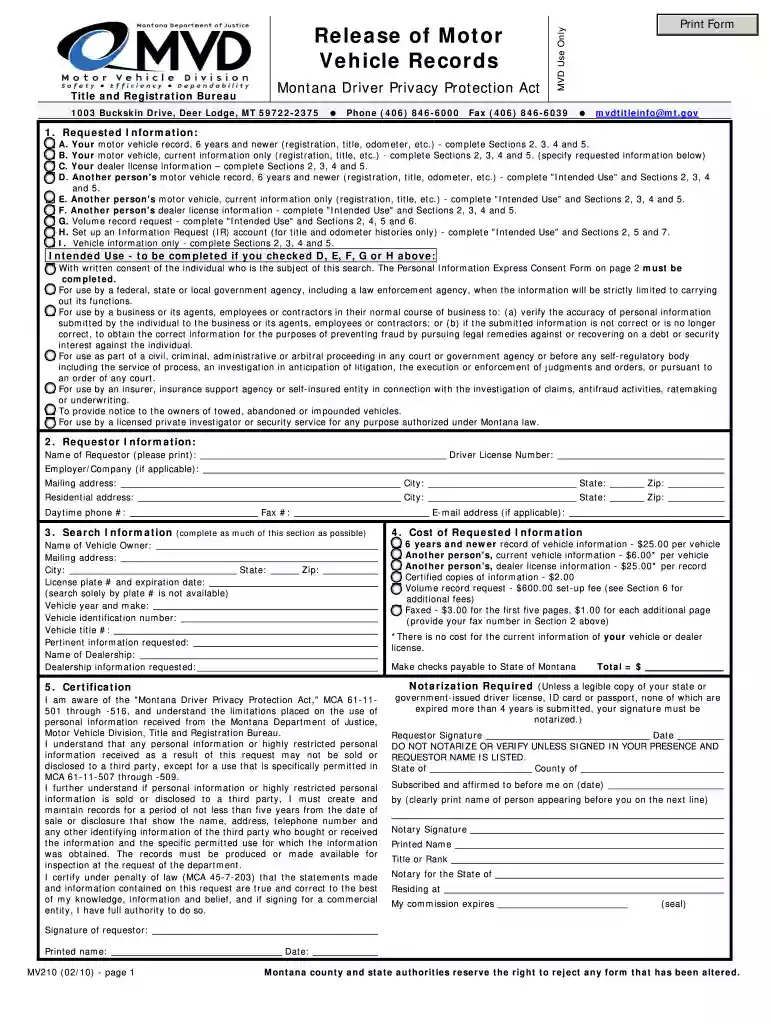
Click ‘Get Form’ to open the mv210 form in our editor.
Begin by filling out the 'Requested Information' section. Choose the appropriate option (A-I) that describes your request and complete Sections 2, 3, 4, and 5 as needed.
In the 'Requestor Information' section, provide your name, driver license number, mailing address, and contact details. Ensure all fields are accurately filled for a smooth processing experience.
Complete the 'Search Information' section with as much detail as possible about the vehicle or individual whose records you are requesting. This includes vehicle owner name, license plate number, and vehicle identification number.
Review the 'Cost of Requested Information' section to understand any fees associated with your request. Make sure to include payment information if required.
Sign and date the certification at the bottom of the form. If notarization is required, ensure it is completed before submission.
Start using our platform today to fill out your mv210 form easily and for free!
We've got more versions of the mv210 form montana 2010 form. Select the right mv210 form montana 2010 version from the list and start editing it straight away!
Cookie consent notice
This site uses cookies to enhance site navigation and personalize your experience.
By using this site you agree to our use of cookies as described in our Privacy Notice.
You can modify your selections by visiting our Cookie and Advertising Notice.