Affidavit form for sam houston state 2009-2026

Get Form
affidavit form for sam houston state 2009 Preview on Page 1

Here's how it works

01. Edit your form online
Type text, add images, blackout confidential details, add comments, highlights and more.

02. Sign it in a few clicks
Draw your signature, type it, upload its image, or use your mobile device as a signature pad.

03. Share your form with others
Send it via email, link, or fax. You can also download it, export it or print it out.

How to use or fill out affidavit form for sam houston state 2009 with our platform

Form edit decoration
9.5
Ease of Setup
DocHub User Ratings on G2
9.0
Ease of Use
DocHub User Ratings on G2
  1. Click ‘Get Form’ to open the affidavit form in the editor.
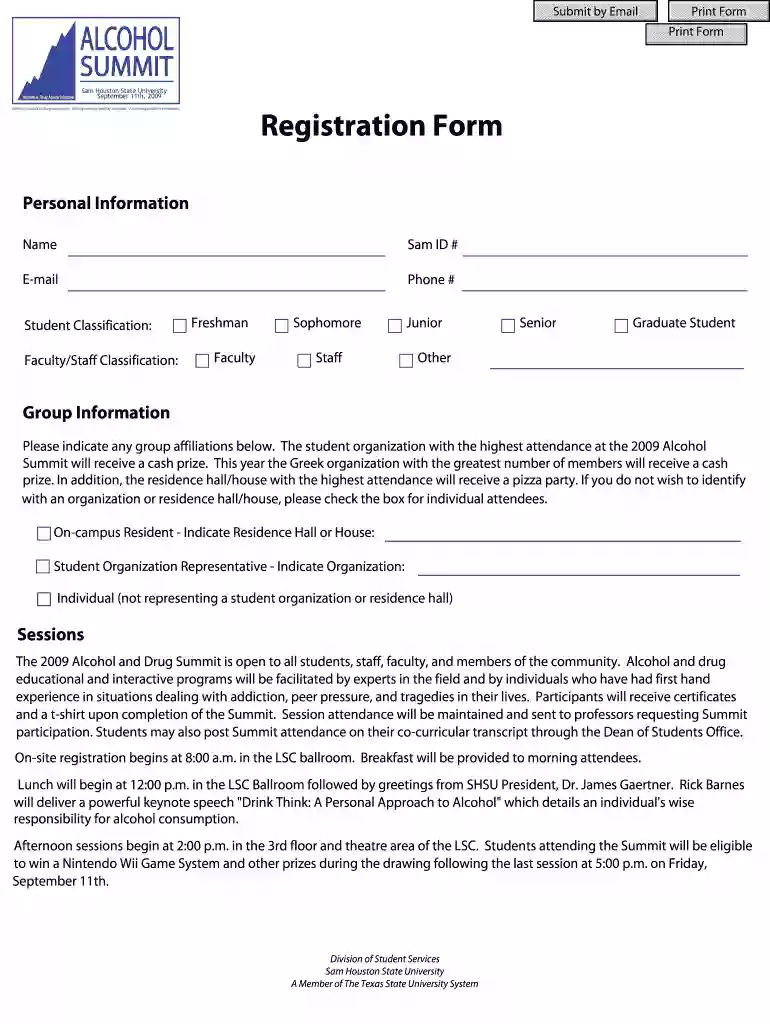
  2. Begin by entering your personal information, including your name, Sam ID number, email, and phone number. Ensure all details are accurate for effective communication.
  3. Select your student classification from the provided options: Freshman, Sophomore, Junior, Senior, Graduate Student, or Other. This helps categorize participants effectively.
  4. In the Group Information section, indicate any affiliations you have with student organizations or residence halls. If you prefer not to associate with any group, check the box for individual attendees.
  5. For session attendance, review the schedule and mark which sessions you plan to attend on both Friday and Saturday. Remember that you can only select one session per time slot.
  6. Once completed, save your changes and submit the form via email or print it out for physical submission as required.

Start filling out your affidavit form today using our platform for a seamless experience!

See more affidavit form for sam houston state 2009 versions

We've got more versions of the affidavit form for sam houston state 2009 form. Select the right affidavit form for sam houston state 2009 version from the list and start editing it straight away!
Versions Form popularity Fillable & printable
2010 4.8 Satisfied (53 Votes)
2009 4.3 Satisfied (53 Votes)
be ready to get more

Complete this form in 5 minutes or less

Get form

Got questions?

We have answers to the most popular questions from our customers. If you can't find an answer to your question, please contact us.
Contact us
Change of Address Access MySJSU in one.SJSU and find the Personal Information section. Click Add a new address to find SEVIS D. Update your U.S. residential (physical) address in SEVIS D within 10 days of moving.
General Affidavits must be signed in front of a notary public. A notary must verify your identification before you sign the document. Make sure to bring ID (like a drivers license or other form of identification) for the notary before you sign the affidavit.
How do I change my address? You can go to CatsWeb under Enrollment Registration then click on Change My Address. Be aware that TXST keeps several types of addresses on file: Local (Current) Address - This is the address where you currently live.
The direct link to change your address is . Verify that you are eligible. To change your address online, you must meet certain eligibility requirements. If you dont meet these requirements, you will have to apply in person or by mail.
Students may change addresses online through MySam. For W2 address changes, please contact the Payroll Office at 936-294-1909. Student submits the form online.

Security and compliance

At DocHub, your data security is our priority. We follow HIPAA, SOC2, GDPR, and other standards, so you can work on your documents with confidence.

Learn more
ccpa2
pci-dss
gdpr-compliance
hipaa
soc-compliance
be ready to get more

Complete this form in 5 minutes or less

Get form

People also ask

Report Changes to UH edu. Click the myUH Self-Service icon. Select Personal Information. Select Address and add or edit your U.S. home address.
Qualifying students may submit an application fee waiver request to the SHSU Office of Admissions by mail or email. Email: admissions@shsu.edu. Mail: SHSU Admissions, Box 2418, Huntsville, Texas 77340.
Official transcripts are sent electronically to graduate@shsu.edu or by mail directly to the Office of Admissions - Graduate Programs, SHSU, Box 2478, Huntsville, TX 77341-2478.

Related links