Americorps timesheet fillable form 2026

Get Form
americorps timesheet Preview on Page 1

Here's how it works

01. Edit your americorps timesheet online
Type text, add images, blackout confidential details, add comments, highlights and more.

02. Sign it in a few clicks
Draw your signature, type it, upload its image, or use your mobile device as a signature pad.

03. Share your form with others
Send americorps login via email, link, or fax. You can also download it, export it or print it out.

How to use or fill out Americorps timesheet fillable form with DocHub

Form edit decoration
9.5
Ease of Setup
DocHub User Ratings on G2
9.0
Ease of Use
DocHub User Ratings on G2
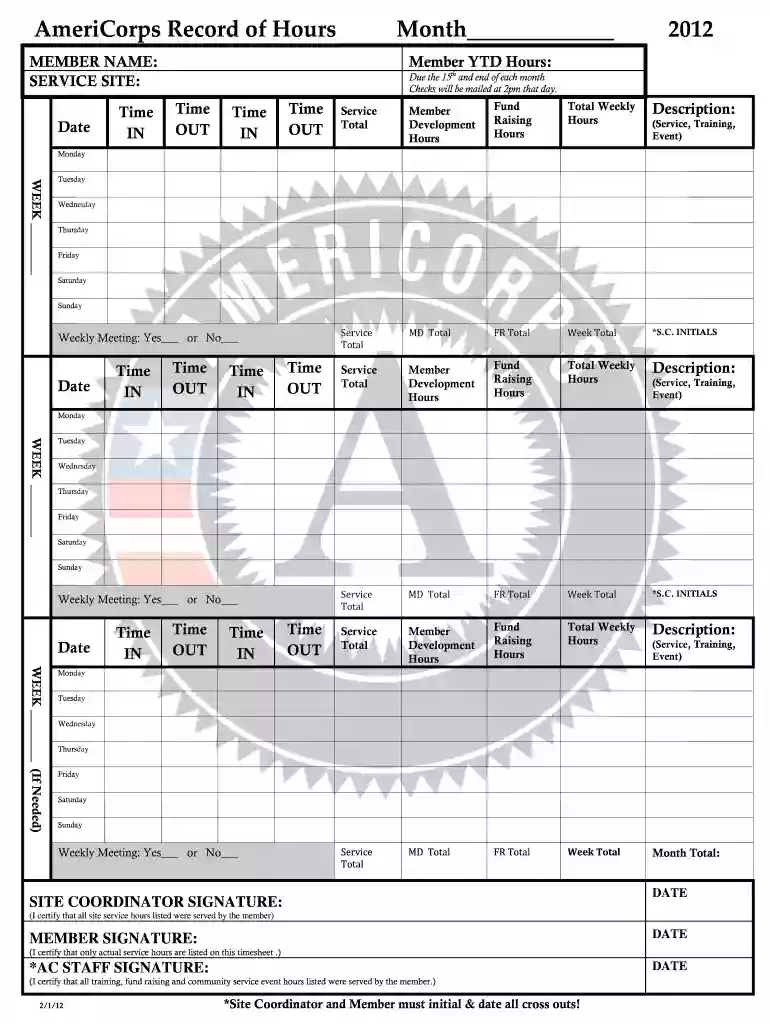
  1. Click ‘Get Form’ to open the Americorps timesheet fillable form in our editor.
  2. Begin by entering your name and service site at the top of the form. This information is essential for identifying your service hours.
  3. Fill in the date and record your time IN and OUT for each day of the week. Ensure accuracy as these hours contribute to your total monthly hours.
  4. In the 'Service Total' section, categorize your hours into Member Development and Fund Raising. This helps track different types of service activities.
  5. At the end of each week, calculate and enter your total weekly hours, ensuring you include all relevant activities such as training or events.
  6. Don’t forget to have both the Site Coordinator and Member sign and date where indicated, certifying that all reported hours are accurate.

Start using our platform today to easily complete your Americorps timesheet for free!

be ready to get more

Complete this form in 5 minutes or less

Get form

Got questions?

We have answers to the most popular questions from our customers. If you can't find an answer to your question, please contact us.
Contact us

With DocHub, you can rapidly approve your americorps timesheet login or any other document on iOS, even without setting up additional applications. You can access your DocHub account from any web-connected browser and fill out and sign your form in any way you like with just a few clicks.

If you need to edit your Americorps timesheet fillable form on the internet swiftly, it does not matter what web browser you employ. DocHub’s straightforward editing instruments are available using any internet browser. Just open the appropriate tab within our editor, add your document, and fill it out without stress.

Time Card Conversion Examples Lets say another employee worked 7 hours and 45 minutes. To convert this to decimal form, you would divide the minutes worked by 60, which gives you 0.75. Then, you would add that decimal to the total number of hours worked, which gives you 7.75 hours.
In summary, 30 minutes equals 0.50 hours on a timesheet. Whether youre tracking manually or using software, using the decimal . 50 ensures your half-hour increments are counted correctly, keeping payroll precise and fair.
How to make a timesheet in Excel Step 1: Format your spreadsheet. Step 2: Title your timesheet. Step 3: Add labels to your timesheet. Step 4: Add the timesheet. Step 5: Add formulas for automatic calculations. Step 6: Print or keep it online.

Security and compliance

At DocHub, your data security is our priority. We follow HIPAA, SOC2, GDPR, and other standards, so you can work on your documents with confidence.

Learn more
ccpa2
pci-dss
gdpr-compliance
hipaa
soc-compliance
be ready to get more

Complete this form in 5 minutes or less

Get form

People also ask

How to Use Timesheet Templates Step 1: Choose the templatedaily, weekly, monthly, project billing or employee. Step 2: Download the template (Google Sheets: File Make a copy). Step 3: Fill headeremployee, supervisor, period start, regular hours, hourly rate. Step 4: Log daily start/end times.
How to Fill Out a Timesheet Step 1: Enter the Employees Name. Step 2: Add a Date Range. Step 3: Add Project Details. Step 4: Add Work Hours for Each Workday. Step 5: Determine Total Work Hours. Step 6: Add Notes, if Required. Step 7: Submit the Timesheet for Approval. Timely Payroll Processing.
To begin with, managers can fill in the basic details and share the timesheets with their employees to key in their work hours. Step 1: Enter the Employees Name. Step 2: Add a Date Range. Step 3: Add Project Details. Step 4: Add Work Hours for Each Workday. Step 5: Determine Total Work Hours. Step 6: Add Notes, if Required.

Related links