Pennsylvania 162 notice 2026

Get Form
form 162 Preview on Page 1

Here's how it works

01. Edit your form 162 online
Type text, add images, blackout confidential details, add comments, highlights and more.
02. Sign it in a few clicks
Draw your signature, type it, upload its image, or use your mobile device as a signature pad.
03. Share your form with others
Send pa 162 form via email, link, or fax. You can also download it, export it or print it out.

How to use or fill out Pennsylvania 162 Notice with our platform

Form edit decoration
9.5
Ease of Setup
DocHub User Ratings on G2
9.0
Ease of Use
DocHub User Ratings on G2
  1. Click ‘Get Form’ to open the Pennsylvania 162 Notice in the editor.
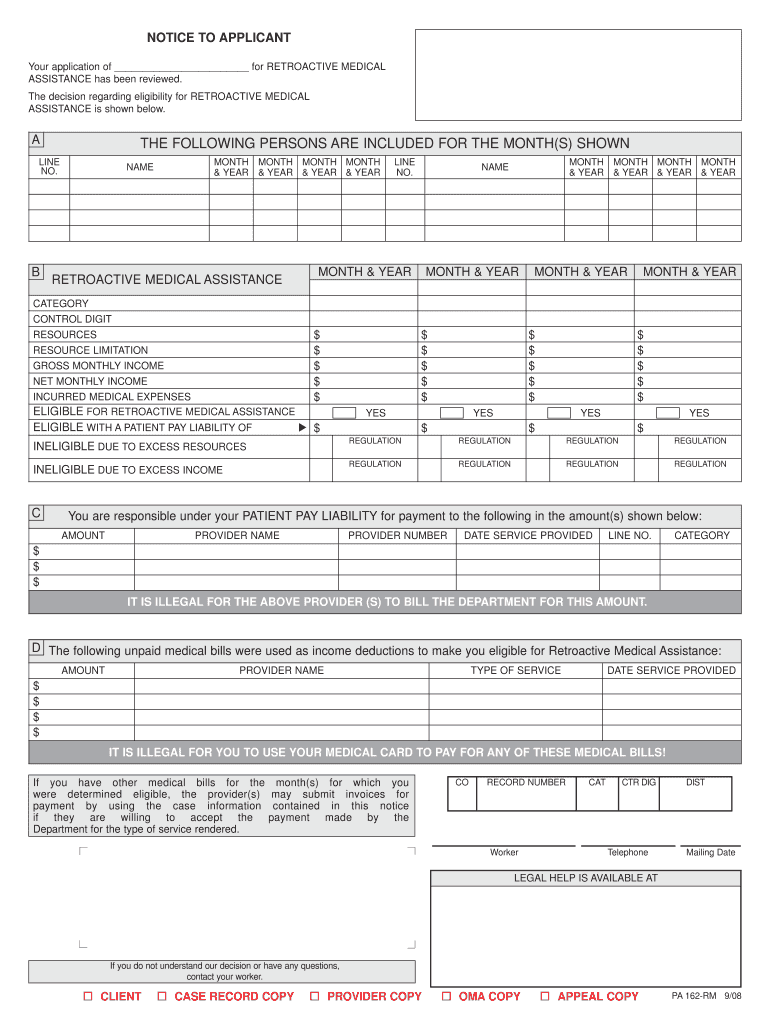
  2. Begin by filling in your name and application details at the top of the form. Ensure accuracy as this information is crucial for processing your retroactive medical assistance.
  3. In section A, list all individuals included for the specified months. Fill in their names and corresponding months accurately to avoid any discrepancies.
  4. Proceed to section B, where you will detail financial information such as gross monthly income and incurred medical expenses. Be thorough; this data determines eligibility.
  5. In section C, check the appropriate boxes regarding eligibility status. If applicable, note any patient pay liabilities clearly.
  6. Finally, review all sections for completeness and accuracy before saving or printing your completed form for submission.

Start using our platform today to fill out your Pennsylvania 162 Notice quickly and efficiently!

See more pennsylvania 162 notice versions

We've got more versions of the pennsylvania 162 notice form. Select the right pennsylvania 162 notice version from the list and start editing it straight away!
Versions Form popularity Fillable & printable
2008 4.7 Satisfied (35 Votes)
be ready to get more

Complete this form in 5 minutes or less

Get form

Got questions?

We have answers to the most popular questions from our customers. If you can't find an answer to your question, please contact us.
Contact us
Commencement notice (Private): Optional. Completion notice (Private): Optional. Preliminary lien notice (Private): Prime contractor - Not required; Subcontractor - 45 days after commencing work if Notice of Commencement is filed.
The PA 162 MPG form serves as a formal document issued by Pennsylvanias Office of Income Maintenance, detailing the eligibility and assistance related to Medicare Part A and/or Part B premiums for individuals with limited income and assets.
The notice to plead shall be directed to the adverse party and shall be in substantially the following form: To : (Name of Adverse Party) You are hereby notified to file a written response to the enclosed (name of pleading) within twenty (20) days from service hereof or a judgment may be entered against you.

Security and compliance

At DocHub, your data security is our priority. We follow HIPAA, SOC2, GDPR, and other standards, so you can work on your documents with confidence.

Learn more
ccpa2
pci-dss
gdpr-compliance
hipaa
soc-compliance
be ready to get more

Complete this form in 5 minutes or less

Get form