Oregon registration statement 2026

Get Form
check vehicle registration status online oregon Preview on Page 1

Here's how it works

01. Edit your check vehicle registration status online oregon online
Type text, add images, blackout confidential details, add comments, highlights and more.

02. Sign it in a few clicks
Draw your signature, type it, upload its image, or use your mobile device as a signature pad.

03. Share your form with others
Send dmv registration status via email, link, or fax. You can also download it, export it or print it out.

How to use or fill out Oregon Registration Statement with our platform

Form edit decoration
9.5
Ease of Setup
DocHub User Ratings on G2
9.0
Ease of Use
DocHub User Ratings on G2
  1. Click ‘Get Form’ to open the Oregon Registration Statement in the editor.
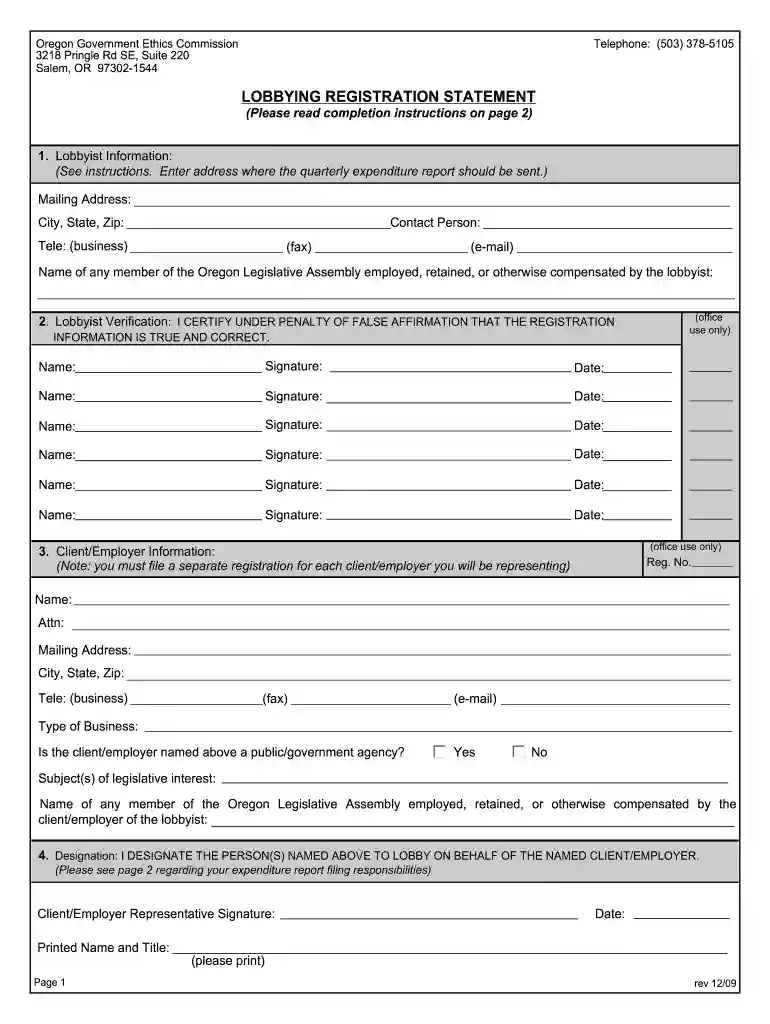
  2. Begin by filling out the Lobbyist Information section. Enter the mailing address where quarterly expenditure reports should be sent, along with the city, state, and zip code. Include a contact person's name and their business telephone, fax, and email.
  3. In the Lobbyist Verification section, ensure that all lobbyists sign and date the form to certify that the registration information is true and correct.
  4. Proceed to the Client/Employer Information section. Fill in the registration number, client/employer name, attention line for report delivery, mailing address, and contact details. Indicate whether the client/employer is a public/government agency.
  5. Finally, complete the Designation section by having a representative from the client/employer sign and print their name and title to authorize lobbying on their behalf.

Start using our platform today for free to streamline your Oregon Registration Statement process!

See more oregon registration statement versions

We've got more versions of the oregon registration statement form. Select the right oregon registration statement version from the list and start editing it straight away!
Versions Form popularity Fillable & printable
2009 4.8 Satisfied (82 Votes)
be ready to get more

Complete this form in 5 minutes or less

Get form

Got questions?

We have answers to the most popular questions from our customers. If you can't find an answer to your question, please contact us.
Contact us
A vehicle title is a physical document that proves you to be the owner of a vehicle that has been legally registered. This document is given to you by your regional DMV. A title proves that you own the vehicle vs a registration which is a car that has been given authorization to drive on the road through the state.
A bill of sale may be used as proof of ownership only if it is docHubd and from seller listed on the vehicle registration. A properly signed off title will be accepted as proof of ownership.
Use quick search and enter a Business Name or Business Registry Number to search. Search other government databases for information by business name. Find a businesss Registered Agent using the Business Registry Search​.
You can still renew online at DMV2U. Print or keep an electronic image of your receipt. The receipt is your proof of registration for up to 30 days.
The sticker tags on your windshield or license plate indicate that your vehicle has an active vehicle registration, whereas your actual registration certificate shows youre the registered owner of the vehicle. Your license plate shows that you can drive the vehicle legally on public roads.

Security and compliance

At DocHub, your data security is our priority. We follow HIPAA, SOC2, GDPR, and other standards, so you can work on your documents with confidence.

Learn more
ccpa2
pci-dss
gdpr-compliance
hipaa
soc-compliance
be ready to get more

Complete this form in 5 minutes or less

Get form