Oklahoma atm registration 2026

Get Form
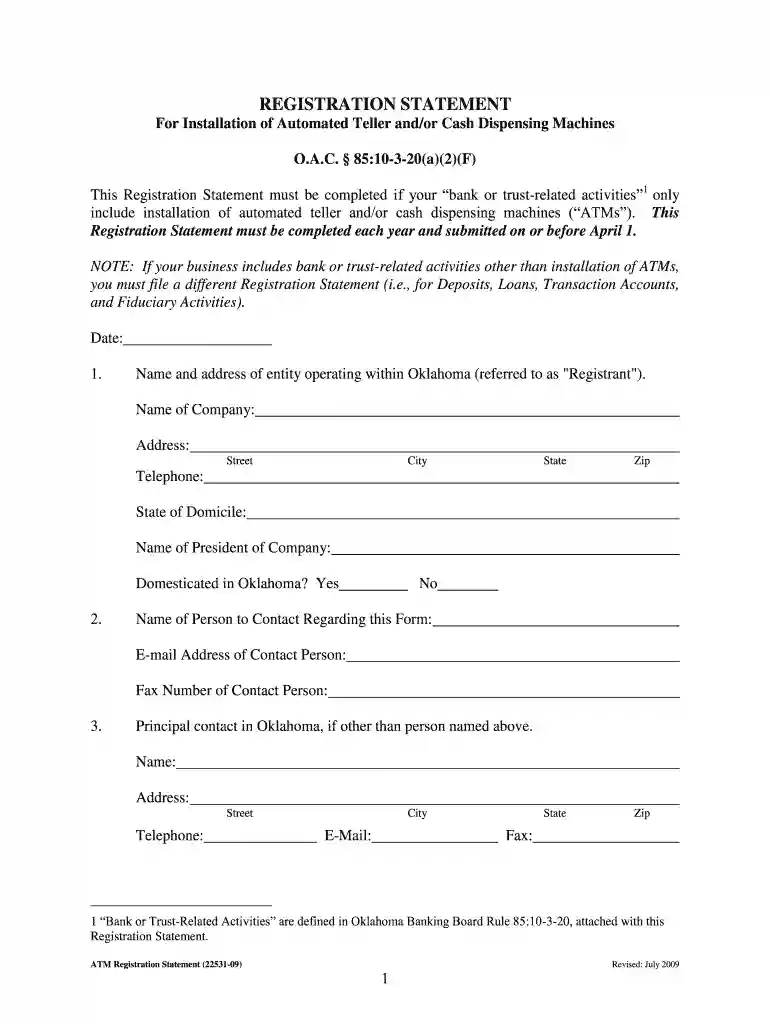
oklahoma atm registration Preview on Page 1

Here's how it works

01. Edit your form online
Type text, add images, blackout confidential details, add comments, highlights and more.

02. Sign it in a few clicks
Draw your signature, type it, upload its image, or use your mobile device as a signature pad.

03. Share your form with others
Send it via email, link, or fax. You can also download it, export it or print it out.

How to use or fill out oklahoma atm registration with our platform

Form edit decoration
9.5
Ease of Setup
DocHub User Ratings on G2
9.0
Ease of Use
DocHub User Ratings on G2
  1. Click ‘Get Form’ to open the Oklahoma ATM Registration Statement in the editor.
  2. Begin by entering the date at the top of the form. Then, fill in the name and address of your entity operating within Oklahoma, including street, city, state, and zip code.
  3. Provide your telephone number and state of domicile. Next, enter the name of your company's president and indicate whether your business is domesticated in Oklahoma.
  4. List a contact person for this form along with their email address and fax number. If there is a principal contact in Oklahoma other than the previous person, include their details as well.
  5. Detail all Oklahoma agencies with which your entity is licensed or registered. If you have no offices in Oklahoma but are represented by agents, list their names and addresses.
  6. Indicate the number of installed ATMs in Oklahoma and provide the addresses for each ATM. Attach additional sheets if necessary.
  7. Finally, ensure that you sign the form with your printed name, title (must be President or authorized officer), and submit it along with the required fee to the Oklahoma State Banking Department.

Start using our platform today to streamline your ATM registration process for free!

See more oklahoma atm registration versions

We've got more versions of the oklahoma atm registration form. Select the right oklahoma atm registration version from the list and start editing it straight away!
Versions Form popularity Fillable & printable
2009 4.9 Satisfied (396 Votes)
be ready to get more

Complete this form in 5 minutes or less

Get form

Got questions?

We have answers to the most popular questions from our customers. If you can't find an answer to your question, please contact us.
Contact us
Step 1: Go to the official website of the preferred financial institution and head to the personal banking/ retail banking/ credit card/ debit card section. Step 2: Select the debit card apply online tab and choose the category of the card you want to apply for.
Insert the debit card in the ATM and use the PIN provided by the bank. Follow the prompts on your banks ATM screen to finalize activation of your debit card.
0:05 1:22 And you will be prompted on the following. Select other then card activation enter the fourdigit PINMoreAnd you will be prompted on the following. Select other then card activation enter the fourdigit PIN number that you have received.
How do I activate my ATM debit card? You can activate your ATM debit card at any Security Bank ATM via Green PIN.
Choose the Name for Your ATM Business. Develop Your ATM Business Plan. Choose the Legal Structure for Your ATM Business. Secure Startup Funding for Your ATM Business (If Needed) Secure a Location for Your ATM Machines. Register Your ATM Business with the IRS. Open a Business Bank Account. Get a Business Credit Card.

Security and compliance

At DocHub, your data security is our priority. We follow HIPAA, SOC2, GDPR, and other standards, so you can work on your documents with confidence.

Learn more
ccpa2
pci-dss
gdpr-compliance
hipaa
soc-compliance
be ready to get more

Complete this form in 5 minutes or less

Get form