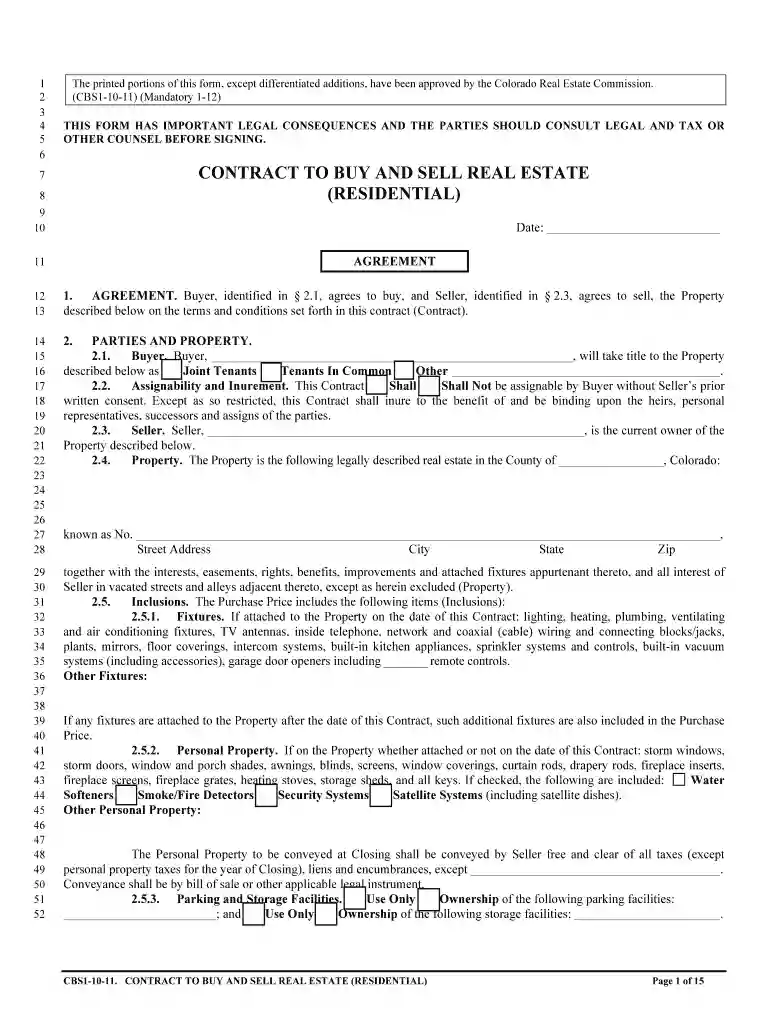
Printable contract real estate 2011 form-2026

Get Form
fme1 form Preview on Page 1

Here's how it works

01. Edit your fme1 form online
Type text, add images, blackout confidential details, add comments, highlights and more.

02. Sign it in a few clicks
Draw your signature, type it, upload its image, or use your mobile device as a signature pad.

03. Share your form with others
Send fme1 form template via email, link, or fax. You can also download it, export it or print it out.

How to use or fill out printable contract real estate 2011 form with our platform

Form edit decoration
9.5
Ease of Setup
DocHub User Ratings on G2
9.0
Ease of Use
DocHub User Ratings on G2
  1. Click ‘Get Form’ to open the printable contract real estate 2011 form in the editor.
  2. Begin by entering the date at the top of the form. This is crucial as it marks the official start of your agreement.
  3. In Section 1, fill in the names of the Buyer and Seller as identified in their respective sections. Ensure accuracy to avoid legal issues.
  4. Proceed to Section 2, where you will describe the property being sold. Include all relevant details such as address and legal description.
  5. In Section 4, specify the purchase price and terms. Clearly outline how payments will be made, including earnest money details.
  6. Review Sections on financing conditions and obligations carefully. Fill out any necessary information regarding loans or financing options.
  7. Once all sections are completed, review your entries for accuracy before saving or printing your document for signatures.

Start using our platform today to streamline your document editing and signing process for free!

See more printable contract real estate 2011 form versions

We've got more versions of the printable contract real estate 2011 form form. Select the right printable contract real estate 2011 form version from the list and start editing it straight away!
Versions Form popularity Fillable & printable
2023 4.8 Satisfied (25 Votes)
2019 4.8 Satisfied (201 Votes)
2013 4.4 Satisfied (551 Votes)
2011 4.4 Satisfied (433 Votes)
2010 4.4 Satisfied (351 Votes)
2009 4.4 Satisfied (467 Votes)
be ready to get more

Complete this form in 5 minutes or less

Get form

Got questions?

We have answers to the most popular questions from our customers. If you can't find an answer to your question, please contact us.
Contact us

A lot of software applications are available out there for document editing and signing. DocHub is one of the most in-demand online solutions that comply with all data protection and compliance standards and guarantees your eSigned paperwork is legally enforceable. All you need to try it out is to sign up for an account, upload your form fme1, provide the necessary details, and click Sign. Create your eSignature by typing, drawing it, uploading its image to your document, or scanning a unique QR code.

If you want to edit your fme1 form pdf online quickly, it does not matter what browser you employ. DocHub’s simple editing instruments are available using any internet browser. Simply open the appropriate tab in the editor, add your document, and fill it out without stress.

Writing your own contracts is perfectly possible, and legal. But its also an incredibly bad idea. Theres two reasons for this: Property law is complicated. Because its such a fundamental part of legislation, its often lots and lots of different laws layered on top of each other.
If youre asking whether you need a lawyer to draft a contract, legally, the answer is no. Anyone can draft a contract on their own and as long as the elements above are included and both parties are legally competent and consent to the agreement, it is generally lawful.
Some states, like California, have created real estate purchase agreements you can download and change. You can also get a template from docHub, as well as benefiting from real estate contract management software functionality.

Security and compliance

At DocHub, your data security is our priority. We follow HIPAA, SOC2, GDPR, and other standards, so you can work on your documents with confidence.

Learn more
ccpa2
pci-dss
gdpr-compliance
hipaa
soc-compliance

People also ask

How Do Real Estate Agents Get Paid? Home Sale Price6% Real Estate Commission50% to Listing Agent Brokerage 50% to Buyers Agent Brokerage $500,000 $30,000 $15,000 to each $400,000 $24,000 $12,000 to each $300,000 $18,000 $9,000 to each $100,000 $6,000 $3,000 to each1 more row
The four types of real estate contracts include purchase agreements, assignment contracts, lease agreements, and power of attorney agreements. They can have some crossover with when theyre used and what they need to contain, but they have separate and distinct uses.
Real estate purchase agreements do not need notarization to be legally binding since they do not require filing with local records. Notarization can still be beneficial to confirm signers identities.
Agreement for Purchase and Sale of Real Property (Standard Form 580-T): This type of contract is used for the sale and purchase of commercial real estate and can be used for any form and format of commercial property, including vacant land to be developed commercially and commercial properties that are either owner-

Related links