Rug mds 3 2026

Get Form
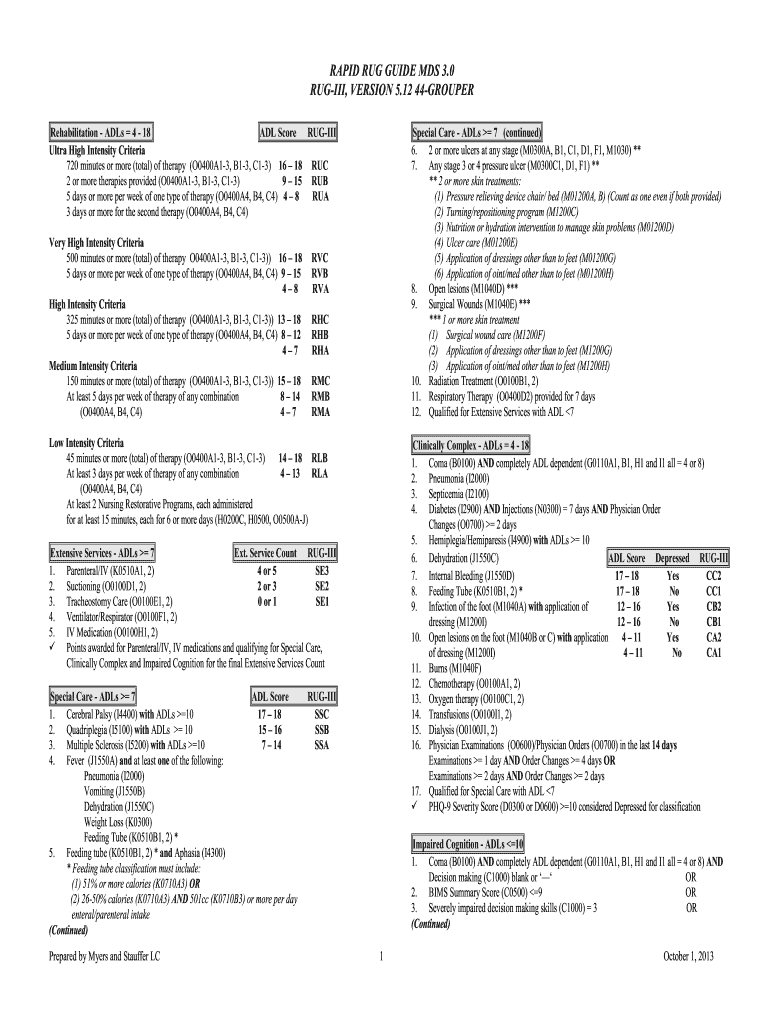
rug levels chart Preview on Page 1

Here's how it works

01. Edit your rug levels chart online
Type text, add images, blackout confidential details, add comments, highlights and more.
02. Sign it in a few clicks
Draw your signature, type it, upload its image, or use your mobile device as a signature pad.
03. Share your form with others
Send rugs iv cheat sheet via email, link, or fax. You can also download it, export it or print it out.

How to use or fill out rug mds 3 with our platform

Form edit decoration
9.5
Ease of Setup
DocHub User Ratings on G2
9.0
Ease of Use
DocHub User Ratings on G2
  1. Click ‘Get Form’ to open the rug mds 3 document in the editor.
  2. Begin by reviewing the sections related to Impaired Cognition. Fill in the relevant fields such as Coma status (B0100) and ADL dependency levels (G0110A1, B1, H1, I1). Ensure you accurately assess decision-making skills (C1000) based on the provided criteria.
  3. Next, navigate to the Special Care section. Here, indicate any skin treatments or ulcers present by checking the appropriate boxes for M0300A through M1030. This is crucial for accurate classification.
  4. Proceed to the Rehabilitation section. Document therapy minutes and types provided (O0400A1-3, B1-3, C1-3). Make sure to count each therapy session accurately as per guidelines.
  5. Finally, review all entries for accuracy before saving your completed form. Utilize our platform's features to easily edit or adjust any information as needed.

Start using our platform today for free and streamline your rug mds 3 completion!

See more rug mds 3 versions

We've got more versions of the rug mds 3 form. Select the right rug mds 3 version from the list and start editing it straight away!
Versions Form popularity Fillable & printable
2013 4.8 Satisfied (84 Votes)
be ready to get more

Complete this form in 5 minutes or less

Get form

Got questions?

We have answers to the most popular questions from our customers. If you can't find an answer to your question, please contact us.
Contact us
The Minimum Data Set (MDS) is part of the federally mandated process for clinical assessment of all residents in Medicare and Medicaid certified nursing homes.
How is the RUG Score Calculated? RUG score calculations are measured in several categories. These categories include rehabilitation, extensive services, special care, impaired cognition, clinically complex, behavioral problems, and reduced physical function.
View Data Documentation. The Long Term Care Minimum Data Set (MDS) is a health status screening and assessment tool used for all residents of long term care nursing facilities certified to participate in Medicare or Medicaid, regardless of payer.
In October 2010, the Centers for Medicare Medicaid Services implemented MDS 3.0, a docHub change in the type of data collected from prior versions of the MDS.
The Resource Utilization Group Score (RUG Score) appears near the very end of the MDS 3.0 in Section Z. The RUG score shows the type and quantity of care required for each individual resident.

Security and compliance

At DocHub, your data security is our priority. We follow HIPAA, SOC2, GDPR, and other standards, so you can work on your documents with confidence.

Learn more
ccpa2
pci-dss
gdpr-compliance
hipaa
soc-compliance
be ready to get more

Complete this form in 5 minutes or less

Get form

People also ask

The MDS 3.0 RAI Users Manual v1.20.1 will be effective beginning October 1, 2025. This version of the MDS 3.0 RAI Users Manual includes changes to Section A: Identification Information, including the removal of item A0800: Gender, addition of new item A0810: Sex, and removal of item A1250: Transportation.
The Minimum Data Set (MDS) is a standardized assessment tool that measures health status in nursing home residents. MDS assessments are completed every 3 months (or more often, depending on circumstances) on nearly all residents of nursing homes in the United States.

rug level chart