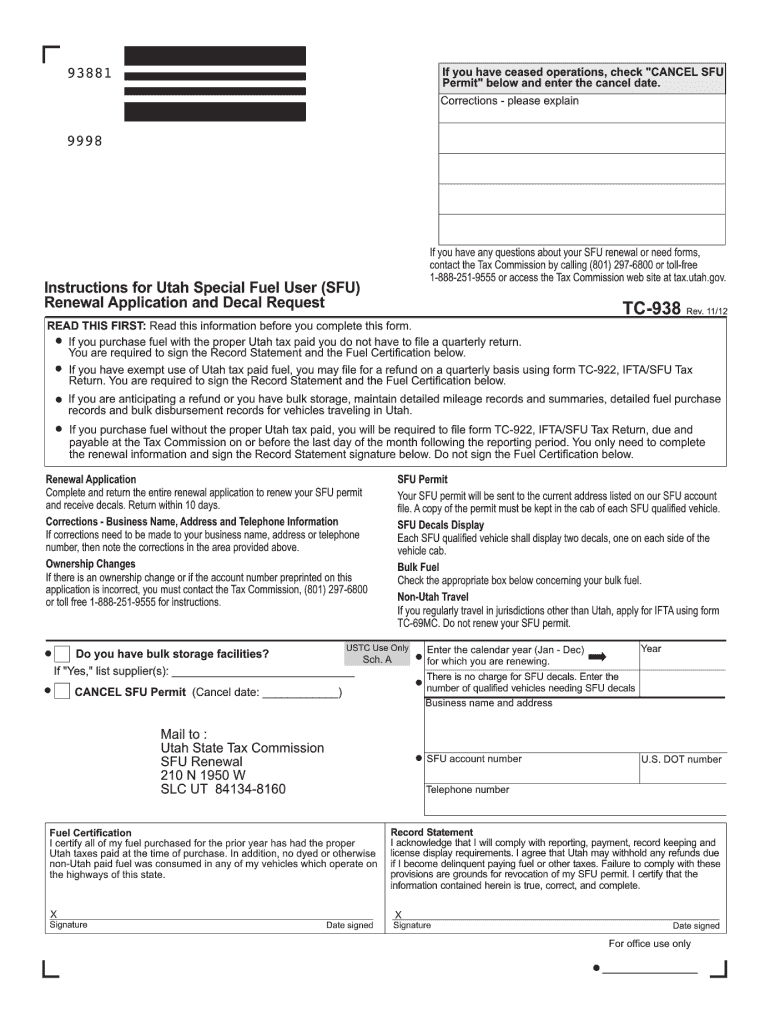
Tc 938 2026

Get Form
tc 938 Preview on Page 1

Here's how it works

01. Edit your form online
Type text, add images, blackout confidential details, add comments, highlights and more.
02. Sign it in a few clicks
Draw your signature, type it, upload its image, or use your mobile device as a signature pad.
03. Share your form with others
Send it via email, link, or fax. You can also download it, export it or print it out.

How to use or fill out tc 938 with our platform

Form edit decoration
9.5
Ease of Setup
DocHub User Ratings on G2
9.0
Ease of Use
DocHub User Ratings on G2
  1. Click ‘Get Form’ to open the tc 938 in the editor.
  2. Begin by entering your business name and address in the designated fields. Ensure accuracy as this information is crucial for your SFU permit.
  3. If you have ceased operations, check the 'CANCEL SFU Permit' box and enter the cancellation date. If corrections are needed for your business details, note them in the provided area.
  4. Complete the renewal application by filling out all required sections, including your U.S. DOT number and telephone number.
  5. Sign the Record Statement and Fuel Certification sections to confirm compliance with reporting and tax requirements. Make sure to date your signature.
  6. Review all entries for accuracy before submitting. Once satisfied, click ‘Submit’ to send your completed form directly through our platform.

Start using our platform today to streamline your tc 938 completion process for free!

See more tc 938 versions

We've got more versions of the tc 938 form. Select the right tc 938 version from the list and start editing it straight away!
Versions Form popularity Fillable & printable
2019 4.9 Satisfied (25 Votes)
2012 4.4 Satisfied (518 Votes)
2008 4.3 Satisfied (59 Votes)
be ready to get more

Complete this form in 5 minutes or less

Get form

Got questions?

We have answers to the most popular questions from our customers. If you can't find an answer to your question, please contact us.
Contact us

Electronic document signing demands a software solution that complies with data security and eSignature standards. DocHub is a great tool for that, since it fulfills all the above mentioned requirements. Whatever method you like to sign your tc 938 in DocHub, your electronic signature will be legally binding and court-admissible.

If you store your files in Google Drive, there is no need to download your tc 938 on the computer and upload it back to our editor. A much simpler way is to install a browser extension created by DocHub to simplify this flow. The extension allows editing PDFs in your internet browser. Alternatively, you may integrate your DocHub and Gmail accounts for more efficient editing.

Can I drive without an IFTA sticker? Driving without valid IFTA decals can result in fines exceeding $500 per violation. Temporary permits should be used while awaiting decals.
Special fuel user means any person purchasing special fuel into bulk storage without payment of the special fuel tax for subsequent use in a motor vehicle, or any person engaged in interstate commercial operation of motor vehicles any part of which is within this state. View Source.
How To Get an IFTA Sticker Fill out an application with your home states department of transportation. For example, California would apply here on CA.gov. Once approved, IFTA decals will be issued and mailed for the current year. A temporary license and IFTA decal permit can be printed in the meantime.

Security and compliance

At DocHub, your data security is our priority. We follow HIPAA, SOC2, GDPR, and other standards, so you can work on your documents with confidence.

Learn more
ccpa2
pci-dss
gdpr-compliance
hipaa
soc-compliance
be ready to get more

Complete this form in 5 minutes or less

Get form

People also ask

Who needs to comply? If any or all of the trucks that you own or oversee have a registered gross vehicle weight over 26,000 lbs or have three or more axles, and travel in more than one state, you have one or more qualified vehicles and need to adhere to the quarterly reporting and IFTA filing process.

Related links