Type text, add images, blackout confidential details, add comments, highlights and more.
02. Sign it in a few clicks
Draw your signature, type it, upload its image, or use your mobile device as a signature pad.
03. Share your form with others
Send does dmv ca have live chat via email, link, or fax. You can also download it, export it or print it out.
How to use or fill out CA DMV Government Form with Our Platform
Ease of Setup
DocHub User Ratings on G2
Ease of Use
DocHub User Ratings on G2
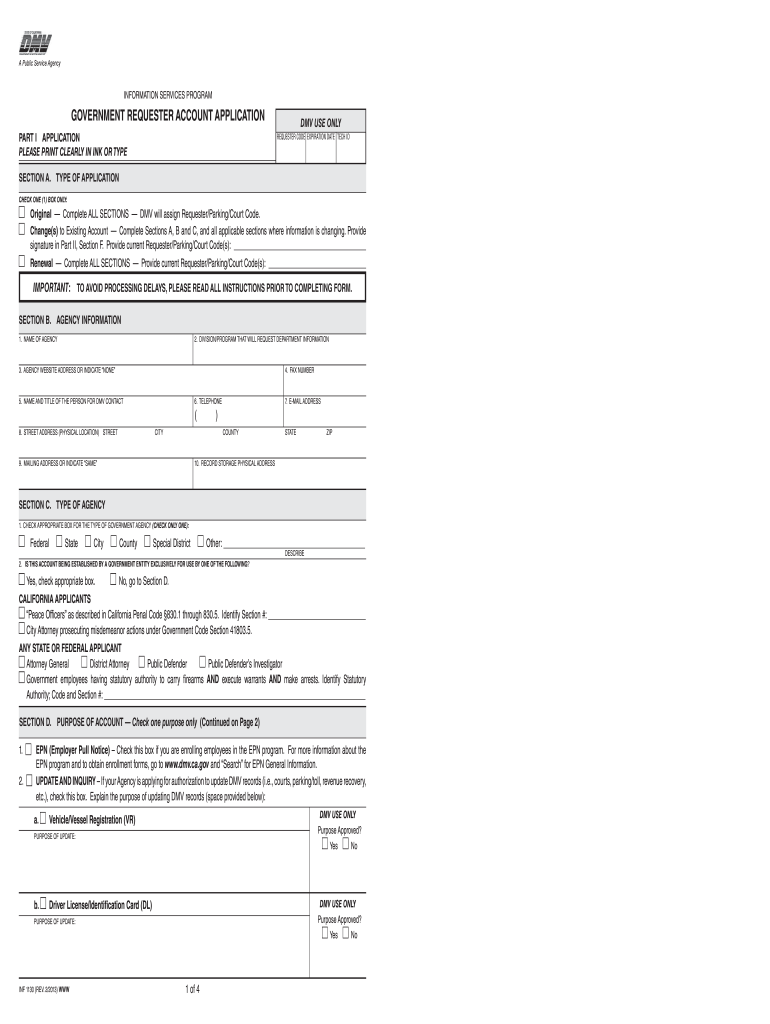
Click ‘Get Form’ to open the CA DMV Government Requester Account Application in the editor.
In Section A, select the type of application by checking one box: Original, Change(s) to Existing Account, or Renewal. Ensure you complete all relevant sections based on your selection.
Proceed to Section B and fill in your agency information. This includes the name of the agency, division/program requesting information, contact details, and physical address.
In Section C, identify the type of agency by checking the appropriate box (Federal, State, City, etc.). If applicable, indicate if this account is for a specific government entity.
Complete Section D by selecting the purpose of your account. Choose from options like EPN enrollment or Inquiry Only and provide any necessary explanations in the space provided.
Fill out Sections E and F as required for access methods and online applicants. Ensure all details are accurate to avoid processing delays.
Finally, review your entries for accuracy before signing in Part II. Submit your completed form through our platform for processing.
Start using our platform today to streamline your CA DMV form completion process for free!
DMV CA gov onlineDMV CA gov online loginDMV ca gov online registration renewalCreate a DMV account CaliforniaMy DMV CADMV CA gov renewnowDMV CA appointmentDMV get in line number
Security and compliance
At DocHub, your data security is our priority. We follow HIPAA, SOC2, GDPR, and other standards, so you can work on your documents with confidence.
DMV (Department of Motor Vehicles): Real ID Info for Non-
Who can get a REAL ID? Any Californian who can prove their current legal presence in the United States (U.S.) with one of the accepted identity documentsRead more
Cookie consent notice
This site uses cookies to enhance site navigation and personalize your experience.
By using this site you agree to our use of cookies as described in our Privacy Notice.
You can modify your selections by visiting our Cookie and Advertising Notice.