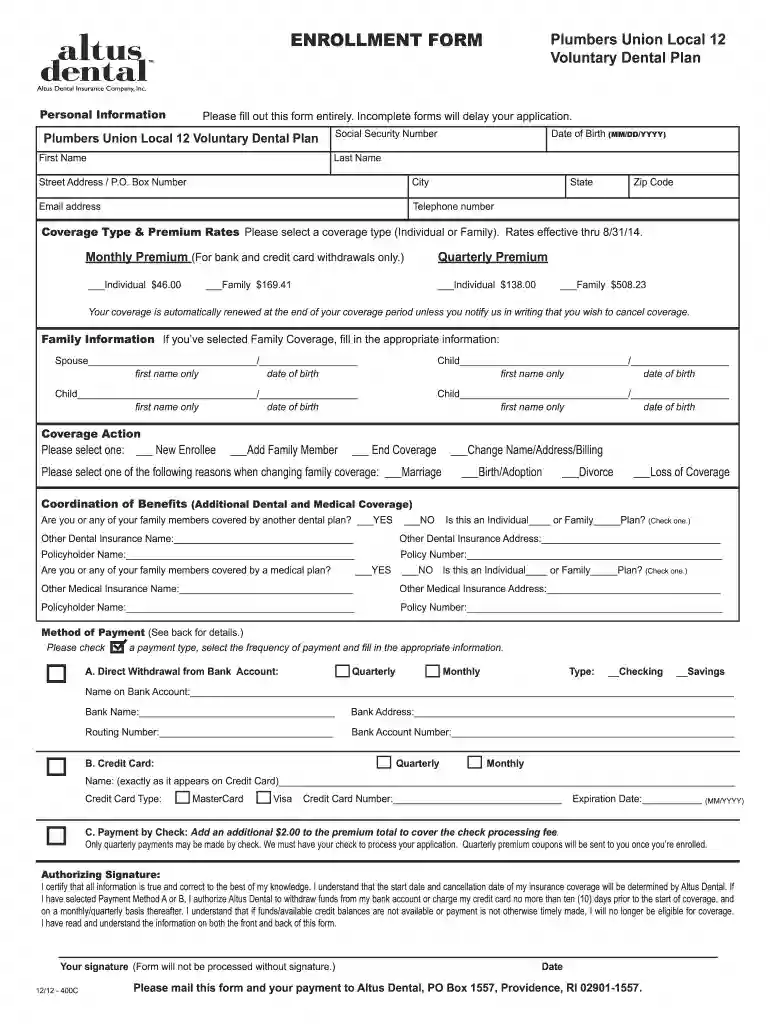
Altus form dental 2026

Get Form
altus dental enrollment form Preview on Page 1

Here's how it works

01. Edit your altus dental enrollment form online
Type text, add images, blackout confidential details, add comments, highlights and more.

02. Sign it in a few clicks
Draw your signature, type it, upload its image, or use your mobile device as a signature pad.

03. Share your form with others
Send altus dental enrollment via email, link, or fax. You can also download it, export it or print it out.

How to use or fill out altus form dental with our platform

Form edit decoration
9.5
Ease of Setup
DocHub User Ratings on G2
9.0
Ease of Use
DocHub User Ratings on G2
  1. Click ‘Get Form’ to open the altus form dental in the editor.
  2. Begin by entering your personal information, including your date of birth, social security number, first and last name, address, email, and telephone number. Ensure all fields are completed to avoid delays.
  3. Select your coverage type (Individual or Family) and indicate the corresponding premium rates. Make sure to check the monthly or quarterly payment options as per your preference.
  4. If you selected Family Coverage, provide details for each family member including their first names and dates of birth.
  5. Choose a coverage action: New Enrollee, Add Family Member, or End Coverage. Specify reasons for any changes if applicable.
  6. Complete the Coordination of Benefits section if you or any family members have additional dental or medical coverage.
  7. Select your method of payment and fill in the required banking information if opting for direct withdrawal or credit card payments. Don’t forget to sign and date the form before submission.

Start filling out your altus form dental today on our platform for free!

See more altus form dental versions

We've got more versions of the altus form dental form. Select the right altus form dental version from the list and start editing it straight away!
Versions Form popularity Fillable & printable
2012 4.8 Satisfied (128 Votes)
be ready to get more

Complete this form in 5 minutes or less

Get form

Got questions?

We have answers to the most popular questions from our customers. If you can't find an answer to your question, please contact us.
Contact us
Here are some kinds of dental treatments that may not be covered: Anything cosmetic, such as teeth whitening and veneers. Orthodontic appliances such as braces, removable teeth aligners, or retainers may not be included in all types of dental plans.
Dentists use the pre-authorization process to determine a patients coverage. Sometimes a treatment plan has been pre-authorized or pre-approved by the carrier and the treatment is performed by the dentist with the expectation that the claim will be paid, but it is denied.
Basic Care: For treatments like fillings, extractions, and deep cleanings (scaling and root planing), Altus typically covers between 70%-80%, helping to reduce out-of-pocket costs for essential services. Major Care: Altus generally covers 50% of major procedures, including crowns, dentures, bridges, and root canals.
The ADA Dental Claim Form provides a common format for reporting dental services to a patients dental benefit plan. ADA policy promotes use and acceptance of the most current version of the ADA Dental Claim Form by dentists.

Security and compliance

At DocHub, your data security is our priority. We follow HIPAA, SOC2, GDPR, and other standards, so you can work on your documents with confidence.

Learn more
ccpa2
pci-dss
gdpr-compliance
hipaa
soc-compliance