Type text, add images, blackout confidential details, add comments, highlights and more.
02. Sign it in a few clicks
Draw your signature, type it, upload its image, or use your mobile device as a signature pad.
03. Share your form with others
Send register of wills via email, link, or fax. You can also download it, export it or print it out.
How to use or fill out Maryland State Register of Wills with DocHub
Ease of Setup
DocHub User Ratings on G2
Ease of Use
DocHub User Ratings on G2
Click ‘Get Form’ to open the Maryland State Register of Wills in our platform's editor.
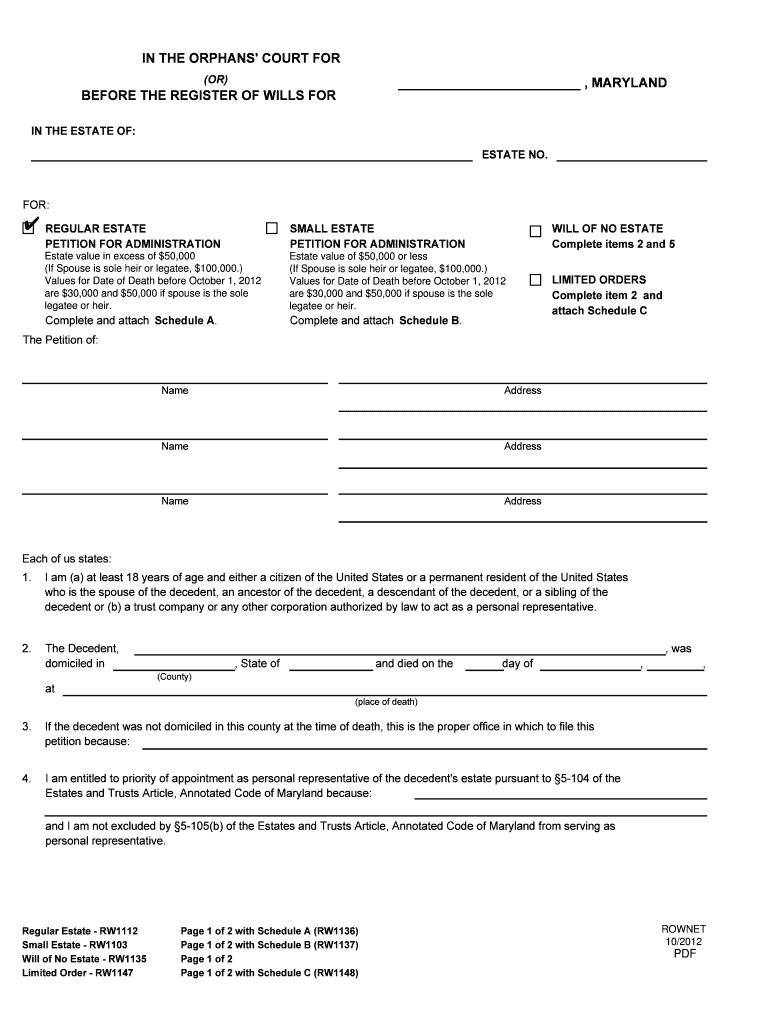
Begin by selecting the appropriate petition type: Regular Estate, Small Estate, or Will of No Estate. This selection will guide you through the relevant sections.
Fill in the decedent's information, including their name, address, and date of death. Ensure accuracy as this information is crucial for processing.
Complete item 5 regarding the decedent's will status. Indicate whether a will exists and provide details if applicable.
In Schedule A, estimate the value of the estate and any unsecured debts. This section is vital for determining tax obligations.
List all interested persons in the designated section, ensuring to include heirs and legatees as required by law.
Review all entries for accuracy before submitting your form. Utilize our platform’s editing tools to make any necessary adjustments easily.
Start using our platform today to streamline your document completion process for free!
Fill out maryland state register of wills online It's free
See more maryland state register of wills versions
We've got more versions of the maryland state register of wills form. Select the right maryland state register of wills version from the list and start editing it straight away!
Maryland state register of wills searchRegister of Wills estate Search by nameMaryland state register of wills onlineMaryland state register of wills lookupMd Register of Wills Estate SearchMaryland state register of wills freeMaryland probate SearchRegister of Wills Baltimore County
Security and compliance
At DocHub, your data security is our priority. We follow HIPAA, SOC2, GDPR, and other standards, so you can work on your documents with confidence.
The Register of Wills serves as the Clerk to the Orphans Court, which has jurisdiction over judicial probate, administration of estates and conduct of personalRead more
Cookie consent notice
This site uses cookies to enhance site navigation and personalize your experience.
By using this site you agree to our use of cookies as described in our Privacy Notice.
You can modify your selections by visiting our Cookie and Advertising Notice.