




Here's how it works



How to use or fill out Lowe's Toolbox for Education Grant 2022 Application

- Click ‘Get Form’ to open it in the editor.
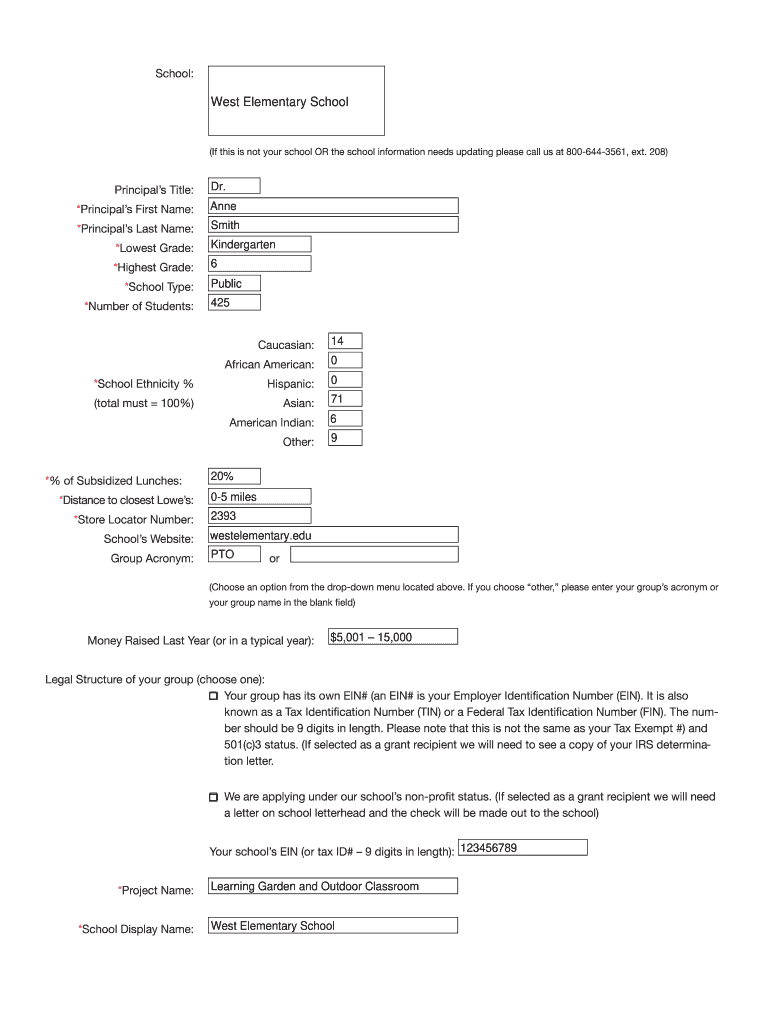
- Begin by entering your school name and updating any necessary information. If your school is not listed, contact the provided number for assistance.
- Fill in the principal’s details, including their title, first name, and last name. Ensure accuracy as this information is crucial for communication.
- Complete the student demographics section by providing the number of students and their ethnic breakdown. Make sure the total equals 100%.
- In the project section, enter your project name and a brief description. Clearly outline your project's goals and how it will benefit students.
- Detail your budget by listing all expenses associated with the project. Be specific about costs and funding sources to enhance clarity.
- Review all sections carefully before submitting to ensure all required fields are completed accurately.
Start using our platform today to streamline your application process for free!
It's free
See more lowe's toolbox for education grant 2022 application versions
| Versions | Form popularity | Fillable & printable |
|---|---|---|
| 2008 | 4.5 Satisfied (44 Votes) |
Got questions?
How can I eSign my sample grant application from Gmail?
With DocHub, it’s quite simple. The editor offers users an add-on called DocHub for Gmail, which you can find in the Google Workspace Marketplace without being charged. Set it up and grant it access to your Google account. Open your email with your sample grant application attached and click on the add-on button in the right-side panel. Sign in to your DocHub account, and import the form to our editor, where you can fill it out and sign.
How do you edit lowes toolbox for education on Android?
Document editing with DocHub is equally convenient on desktop and mobile devices. You just need an internet browser to revise your lowes toolbox for education on Android. Open our site and sign in to access the instruments you need. Add your document and introduce your intended changes. After that, you can keep your form in your document storage or send it out right away.
Security and compliance
At DocHub, your data security is our priority. We follow HIPAA, SOC2, GDPR, and other standards, so you can work on your documents with confidence.
Learn more




