DFS-H2-1668 - Florida's Department of Financial Services-2026

Get Form
florida dfs Preview on Page 1

Here's how it works

01. Edit your florida dfs online
Type text, add images, blackout confidential details, add comments, highlights and more.

02. Sign it in a few clicks
Draw your signature, type it, upload its image, or use your mobile device as a signature pad.

03. Share your form with others
Send it via email, link, or fax. You can also download it, export it or print it out.

How to use or fill out DFS-H2-1668 - Florida's Department of Financial Services with DocHub

Form edit decoration
9.5
Ease of Setup
DocHub User Ratings on G2
9.0
Ease of Use
DocHub User Ratings on G2
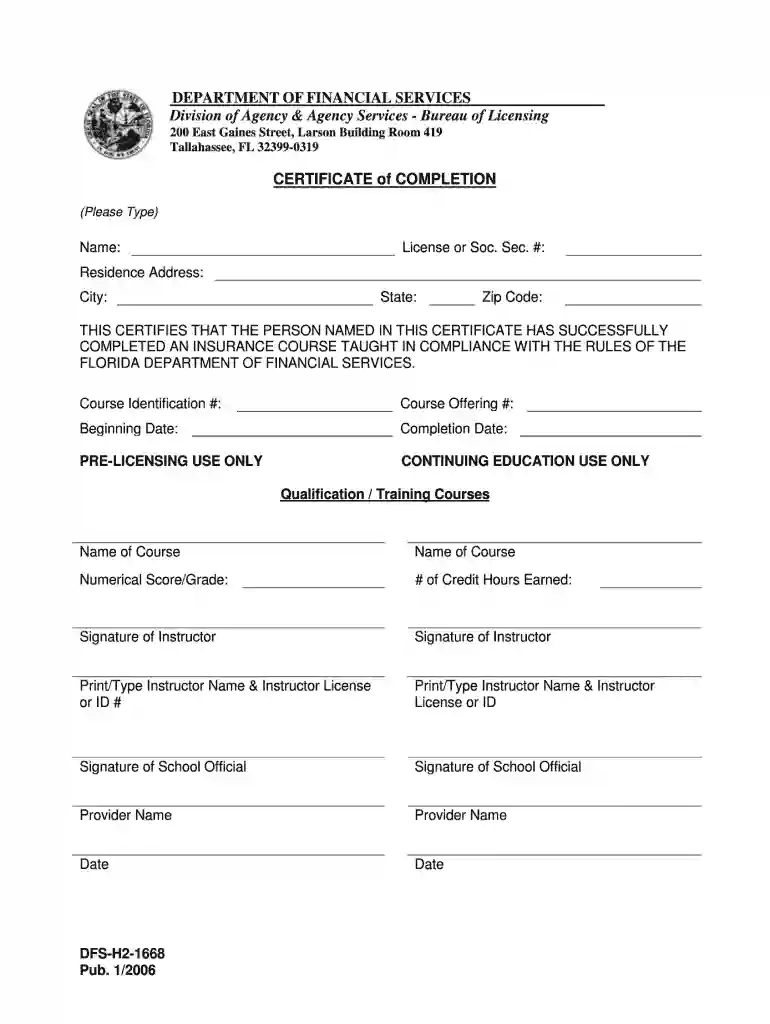
  1. Click ‘Get Form’ to open the DFS-H2-1668 in our editor.
  2. Begin by entering your name in the designated field at the top of the form. Ensure that it is typed clearly for accurate processing.
  3. Next, provide your License or Social Security Number in the appropriate section. Remember, this information is required by law for identification purposes.
  4. Fill in your residence address, including city, state, and zip code. This ensures that all correspondence reaches you without delay.
  5. Complete the course details by entering the Course Identification Number and Course Offering Number as specified on your course completion certificate.
  6. Indicate both the beginning and completion dates of your course to validate your attendance.
  7. For pre-licensing or continuing education use, list any relevant courses along with numerical scores/grades and credit hours earned.
  8. Finally, ensure all signatures are completed where indicated, including those of instructors and school officials, before submitting your form.

Start using our platform today to fill out your DFS-H2-1668 form online for free!

See more DFS-H2-1668 - Florida's Department of Financial Services versions

We've got more versions of the DFS-H2-1668 - Florida's Department of Financial Services form. Select the right DFS-H2-1668 - Florida's Department of Financial Services version from the list and start editing it straight away!
Versions Form popularity Fillable & printable
2017 4.8 Satisfied (256 Votes)
2006 4.4 Satisfied (352 Votes)
2006 4.4 Satisfied (586 Votes)
be ready to get more

Complete this form in 5 minutes or less

Get form

Got questions?

We have answers to the most popular questions from our customers. If you can't find an answer to your question, please contact us.
Contact us

Electronic document signing demands a software solution that works in compliance with data protection and eSignature standards. DocHub is a perfect tool for that, because it meets all the aforementioned requirements. Whatever method you prefer to sign your DFS-H2-1668 - Florida's Department of Financial Services in DocHub, your electronic signature will be legally binding and court-admissible.

You can complete and eSign your DFS-H2-1668 - Florida's Department of Financial Services on the internet, even on a tight deadline. All you need to access high quality editing instruments on any device is a DocHub account, which you can sign up within a few moments. When you sign up, upload your file or find what you are searching for in our catalog, complete it using the editing instruments you need, and place your electronic signature on it at the end.

11351 Ulmerton Road, Suite 314 Largo, FL 33778-1635.
About the Agency The Department is made up of 13 divisions, several specialized offices and 2,000 employees providing the most efficient and effective help for you.
1-877-MY-FL-CFO (693-5236)

Security and compliance

At DocHub, your data security is our priority. We follow HIPAA, SOC2, GDPR, and other standards, so you can work on your documents with confidence.

Learn more
ccpa2
pci-dss
gdpr-compliance
hipaa
soc-compliance
be ready to get more

Complete this form in 5 minutes or less

Get form

People also ask

CFO Jimmy Patronis The Department is made up of 13 divisions, several specialized offices and 2,000 employees providing the most efficient and effective help for you.
1-877-MY-FL-CFO (693-5236)
Consumer Helpline Contact Information Statewide Toll-Free: 1-877-MY-FL-CFO (1-877-693-5236) Out of State Callers: (850) 413-3089. TDD Line: 1-800-640-0886. Email Address: Consumer.Services@myfloridacfo.com.
The Statutory responsibilities of the Department of Financial Services include: Carrying out the states accounting and auditing functions, including preparing the states Comprehensive Annual Financial Report; monitoring state contracts; and making payment for state expenditures.
How to File a Complaint or Check on a Business Settlements, Final Judgments, and Filed Complaints. Consumer Complaint Form. SPAM Complaint Form. Protecting Yourself from Consumer Fraud. DBPR Online Services. Fraud Hotline: 1-866-9-NO-SCAM (1-866-966-7226) (toll free within Florida. Citizens Services: 850-414-3990.

Related links