Sc title template 2026

Get Form
printable car title templates pdf Preview on Page 1

Here's how it works

01. Edit your printable car title templates pdf online
Type text, add images, blackout confidential details, add comments, highlights and more.
02. Sign it in a few clicks
Draw your signature, type it, upload its image, or use your mobile device as a signature pad.
03. Share your form with others
Send car title template pdf via email, link, or fax. You can also download it, export it or print it out.

How to use or fill out sc title template with our platform

Form edit decoration
9.5
Ease of Setup
DocHub User Ratings on G2
9.0
Ease of Use
DocHub User Ratings on G2
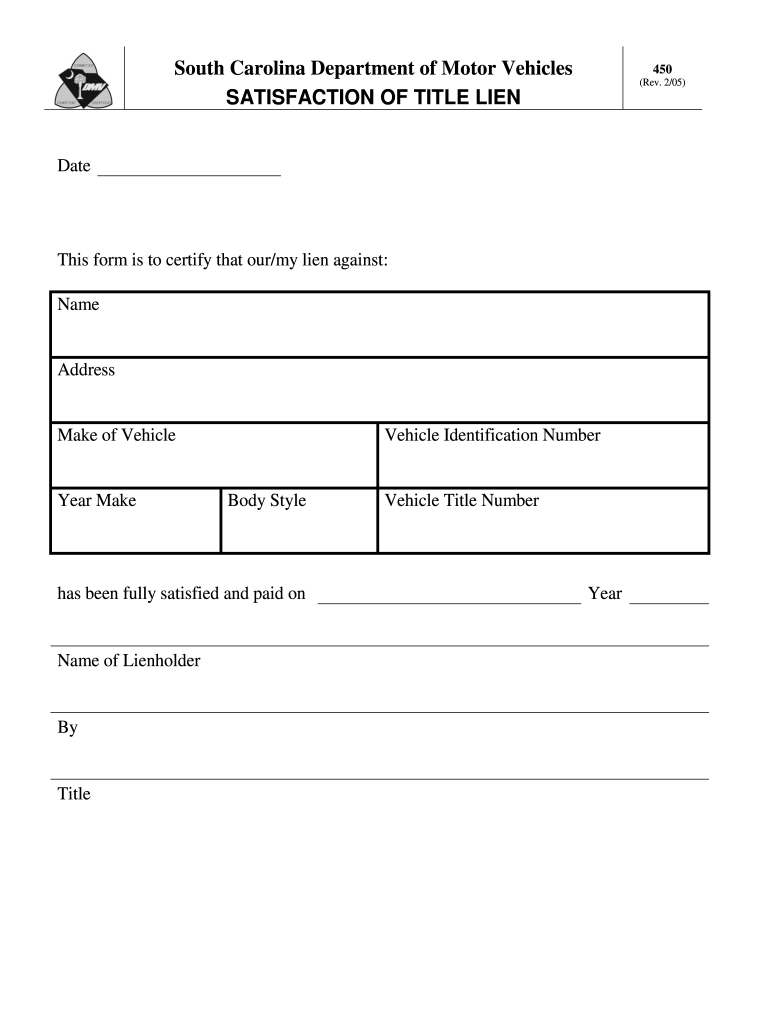
  1. Click ‘Get Form’ to open the sc title template in the editor.
  2. Begin by entering the date at the top of the form. This is essential for record-keeping purposes.
  3. In the section labeled 'Name', input the name of the individual or entity that holds the lien.
  4. Next, provide the 'Address' of the lienholder. Ensure this information is accurate to avoid any issues.
  5. Fill in the 'Make of Vehicle' and 'Year Make' fields with the appropriate details about the vehicle associated with the lien.
  6. Enter the 'Vehicle Identification Number' (VIN) accurately, as this uniquely identifies your vehicle.
  7. Complete the 'Body Style' field by specifying whether it’s a sedan, SUV, truck, etc.
  8. Indicate that your lien has been satisfied by filling in 'Name of Lienholder', followed by your signature under 'By'.
  9. Finally, include your title and vehicle title number along with the year to finalize your document.

Start using our platform today to easily complete and manage your documents for free!

See more sc title template versions

We've got more versions of the sc title template form. Select the right sc title template version from the list and start editing it straight away!
Versions Form popularity Fillable & printable
2005 4.9 Satisfied (511 Votes)
be ready to get more

Complete this form in 5 minutes or less

Get form

Got questions?

We have answers to the most popular questions from our customers. If you can't find an answer to your question, please contact us.
Contact us

Sure, electronically drawing your signature is acceptable, but only if you utilize a tool that complies with industry regulations and policies. Try DocHub, which guarantees eSignature validity under ESIGN and UETA requirements. All you need to eSign your printable blank car title template is an account with DocHub and an internet connection. When you open your file in our editor, click Sign and select the Draw tool.

If you are searching for a state-specific template pdf printable blank car title template sample, you will find it in our DocHub Forms & Templates catalog. Use the search field, enter your form’s name, and search through the results for your state. You can also filter out irrelevant results while exploring our catalog by categories.

What You'll Need to Do to Transfer your Vehicle Title in South Carolina Complete and sign the title certificate (seller and buyer). Complete a Bill of Sale (if applicable). Complete the title application form. Visit any DMV office near you. Consider making a DMV appointment or getting a line waiting concierge.
Do you have to pay taxes on a gifted car in South Carolina? No, you will be exempt from sales tax, use tax, and casual tax. But, there is a fee to execute the title transfer and an infrastructure maintenance fee.
TITLE AND PLATE TRANSFER 1) Manufacturer Certificate of Origin (MCO) or Title. 2) List Previous Tag # 3) Previous registration in owner's name. 4) $15.00 title 5) $10.00 transfer fee 6) Sales Tax (5% of selling price or $300.00 max.)

Security and compliance

At DocHub, your data security is our priority. We follow HIPAA, SOC2, GDPR, and other standards, so you can work on your documents with confidence.

Learn more
ccpa2
pci-dss
gdpr-compliance
hipaa
soc-compliance

People also ask

In South Carolina, the title transfer fee is based on the tax value of the vehicle. There is a $15 flat fee for the service of transferring the title, and a 5% (up to $500 maximum) road tax toward South Carolina infrastructure.
What do you need to transfer a car title in the state of South Carolina? Title transfer requirements are fairly simple in South Carolina. Notarized signatures from the buyer and seller are sufficient.
Do you have to pay taxes on a gifted car in South Carolina? No, you will be exempt from sales tax, use tax, and casual tax. But, there is a fee to execute the title transfer and an infrastructure maintenance fee.
Titles Completed Title Application (SCDMV Form 400) Completed Statement of Vehicle Operation in South Carolina (SCDMV Form TI-006), if applicable. ... Title signed over to you as the buyer. ... Title fee. Infrastructure Maintenance Fee payment, if applicable.
What do you need to transfer a car title in the state of South Carolina? Title transfer requirements are fairly simple in South Carolina. Notarized signatures from the buyer and seller are sufficient. Typically, the transaction is conducted in a bank or at the DMV, where a licensed notary can perform such function.

car title template