




Here's how it works



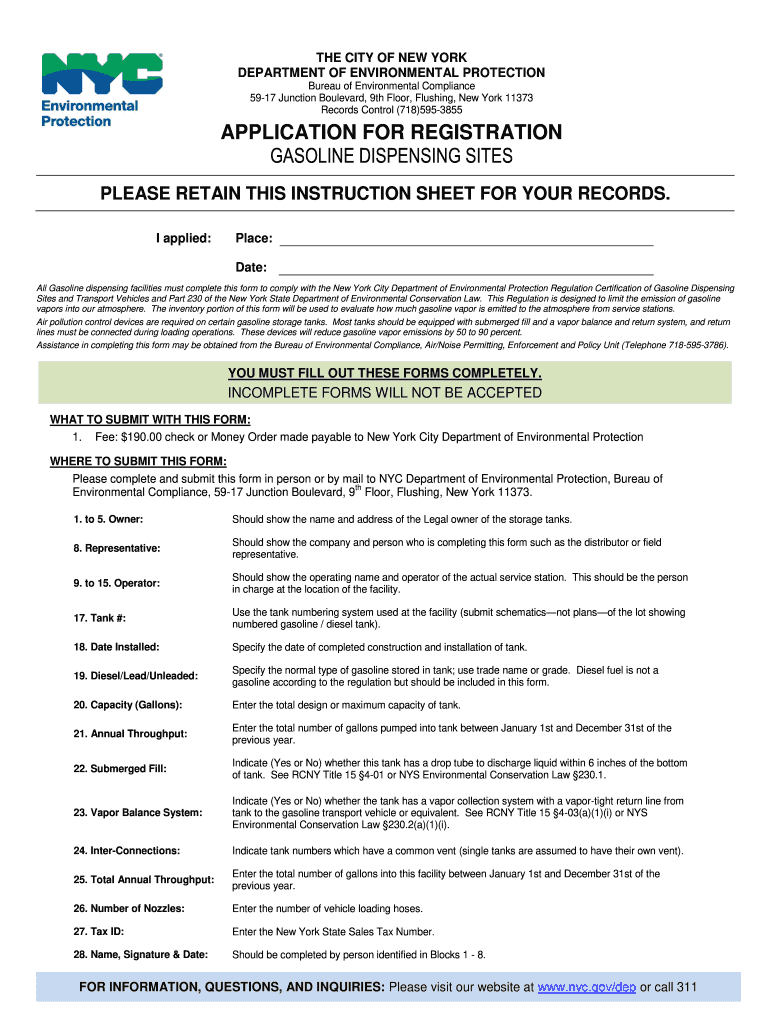
How to use or fill out New York City Department of Environmental Protection Regulation Certification of Gasoline Dispensing Sites Form

- Click ‘Get Form’ to open it in the editor.
- Begin by filling out the Owner section (fields 1-5) with the legal owner's name and address of the storage tanks.
- In the Representative section (field 8), provide details about the company or person completing the form, such as a distributor or field representative.
- Complete the Operator section (fields 9-15) with the operating name and contact information for the service station.
- For Tank Information (fields 17-28), specify tank numbers, installation dates, types of gasoline stored, capacities, and throughput details. Ensure to indicate if submerged fills and vapor balance systems are present.
- Finally, sign and date the form in section 28 to affirm that all provided information is accurate.
Start using our platform today to easily complete your certification form online for free!
It's free
See more new york city department of environmental protection regulation certification of gasoline dispensing sites form versions
| Versions | Form popularity | Fillable & printable |
|---|---|---|
| 2011 | 4.8 Satisfied (293 Votes) |
Got questions?
How do I create an eSignature on my new york city department of environmental protection regulation certification of gasoline dispensing sites form from Google Chrome?
Managing your paperwork with DocHub this way is very simple after you have downloaded its extension for Google Chrome. Go to the Chrome Web Store and set up DocHub - Sign PDF from Gmail to get it. Give our tool access to your Google account, and then open an email containing new york city department of environmental protection regulation certification of gasoline dispensing sites form as an attachment and point to the file with your cursor - the DocHub extension button will automatically appear there. Click on it to open your file in our editor. Make any required edits, fill out the blanks, and click Sign to create your legally-binding eSignature.
How to manage my new york city department of environmental protection regulation certification of gasoline dispensing sites form from Gmail?
In case your go-to electronic mail service is Gmail, it is simple to incorporate your DocHub editor into your work. Modify your new york city department of environmental protection regulation certification of gasoline dispensing sites form with DocHub instruments and connect it to your drafts in Gmail. See how straightforward it can be to exchange papers and collaborate with a swift PDF editing solution at hand.
Security and compliance
At DocHub, your data security is our priority. We follow HIPAA, SOC2, GDPR, and other standards, so you can work on your documents with confidence.
Learn more




