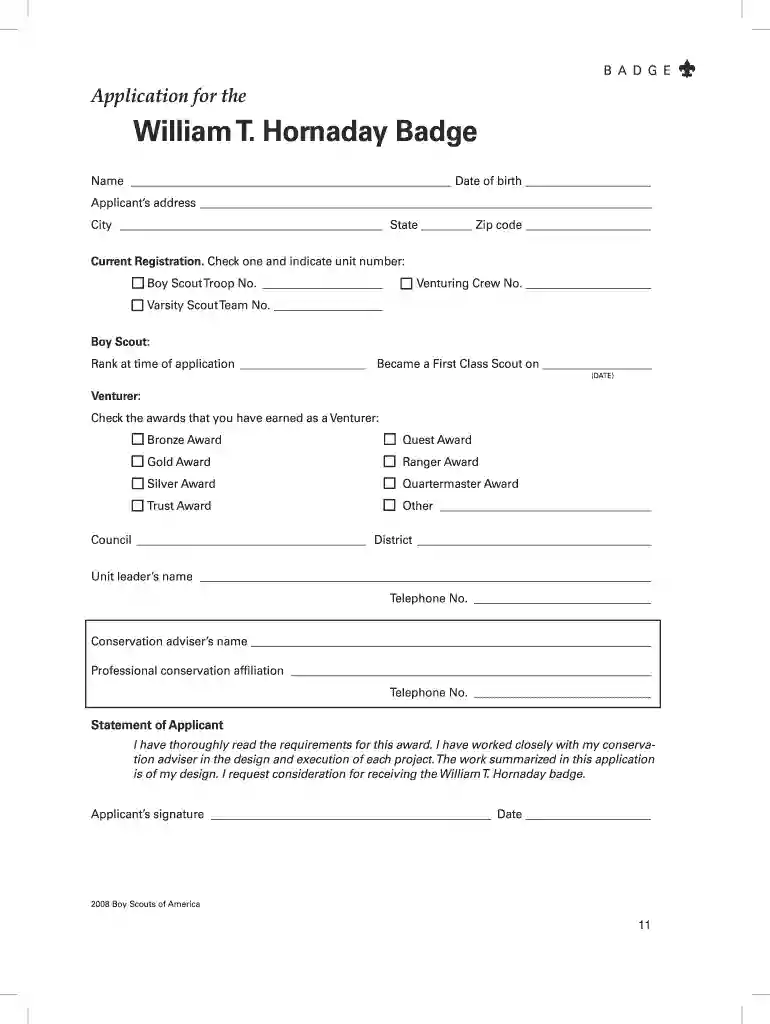
Badge award application 2026

Get Form
badge t Preview on Page 1

Here's how it works

01. Edit your badge t online
Type text, add images, blackout confidential details, add comments, highlights and more.

02. Sign it in a few clicks
Draw your signature, type it, upload its image, or use your mobile device as a signature pad.

03. Share your form with others
Send project badge scout via email, link, or fax. You can also download it, export it or print it out.

How to use or fill out badge award application with our platform

Form edit decoration
9.5
Ease of Setup
DocHub User Ratings on G2
9.0
Ease of Use
DocHub User Ratings on G2
  1. Click ‘Get Form’ to open the badge award application in the editor.
  2. Begin by entering your name and date of birth in the designated fields. Ensure accuracy as this information is crucial for identification.
  3. Fill in your address, including city, state, and zip code. This helps in verifying your location.
  4. Indicate your current registration by checking the appropriate box for Boy Scout Troop, Venturing Crew, or Varsity Scout Team and provide the unit number.
  5. For Boy Scouts, specify your rank at the time of application and the date you became a First Class Scout.
  6. If you are a Venturer, check all awards you have earned from the provided list.
  7. Complete sections for council and district information, along with signatures from both the applicant and unit leader to validate your application.
  8. Attach any required project descriptions and supporting materials as specified in the guidelines before submitting your application.

Start using our platform today to easily complete your badge award application online for free!

See more badge award application versions

We've got more versions of the badge award application form. Select the right badge award application version from the list and start editing it straight away!
Versions Form popularity Fillable & printable
2008 4.8 Satisfied (62 Votes)
be ready to get more

Complete this form in 5 minutes or less

Get form

Got questions?

We have answers to the most popular questions from our customers. If you can't find an answer to your question, please contact us.
Contact us
Studies have shown that apps using these badges experience up to 88% higher open rates than those without, tapping into user curiosity without the need for an interruptive message.
In simple terms, app icon badges are small visual indicators that appear on an app icon to signify that there are unread notifications or updates. They typically show as a colored dot, number, or icon on the corner of the app.
Button Badges Now From 6.95 (inc VAT) Print dispatch within 24hrs of placing an order. Comes with a metal pin back. Design your own unique badge using our online designer.
The following are examples of how you can earn a badge: Completing learning content. Completing a meaningful action or milestone. Participating in an event. Recognizing membership.
Applications native to mobile and desktop operating systems can display badges on top of their app icons to inform users that new content is available. For example, an email client application can display the total number of unread messages in a badge and update this number even if the app is not running.

Security and compliance

At DocHub, your data security is our priority. We follow HIPAA, SOC2, GDPR, and other standards, so you can work on your documents with confidence.

Learn more
ccpa2
pci-dss
gdpr-compliance
hipaa
soc-compliance

People also ask

The Badge of Honour, accompanied by the Kings Certificate and Badge of Honour, is a civil award previously presented by the governments of British colonies and protectorates, and now by British Overseas Territories, to recognise loyal and valuable service by native chiefs and other non-European dignitaries.
According to a study by Localytics, app icon badges can boost app open rates by up to 88% compared to apps without them. These badges act as gentle reminders, sparking a subtle sense of urgency that there might be something important, interesting, or stimulating to see if they launch the app.

Related links