Orthodontic Claim Form . pdf - CFAO - cfao 2026

Get Form
Orthodontic Claim Form . pdf - CFAO - cfao Preview on Page 1

Here's how it works

01. Edit your form online
Type text, add images, blackout confidential details, add comments, highlights and more.

02. Sign it in a few clicks
Draw your signature, type it, upload its image, or use your mobile device as a signature pad.

03. Share your form with others
Send it via email, link, or fax. You can also download it, export it or print it out.

How to use or fill out Orthodontic Claim Form . pdf - CFAO - cfao with Our Platform

Form edit decoration
9.5
Ease of Setup
DocHub User Ratings on G2
9.0
Ease of Use
DocHub User Ratings on G2
  1. Click ‘Get Form’ to open the Orthodontic Claim Form in our editor.
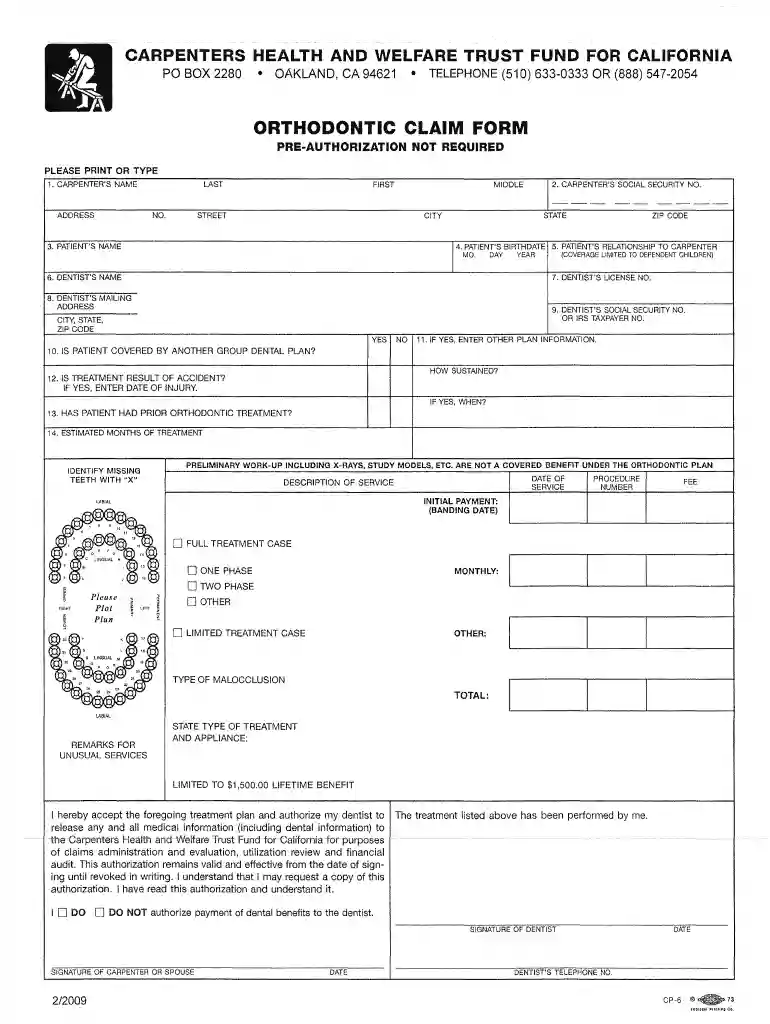
  2. Begin by entering the Carpenter's name, including first, middle, and last names, along with their address.
  3. Input the Carpenter's Social Security Number for identification purposes.
  4. Fill in the Patient's name and birthdate. Ensure that you indicate the relationship of the patient to the carpenter, as coverage is limited to dependent children.
  5. Provide details about the dentist, including their name, license number, mailing address, and Social Security or IRS Taxpayer number.
  6. Answer whether the patient is covered by another group dental plan and provide additional information if applicable.
  7. Indicate if treatment was a result of an accident and provide relevant dates if necessary.
  8. Complete sections regarding prior orthodontic treatment and estimated months of treatment required.
  9. List services provided along with corresponding fees. Be sure to identify missing teeth and specify any unusual services in remarks.
  10. Finally, sign and date the form at the bottom where indicated for both the dentist and carpenter or spouse.

Start filling out your Orthodontic Claim Form today for free using our platform!

be ready to get more

Complete this form in 5 minutes or less

Get form

Got questions?

We have answers to the most popular questions from our customers. If you can't find an answer to your question, please contact us.
Contact us

Managing your forms with DocHub this way is extremely straightforward after you have downloaded its extension for Google Chrome. Navigate to the Chrome Web Store and install DocHub - Sign PDF from Gmail to obtain it. Give our tool access to your Google account, and then open an email containing Orthodontic Claim Form . pdf - CFAO - cfao as an attachment and point to the file with your cursor - the DocHub extension key will automatically appear there. Click on it to open your form in our editor. Make any required adjustments, fill out the blanks, and click Sign to create your legally-binding electronic signature.

If you store your paperwork in Google Drive, there is no need to download your Orthodontic Claim Form . pdf - CFAO - cfao on the computer and upload it back to our editor. A much easier way is to set up a browser extension created by DocHub to streamline this flow. The extension allows editing PDFs right in your browser. Alternatively, you can integrate your DocHub and Gmail accounts for more efficient editing.

CDT Codes are categorized as per the type of service: ServicesCodesCategories Diagnostic D0100 - D0999 (D0) Preventive D1000 - D1999 (D1) Restorative D2000 - D2999 (D2) Endodontics D3000 - D3999 (D3)8 more rows
In Box 25 of the CMS-1500 claim form, you should enter the billing providers federal tax ID number (either Social Security Number or Employer Identification Number). This number is used to identify the provider for tax and billing purposes.
To recap, here are 4 things your dental insurance claims need for prompt reimbursement on their first submission: Must-Have #1. The correct claim form. Must-Have #2. Accurate dental patient information. Must-Have #3. Accurate billing entity/provider information. Must-Have #4. Appropriate attachments and documentation.

Security and compliance

At DocHub, your data security is our priority. We follow HIPAA, SOC2, GDPR, and other standards, so you can work on your documents with confidence.

Learn more
ccpa2
pci-dss
gdpr-compliance
hipaa
soc-compliance
be ready to get more

Complete this form in 5 minutes or less

Get form

People also ask

To Print The Standard ADA Form: Go to Office Manager Reports Blank ADA Form. Select the correct form, and click Yes. Check Save as Default Claim Form if you want the current selection to be selected by default each time you print a blank form.
General area of oral cavity (Box 25) is arranged by numeric codes rather than abbreviations. Tooth system (Box 26) JP, or the American system, follows the ADAs Universal Tooth Designation System with a combination of letters and numbers.
The ADA Dental Claim Form provides a common format for reporting dental services to a patients dental benefit plan. ADA policy promotes use and acceptance of the most current version of the ADA Dental Claim Form by dentists.
Every dental procedure has a corresponding procedure code. In order to confirm eligibility for specific procedures we need the actual procedure codes and tooth numbers (if applicable) for each procedure your dentist intends to perform. Your dental office can provide you with the procedure codes.

Related links