duke premier notes Preview on Page 1

Duke energy forms 2026

Here's how it works

  • 01. Edit your duke premier notes online

    Type text, add images, blackout confidential details, add comments, highlights and more.

  • 02. Sign it in a few clicks

    Draw your signature, type it, upload its image, or use your mobile device as a signature pad.

  • 03. Share your form with others

    Send duke premier notes login via email, link, or fax. You can also download it, export it or print it out.

How to use or fill out Duke Energy forms with our platform

Form edit decoration
9.5
Ease of Setup
DocHub User Ratings on G2
9.0
Ease of Use
DocHub User Ratings on G2
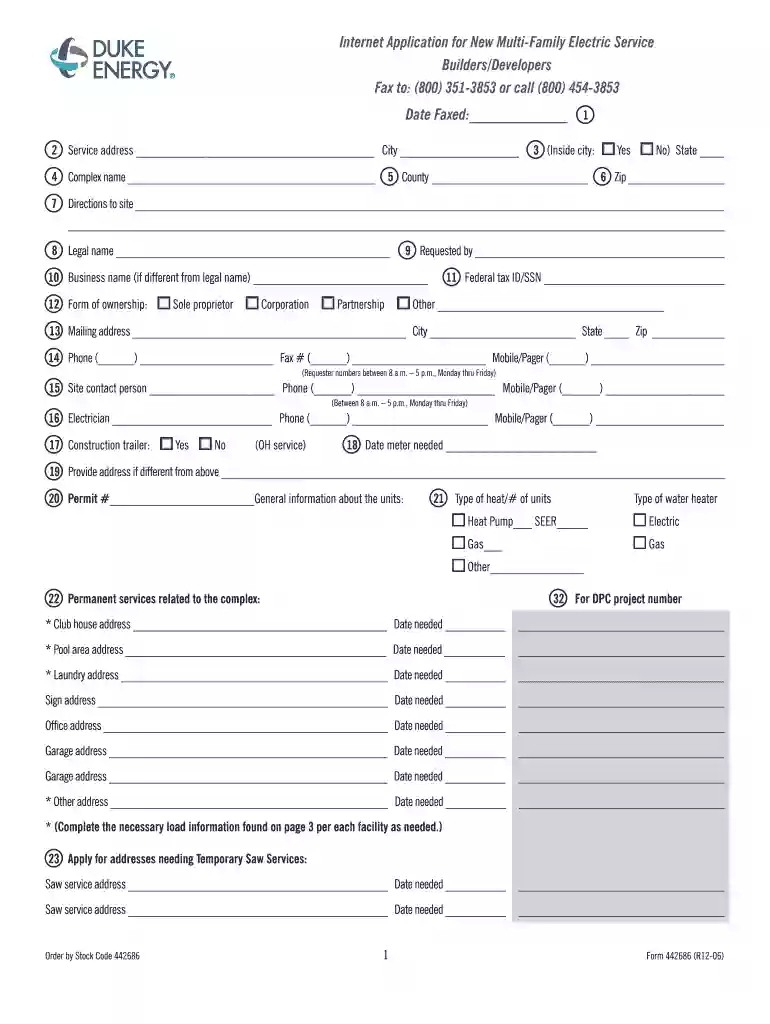
  1. Click ‘Get Form’ to open the Duke Energy form in the editor.
  2. Begin by entering the date faxed at the top of the form. This is essential for tracking your application.
  3. Fill in the service address, including city, state, and zip code. Ensure this is a physical address, not a P.O. Box.
  4. Provide the complex name and county where the service will be located.
  5. In section 8, enter the legal name responsible for the services requested, followed by any business name if applicable.
  6. Complete contact information including phone numbers for both the requester and site contact person to ensure smooth communication.
  7. Indicate whether you need service for a construction trailer and specify when you need the meter set.
  8. For each building in your complex, provide detailed addresses and service requirements as outlined in sections 24 to 32.

Start filling out your Duke Energy forms online for free today!

See more duke premier notes versions

We've got more versions of the duke premier notes form. Select the right duke premier notes version from the list and start editing it straight away!

VersionsForm popularityFillable & printable
20064.8 Satisfied (239 Votes)

be ready to get more

Complete this form in 5 minutes or less

Got questions?

We have answers to the most popular questions from our customers. If you can't find an answer to your question, please contact us.

0:07 1:14 Schools and when you request your free kit your family can be entered into a drawing for $1,000.MoreSchools and when you request your free kit your family can be entered into a drawing for $1,000. There are also cash prizes for your students. School request your free kit at my energykit.org.
Get your free Energy Saving Toolkit packed with products to upgrade your home and slash energy costs. Enjoy energy efficient light bulbs, water-saving aerators, and morevalued up to $100+and trim your monthly bills.
Time-of-Use Periods Applicable DaysTime-of-Use Periods On-Peak Period: Monday - Friday Excludes Holidays* and weekends 5 p.m. - 9 p.m. Discount Period: Daily Includes Holidays* and weekends 12 a.m. - 4 a.m. Off-Peak Period: All hours that are not On-Peak or Discount hours.1 more row
How do I download the app? The Duke Energy app is available on both the App and Google Play stores. To download the Android version, visit here. To download the iOS version, visit here.
Be aware that Duke Energy is not responsible for food loss, power outages, voltage fluctuations or property damage caused by acts of nature. This includes but is not limited to hurricanes, snow, ice, lightning, floods, extreme storms, heat or wind.

Security and compliance

At DocHub, your data security is our priority. We follow HIPAA, SOC2, GDPR, and other standards, so you can work on your documents with confidence.

People also ask

Are you Eligible for Free LED Lighting for your Home or Business? Check With Your Utility. For both business and residential customers, your electric company is the best place to start searching for deals on lighting. Look for State Incentives. Find Federal Programs. Save on LED Lighting Systems.
Contact your power company. They will often provide free LED bulbs as part of a free energy audit.
At any time, you may request that all or a portion of the shares of our common stock credited to your account be sold. You may submit your through your online account, send written instructions either by mail or fax, or by telephone. Requests received in writing must be signed by all registered holders of those shares.

duke energy premier notes rates

Duke Energy Rebate Form

Complete the Duke Energy Tune-Up Form, Form. 6, 3, Air infiltration must be sealed according to Duke Energy standards, HVAC Tune-Up. 7, 4, All equipmentRead more

Learn more
Form Center Duke Energy Service Change Permit

This Permit Application can only be used for Duke Energy Service Change Permits. Application / Project #. CID or EFT #. Date*. Date. March. 2026. Sun, Mon, TueRead more

Learn more
If you believe that this page should be taken down, please follow our DMCA take down process here