Patient Registration Form - Advocare 2026

Get Form
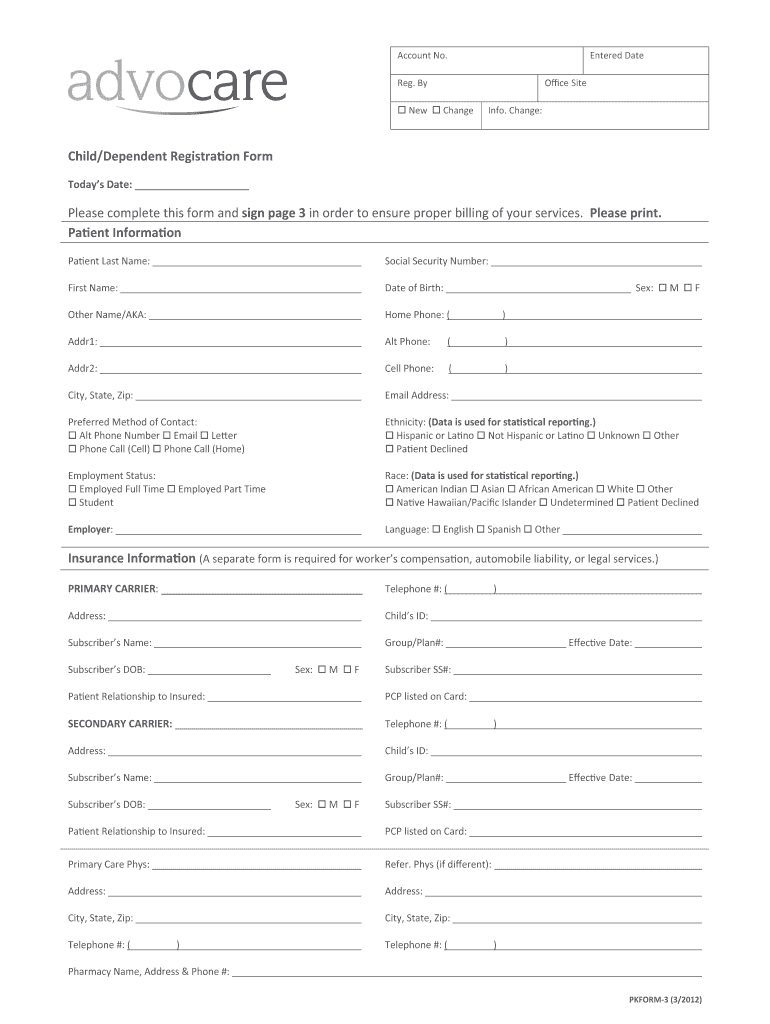
Patient Registration Form - Advocare Preview on Page 1

Here's how it works

01. Edit your form online
Type text, add images, blackout confidential details, add comments, highlights and more.
02. Sign it in a few clicks
Draw your signature, type it, upload its image, or use your mobile device as a signature pad.
03. Share your form with others
Send it via email, link, or fax. You can also download it, export it or print it out.

How to use or fill out Patient Registration Form - Advocare with our platform

Form edit decoration
9.5
Ease of Setup
DocHub User Ratings on G2
9.0
Ease of Use
DocHub User Ratings on G2
  1. Click ‘Get Form’ to open the Patient Registration Form - Advocare in the editor.
  2. Begin by filling out the 'Patient Information' section. Enter the patient's last name, first name, date of birth, and social security number. Ensure all fields are completed accurately for proper billing.
  3. Next, provide contact details including home phone, cell phone, email address, and preferred method of contact. This information is crucial for communication regarding appointments and billing.
  4. In the 'Insurance Information' section, input details about the primary and secondary insurance carriers. Include subscriber names, group numbers, and any relevant identification numbers.
  5. Complete the 'Guarantor Information' section by entering details about the person financially responsible for the patient’s bill. This includes their relationship to the patient and contact information.
  6. Finally, review all entered information for accuracy before signing on page 3 to authorize billing to your insurance company.

Start filling out your Patient Registration Form - Advocare today for free using our platform!

See more Patient Registration Form - Advocare versions

We've got more versions of the Patient Registration Form - Advocare form. Select the right Patient Registration Form - Advocare version from the list and start editing it straight away!
Versions Form popularity Fillable & printable
2014 4.3 Satisfied (60 Votes)
2012 4.9 Satisfied (54 Votes)
be ready to get more

Complete this form in 5 minutes or less

Get form

Got questions?

We have answers to the most popular questions from our customers. If you can't find an answer to your question, please contact us.
Contact us
Request the necessary insurance data and a photo identification when you provide the patient with the standard new patient forms, typically the health history form, a declaration of the practices payment policy, the Health Insurance Portability and Accountability Act of 1996 (HIPAA) forms, etc.
A patient registration form should include essential data fields such as personal details (name, date of birth, contact information), medical history, insurance details, emergency contacts, and consent agreements.
The basic function of patient registration is to create/assign account numbers for defined episodes of care (also known as encounters) and to link each account to the identified patients medical records. If no medical record exists patient registration creates a new medical record number.
Now you can connect with us anywhere, anytime with our new mobile app! Downloading our mobile app is free and easy. Just follow the simple steps below and youre on your way.
A registration form is the first point of contact between event organisers and potential attendees. It not only serves to collect information but also sets expectations for the event.

Security and compliance

At DocHub, your data security is our priority. We follow HIPAA, SOC2, GDPR, and other standards, so you can work on your documents with confidence.

Learn more
ccpa2
pci-dss
gdpr-compliance
hipaa
soc-compliance
be ready to get more

Complete this form in 5 minutes or less

Get form