Employment application uson make 2026

Get Form
applicant drug Preview on Page 1

Here's how it works

01. Edit your applicant drug online
Type text, add images, blackout confidential details, add comments, highlights and more.
02. Sign it in a few clicks
Draw your signature, type it, upload its image, or use your mobile device as a signature pad.
03. Share your form with others
Send it via email, link, or fax. You can also download it, export it or print it out.

How to use or fill out employment application uson make with our platform

Form edit decoration
9.5
Ease of Setup
DocHub User Ratings on G2
9.0
Ease of Use
DocHub User Ratings on G2
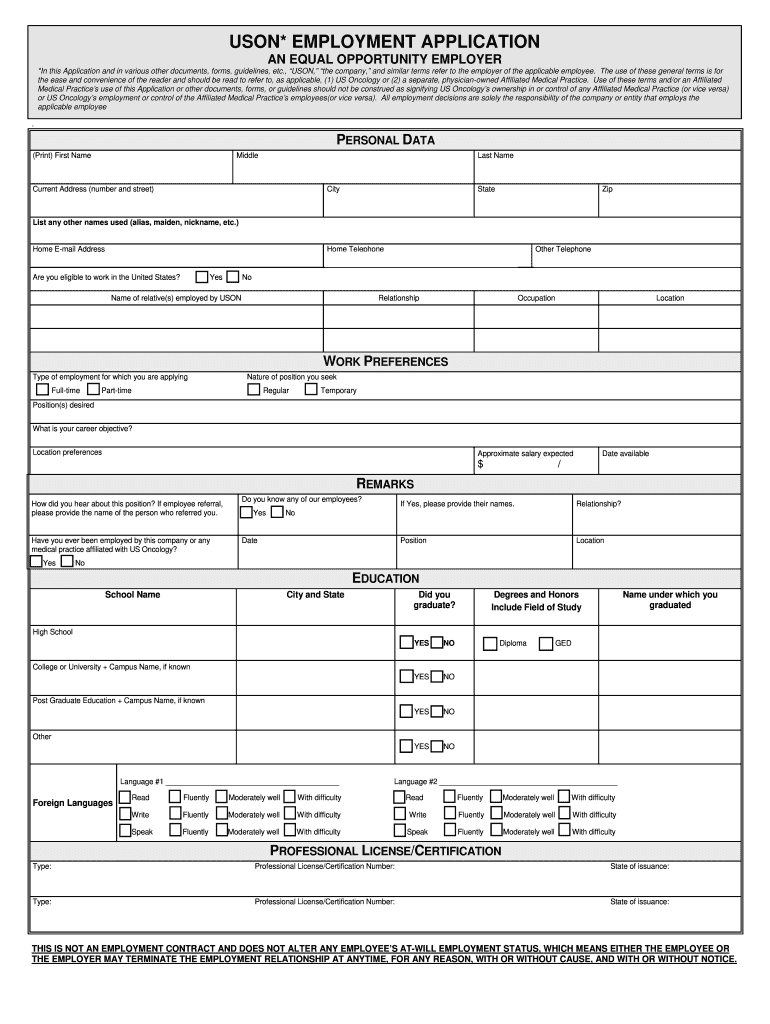
  1. Click ‘Get Form’ to open the employment application uson make in the editor.
  2. Begin by filling out your personal data. Enter your first, middle, and last name, along with your current address, email, and phone numbers. Ensure all information is accurate.
  3. In the Work Preferences section, indicate the type of employment you are seeking (full-time or part-time) and specify your desired position(s) and salary expectations.
  4. Complete the Education section by listing your educational background. Include school names, degrees earned, and any honors received.
  5. Provide details about your professional licenses or certifications if applicable. Include type, number, and state of issuance.
  6. List your two most recent employers in the Employment section. Include dates of employment, company names, positions held, and reasons for leaving.
  7. Finally, review all sections for completeness and accuracy before submitting your application through our platform.

Start filling out your employment application uson make today for free using our editor!

See more employment application uson make versions

We've got more versions of the employment application uson make form. Select the right employment application uson make version from the list and start editing it straight away!
Versions Form popularity Fillable & printable
2009 4.9 Satisfied (335 Votes)
be ready to get more

Complete this form in 5 minutes or less

Get form

Got questions?

We have answers to the most popular questions from our customers. If you can't find an answer to your question, please contact us.
Contact us
Your application form must follow an organized structure. My suggestion is for you to divide it into parts by topic. For example, have a section for personal information (name, email address, the preferred method for contact, etc.), another for education (degrees and certificates), and one more for work background.
Employment application forms ask for personal information, as well as information about a candidates education, experience, and references. You can create a standard employment application template to simplify your responsibilities. Take a look at some of the information you might ask applicants for: Legal name.
Employers use job application forms to gather information from prospective employees. The questions on these forms typically introduce candidates, share their contact information and detail their work history.
How to write an application letter Research the company and job opening. Use a professional format. State the position youre applying for. Explain why youre the best fit for the job. Summarize your qualifications. Mention why you want the job. Include a professional closing.
What is included in a job application? Personal information. Full name, phone number, email address, social media accounts such as LinkedIn information, mailing address, and social security number or other identification details. Educational background. Work experience. Skills and competencies. References.

Security and compliance

At DocHub, your data security is our priority. We follow HIPAA, SOC2, GDPR, and other standards, so you can work on your documents with confidence.

Learn more
ccpa2
pci-dss
gdpr-compliance
hipaa
soc-compliance
be ready to get more

Complete this form in 5 minutes or less

Get form