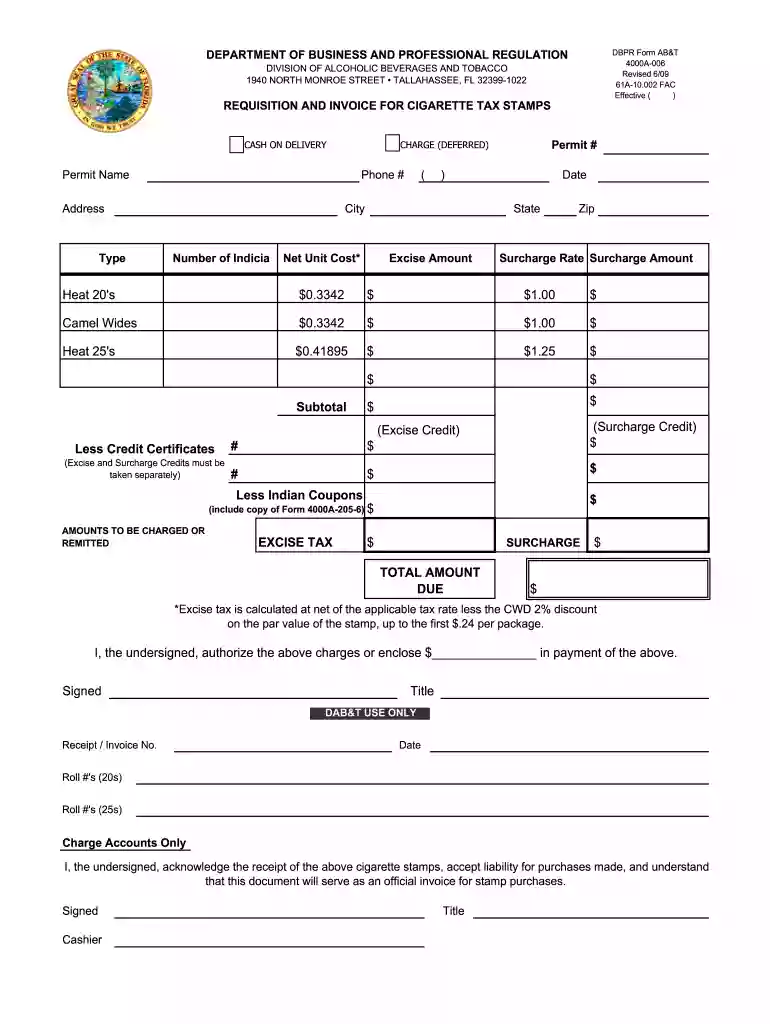
Florida dbpr requisition 2026

Get Form
florida dbpr login Preview on Page 1

Here's how it works

01. Edit your florida dbpr login online
Type text, add images, blackout confidential details, add comments, highlights and more.

02. Sign it in a few clicks
Draw your signature, type it, upload its image, or use your mobile device as a signature pad.

03. Share your form with others
Send dbpr license login via email, link, or fax. You can also download it, export it or print it out.

How to use or fill out Florida DBPR Requisition with Our Platform

Form edit decoration
9.5
Ease of Setup
DocHub User Ratings on G2
9.0
Ease of Use
DocHub User Ratings on G2
  1. Click ‘Get Form’ to open the Florida DBPR requisition in the editor.
  2. Begin by entering the 'Permit Name' and 'Phone #' in the designated fields. Ensure that your contact information is accurate for any follow-up.
  3. Fill in your 'Address', 'City', 'State', and 'Zip' code. This information is crucial for processing your requisition.
  4. Specify the 'Type' of cigarettes you are ordering by selecting from the options provided, such as Heat 20's or Camel Wides.
  5. Input the number of indicia required and your permit number in their respective fields to ensure proper tracking.
  6. Calculate and enter the net unit cost, excise amount, surcharge rate, and surcharge amount for each type of cigarette ordered.
  7. Complete any applicable deductions such as credit certificates or Indian coupons by entering the amounts in their respective sections.
  8. Finally, sign and date the form at the bottom to authorize charges or confirm payment. Make sure all details are correct before submission.

Start using our platform today to streamline your document editing and form completion for free!

See more florida dbpr requisition versions

We've got more versions of the florida dbpr requisition form. Select the right florida dbpr requisition version from the list and start editing it straight away!
Versions Form popularity Fillable & printable
2009 4.9 Satisfied (40 Votes)
be ready to get more

Complete this form in 5 minutes or less

Get form

Got questions?

We have answers to the most popular questions from our customers. If you can't find an answer to your question, please contact us.
Contact us
The Department of Business and Professional Regulation is the agency charged with licensing and regulating businesses and professionals in the State of Florida, such as cosmetologists, veterinarians, real estate agents and pari-mutuel wagering facilities.
DBPR Customer Contact Center (CCC) can be docHubed at 850.487. 1395. The CCC hours of operations are Monday-Friday, 8 a.m. - 5:00 p.m. EST. For a quicker response from a DBPR representative, the best times during the day to call are between the hours of 8 a.m. to 10 a.m. or 3:30 p.m. to 5:00 p.m.
The Approval Process Timeline When applying for approval to take the Florida state exam, you can typically expect to receive a response within 2 to 4 weeks. The Florida Department of Business and Professional Regulation (DBPR) reserves a maximum of 90 days for processing applications.
The primary purpose of a building code is to regulate new or proposed construction. Building codes only apply to an existing building if the building undergoes reconstruction, rehabilitation or alteration, or if the occupancy of the existing building changes to a new occupancy level as defined by the building code.
The Vast Umbrella: Regulated Professions under the Florida DBPR. Many might be surprised by the breadth of the professions and industries that fall under the DBPRs purview. This ranges from the construction industry to cosmetology, from hotels to pilots, and from home inspectors to consultants and athlete agents.

Security and compliance

At DocHub, your data security is our priority. We follow HIPAA, SOC2, GDPR, and other standards, so you can work on your documents with confidence.

Learn more
ccpa2
pci-dss
gdpr-compliance
hipaa
soc-compliance
be ready to get more

Complete this form in 5 minutes or less

Get form

People also ask

0:28 2:19 And click on my account link on the top right side of the homepage. Select create my account toMoreAnd click on my account link on the top right side of the homepage. Select create my account to begin the registration. Process. Complete the required fields indicated by a red asterisk.
The primary purpose of Floridas K12 assessment system is to measure students achievement of Floridas education standards.

dbpr license renewal