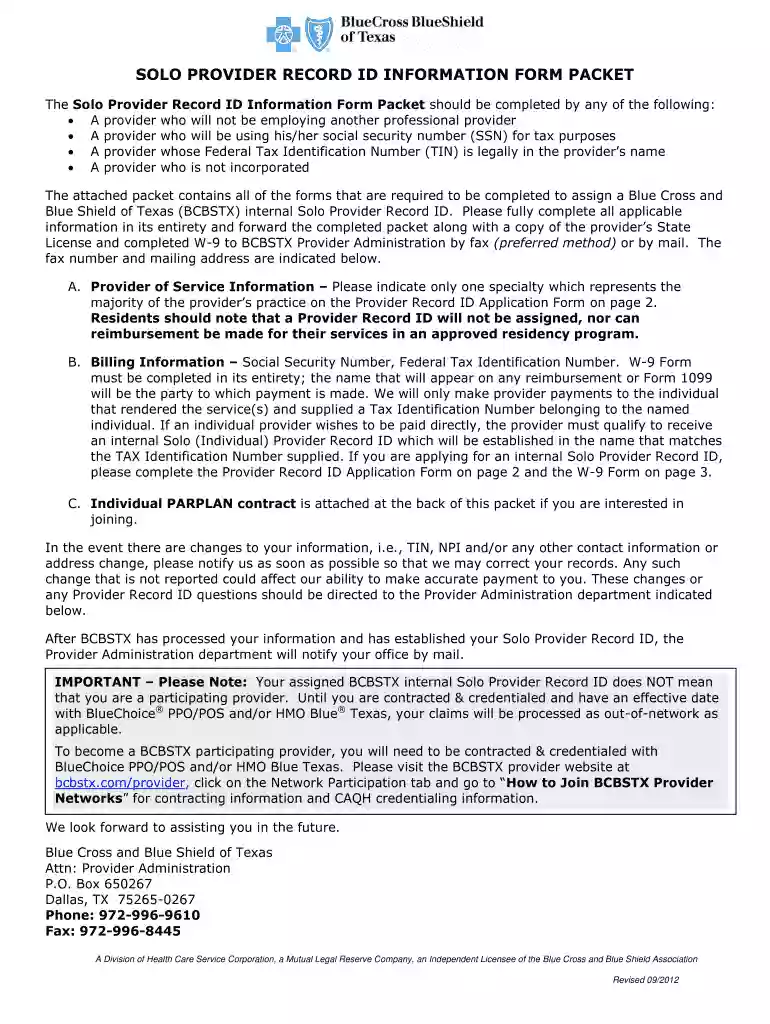
bcbstx provider onboarding form Preview on Page 1

Solo provider record id information form fillable bcbs texas 2012-2026

Here's how it works

  • 01. Edit your bcbstx provider onboarding form online

    Type text, add images, blackout confidential details, add comments, highlights and more.

  • 02. Sign it in a few clicks

    Draw your signature, type it, upload its image, or use your mobile device as a signature pad.

  • 03. Share your form with others

    Send it via email, link, or fax. You can also download it, export it or print it out.

How to use or fill out Solo provider record id information form fillable bcbs texas 2012 with our platform

Form edit decoration
9.5
Ease of Setup
DocHub User Ratings on G2
9.0
Ease of Use
DocHub User Ratings on G2
  1. Click ‘Get Form’ to open the Solo Provider Record ID Information Form in the editor.
  2. Begin with Section A, 'Provider of Service Information.' Fill in your name as it appears on the W-9, your practice address, phone number, and specialty. Ensure all fields are completed accurately.
  3. Proceed to Section B, 'Billing Information.' Enter your Social Security Number (SSN) and Federal Tax Identification Number (TIN). Confirm whether these numbers belong to you personally or a corporation.
  4. Attach copies of your State License and completed W-9 form. Make sure these documents are clear and legible for submission.
  5. Review all entered information for accuracy. Incomplete forms will be returned, so double-check each section before finalizing.
  6. Once satisfied, submit the completed packet via fax or mail to Blue Cross and Blue Shield of Texas as indicated at the bottom of the form.

Start using our platform today to streamline your document editing and submission process for free!

See more bcbstx provider onboarding form versions

We've got more versions of the bcbstx provider onboarding form form. Select the right bcbstx provider onboarding form version from the list and start editing it straight away!

VersionsForm popularityFillable & printable
20184.8 Satisfied (77 Votes)
20154.3 Satisfied (141 Votes)
20124 Satisfied (37 Votes)

be ready to get more

Complete this form in 5 minutes or less

Security and compliance

At DocHub, your data security is our priority. We follow HIPAA, SOC2, GDPR, and other standards, so you can work on your documents with confidence.

Related links

Form 5500 Series

File your Form 5500 series with ease. Access resources and official guidance for plan reporting and compliance.

Learn more
Clinic Manual - Ketchum University

Marshall Bidwell Ketchum was born in Canada in 1856 and became a pharmacist. In order to further his education, he traveled to the United States to studyRead more

Learn more
If you believe that this page should be taken down, please follow our DMCA take down process here