Lic8 do i 2026

Get Form
lic8 Preview on Page 1

Here's how it works

01. Edit your lic8 online
Type text, add images, blackout confidential details, add comments, highlights and more.

02. Sign it in a few clicks
Draw your signature, type it, upload its image, or use your mobile device as a signature pad.

03. Share your form with others
Send lic8 4 via email, link, or fax. You can also download it, export it or print it out.

How to use or fill out lic8 do i with our platform

Form edit decoration
9.5
Ease of Setup
DocHub User Ratings on G2
9.0
Ease of Use
DocHub User Ratings on G2
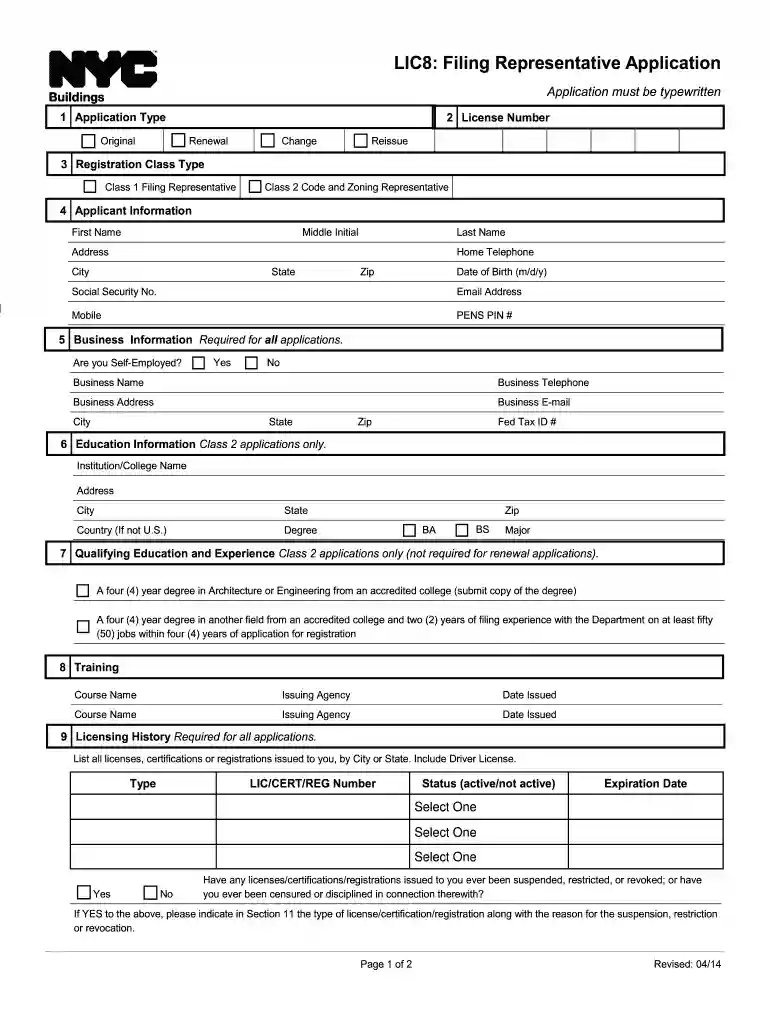
  1. Click ‘Get Form’ to open the lic8 do i application in the editor.
  2. Begin by selecting the type of application you are submitting: Original, Renewal, Change, or Reissue. This is crucial for processing your request correctly.
  3. Fill in your personal information in the Applicant Information section. Ensure that all fields such as First Name, Last Name, Address, and Date of Birth are accurately completed.
  4. In the Business Information section, indicate if you are self-employed and provide your business details including name and contact information.
  5. If applying for Class 2, complete the Education Information section with your institution's details and degree obtained.
  6. List any licenses or certifications in the Licensing History section. Be thorough to avoid delays in processing.
  7. Finally, review all sections for accuracy before signing and dating the application in the Statements and Signatures section.

Start filling out your lic8 do i application today for free using our platform!

See more lic8 do i versions

We've got more versions of the lic8 do i form. Select the right lic8 do i version from the list and start editing it straight away!
Versions Form popularity Fillable & printable
2018 4.8 Satisfied (142 Votes)
2012 4.2 Satisfied (72 Votes)
be ready to get more

Complete this form in 5 minutes or less

Get form

Got questions?

We have answers to the most popular questions from our customers. If you can't find an answer to your question, please contact us.
Contact us
To renew a license, you must be logged in with the email address associated with your license number. Step 2: After logging into DOB NOW, the Welcome page displays. Hover over DOB NOW: Licensing and select Manage License. Step 3: When the Licensing dashboard displays, click the Renew License button.
The passport is the ultimate form of ID for travel. Its required for international flights, but its also accepted as a REAL ID alternative for domestic flights. That said, its not a bad idea to get a REAL ID, so you dont need to use your passport for domestic travel.
A new or renewal Real ID drivers license is $45. A compliant identification card costs $39. There may be discounts and reduced fee options for those who qualify.
You do not have to wait until your renewal to get a REAL ID. Youll pay the one-time $30 REAL ID fee plus your standard renewal fee. Your new REAL ID will include the remaining time on your current license plus an additional four years.
To get a REAL ID, you must provide: One document proving identity and lawful status. One document proving your Social Security number. Two documents proving your Pennsylvania residency. Proof of legal name change when applicable.

Security and compliance

At DocHub, your data security is our priority. We follow HIPAA, SOC2, GDPR, and other standards, so you can work on your documents with confidence.

Learn more
ccpa2
pci-dss
gdpr-compliance
hipaa
soc-compliance

People also ask

You may go to an Online Messenger Service(opens in a new tab) or Driver License Center(opens in a new tab) and apply for a duplicate Non-Commercial Drivers license by using the DL-80 form. You will receive an interim license that is valid for 15 days while PennDOT processes the duplicate request.

Related links