Type text, add images, blackout confidential details, add comments, highlights and more.

02. Sign it in a few clicks
Draw your signature, type it, upload its image, or use your mobile device as a signature pad.

03. Share your form with others
Send it via email, link, or fax. You can also download it, export it or print it out.

How to use or fill out the IATAN Professional Profile Form
Ease of Setup
DocHub User Ratings on G2
Ease of Use
DocHub User Ratings on G2
Click ‘Get Form’ to open it in our editor.
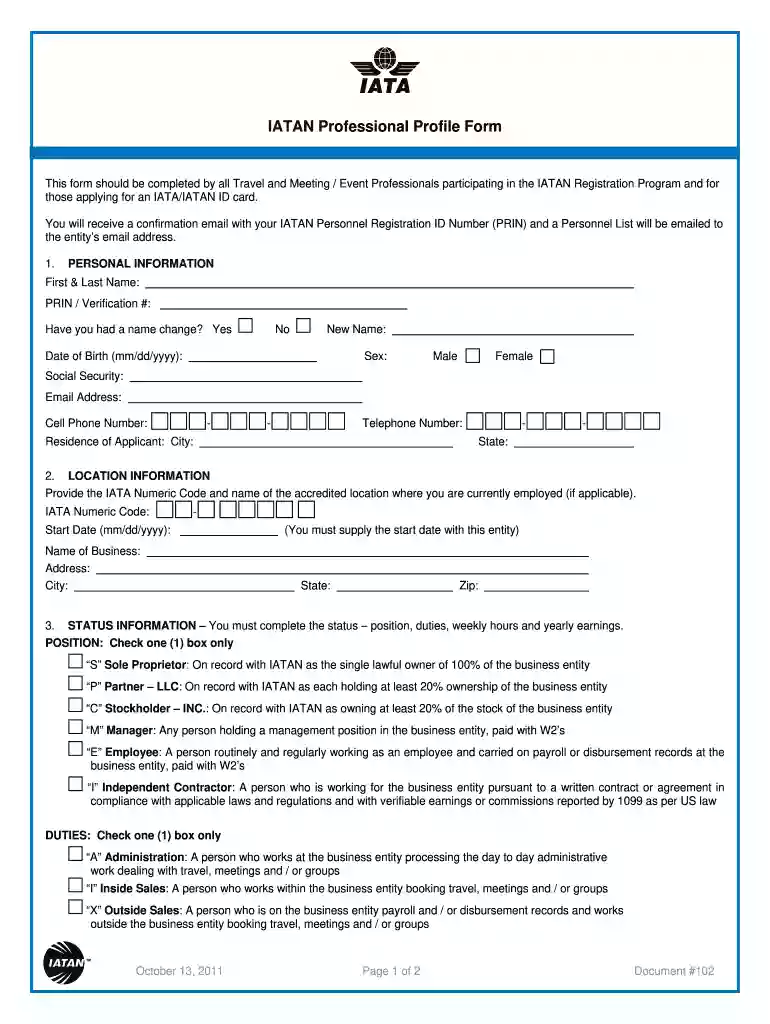
Begin with the 'Personal Information' section. Fill in your First & Last Name, PRIN/Verification Number, and indicate if you have had a name change. Provide your Date of Birth, Sex, Social Security Number, Email Address, Cell Phone Number, and Telephone Number.
Next, move to 'Location Information'. Enter the IATA Numeric Code and name of your accredited location. Include your Start Date with this entity, Business Name, Address, City, State, and Zip Code.
In the 'Status Information' section, select your Position by checking one box that best describes your role. Then check one box for Duties and indicate your Weekly Hours and Yearly Earnings.
If applicable, complete the 'Deletion' section by providing the Termination Date for any professionals no longer working at the business entity.
Finally, ensure both signatures are provided in the 'Signatures' section along with the date for processing.
Start filling out your IATAN Professional Profile Form today using our platform for free!
Fill out iatan professional profile form online It's free
We've got more versions of the iatan professional profile form form. Select the right iatan professional profile form version from the list and start editing it straight away!
IATAN (International Airlines Travel Agent Network) is a department of IATA and has been servicing all aspects of the US Travel and Tourism industry for more than 20 years. IATAN offers you global recognition and global reach, which no other accreditation program can.
What is a Clia IATAN card?
The IATA/IATAN ID card is an internationally recognized identification for travel professionals, this prestigious identification ensures that your professional status is recognised worldwide within the travel industry.
What is the difference between IATA and non IATA travel agency?
As the name suggests, non-IATA/independent travel agents are agents who are not accredited by the International Air Transport Association (IATA). IATA is considered to be one of the most basic resources for a travel agent because most airline bookings are done through the IATA portal.
What is IATAN certification?
IATAN Accreditation. Accreditation. IATA/IATAN ID Card. IATAN Accreditation is a globally recognized program that acknowledges travel businesses as legitimate and committed to providing high-quality services.
What is IATAN membership?
Essentially, having your IATAN card serves as recognition of your proficiency in booking travel and establishes you as an agent travel suppliers and travel clients want to work with. The Cruise Lines International Association (CLIA) also recognizes travel agents through the EMBARC Card.
Related Searches
Iatan professional profile form pdfIatan professional profile form downloadIatan professional profile form onlineIATA application form for travel agentsIATAN certificationIATAN CardIATAN Card RenewalIATAN number lookup
Security and compliance
At DocHub, your data security is our priority. We follow HIPAA, SOC2, GDPR, and other standards, so you can work on your documents with confidence.
District of Columbia - Paid Family Leave - Job Details
Aug 25, 2025 At AAA Club Alliance, were looking for enthusiastic, sales-driven individuals who want to help others create unforgettable travel experiences.
Nov 24, 2024 The first form is for the student to request for accommodations. The second form is to be completed by a qualified professional. Request for
Cookie consent notice
This site uses cookies to enhance site navigation and personalize your experience.
By using this site you agree to our use of cookies as described in our Privacy Notice.
You can modify your selections by visiting our Cookie and Advertising Notice.