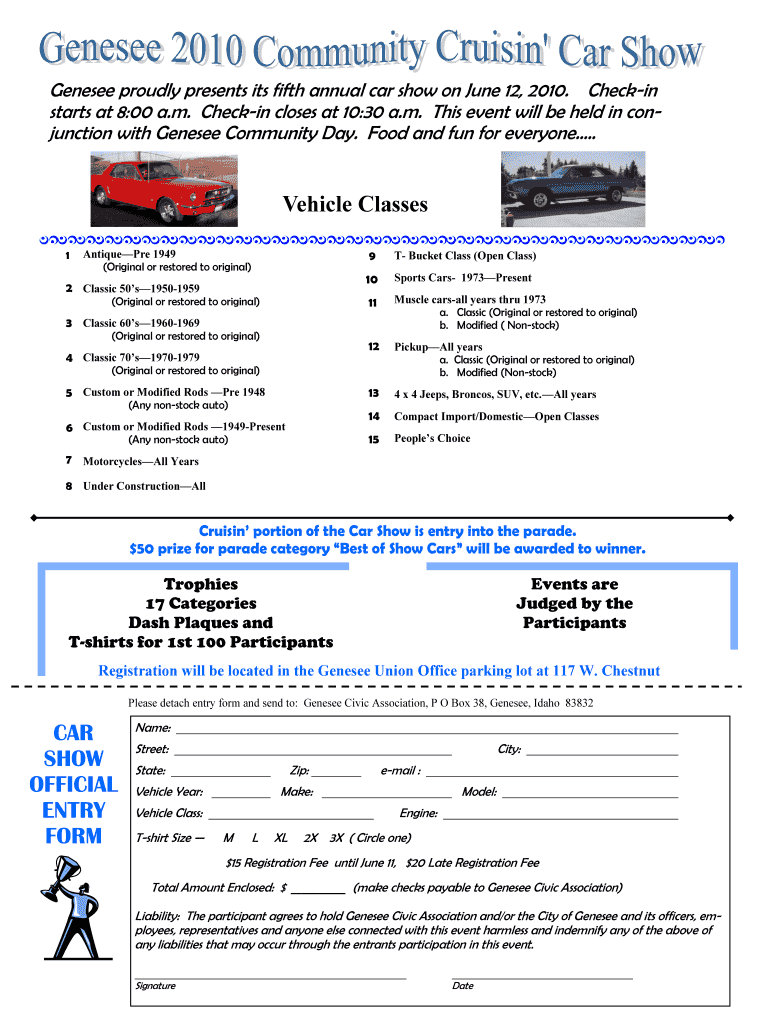
Registratiin sheet for car show judging form 2026

Get Form
free printable car show judging sheet Preview on Page 1

Here's how it works

01. Edit your free printable car show judging sheet online
Type text, add images, blackout confidential details, add comments, highlights and more.
02. Sign it in a few clicks
Draw your signature, type it, upload its image, or use your mobile device as a signature pad.
03. Share your form with others
Send car show judging form via email, link, or fax. You can also download it, export it or print it out.

How to use or fill out registration sheet for car show judging form with our platform

Form edit decoration
9.5
Ease of Setup
DocHub User Ratings on G2
9.0
Ease of Use
DocHub User Ratings on G2
  1. Click ‘Get Form’ to open the registration sheet in the editor.
  2. Begin by entering your personal information. Fill in your Name, Street, City, State, and Zip code in the designated fields.
  3. Next, provide details about your vehicle. Enter the Vehicle Year, Make, Model, and Engine specifications as required.
  4. Select your Vehicle Class from the dropdown menu. Ensure you choose the correct category that matches your vehicle type.
  5. Indicate your T-shirt Size by circling one of the options: M, L, XL, 2X, or 3X.
  6. Calculate your total registration fee. Enter $15 if registering before June 11 or $20 for late registration. Write this amount in the Total Amount Enclosed field.
  7. Finally, sign and date the form to acknowledge liability terms before submitting it to Genesee Civic Association.

Start filling out your registration sheet today for free and streamline your car show experience!

See more registratiin sheet for car show judging form versions

We've got more versions of the registratiin sheet for car show judging form form. Select the right registratiin sheet for car show judging form version from the list and start editing it straight away!
Versions Form popularity Fillable & printable
2018 4.8 Satisfied (37 Votes)
2010 4 Satisfied (43 Votes)
be ready to get more

Complete this form in 5 minutes or less

Get form

Got questions?

We have answers to the most popular questions from our customers. If you can't find an answer to your question, please contact us.
Contact us

Yes, electronically drawing your signature is appropriate, but only if you use a tool that complies with industry laws and regulations. Try DocHub, which guarantees eSignature validity under ESIGN and UETA requirements. All you need to eSign your car show judge sheet is an account with DocHub and an internet connection. After you open your file in our editor, click Sign and select the Draw tool.

You may complete and eSign your car show judging sheet pdf online, even on a tight deadline. All you need to access high quality editing tools on any device is a DocHub profile, which you can register in just a few moments. When you register, add your file or find what you are searching for in our catalog, complete it utilizing the editing tools you want, and put your electronic signature on it at the end.

During the car show, be open and approachable so people can ask you questions and talk to you about your car. To make a great first impression, you should dress for the occasion. This means wearing your best driving hat, clothes, gloves, sunglasses, and watch.
How to Throw a Car Show in 10 Steps 1) Organize a Coordination Team. 2) Select a Location, Date, and Time. 3) Define a Purpose and Theme. 4) Invite Vendors. 5) Organize the Activities. 6) Provide Entertainment. 7) Acquire Proper Permits. 8) Promote the Event.
Try watching this video on .youtube.com, or enable JavaScript if it is disabled in your browser. Dont Touch the Cars. Dont Trash-Talk Other Cars. Be Careful with Your Kids. Keep an Eye Out for Cameras. Respect the Show and Its Promoters.

Security and compliance

At DocHub, your data security is our priority. We follow HIPAA, SOC2, GDPR, and other standards, so you can work on your documents with confidence.

Learn more
ccpa2
pci-dss
gdpr-compliance
hipaa
soc-compliance
be ready to get more

Complete this form in 5 minutes or less

Get form