Blank registration forms 2026

Get Form
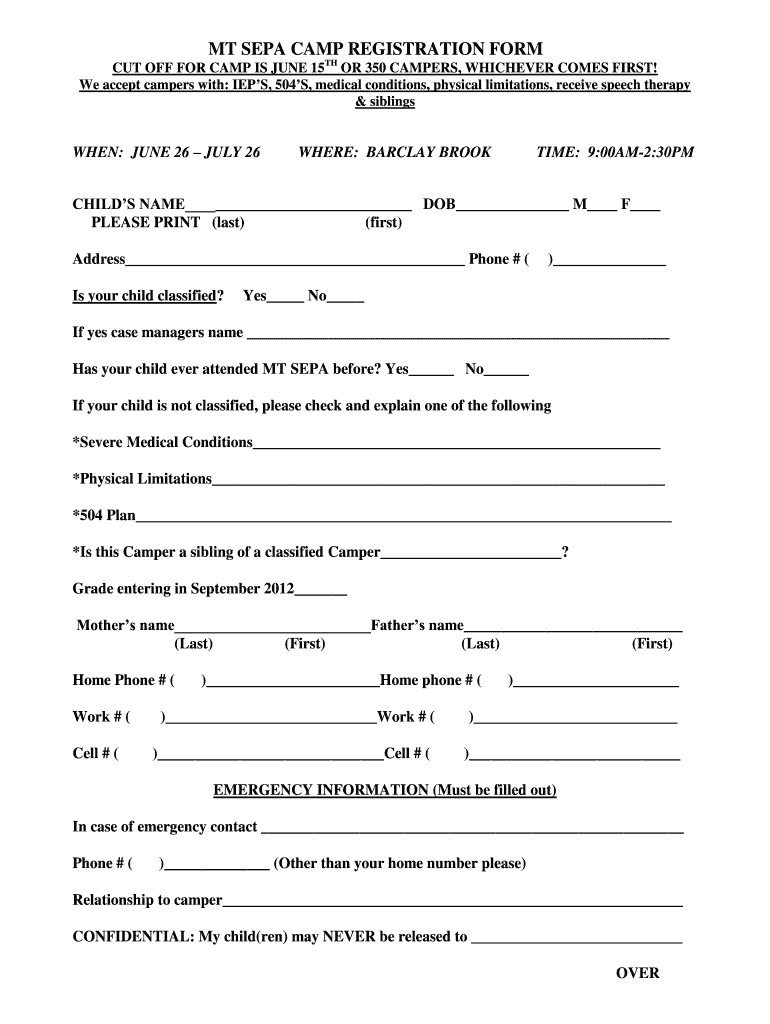
blank registration form Preview on Page 1

Here's how it works

01. Edit your blank registration form online
Type text, add images, blackout confidential details, add comments, highlights and more.
02. Sign it in a few clicks
Draw your signature, type it, upload its image, or use your mobile device as a signature pad.
03. Share your form with others
Send blank registration form template via email, link, or fax. You can also download it, export it or print it out.

How to use or fill out blank registration forms with our platform

Form edit decoration
9.5
Ease of Setup
DocHub User Ratings on G2
9.0
Ease of Use
DocHub User Ratings on G2
  1. Click ‘Get Form’ to open the blank registration form in the editor.
  2. Begin by entering your child's name and date of birth in the designated fields. Ensure you select the correct gender option.
  3. Fill in your address and phone number, making sure to provide a reliable contact number.
  4. Indicate whether your child is classified by checking 'Yes' or 'No'. If yes, provide the case manager's name.
  5. Answer if your child has attended MT SEPA before and check any relevant medical conditions or plans that apply.
  6. Complete the parent/guardian information section, including names and contact numbers for home, work, and cell.
  7. Fill out emergency contact details, ensuring you list someone other than yourself.
  8. Select shirt size for your child and indicate if they are a child or adult size.
  9. Sign the permission slip for trips and indicate your preference regarding photo publication.

Start filling out your registration form online for free today!

See more blank registration forms versions

We've got more versions of the blank registration forms form. Select the right blank registration forms version from the list and start editing it straight away!
Versions Form popularity Fillable & printable
2012 4 Satisfied (44 Votes)
be ready to get more

Complete this form in 5 minutes or less

Get form

Got questions?

We have answers to the most popular questions from our customers. If you can't find an answer to your question, please contact us.
Contact us
How to create a registration form in 7 steps Determine form length. Set clear fields. Set up a confirmation message. Add a payment option (if applicable) Check for accessibility. Embed the form for easy completion. Create your own registration form with SurveyMonkey.
How to create fillable PDF files: Open Acrobat: Click on the Tools tab and select Prepare Form. Select a file or scan a document: Acrobat will automatically analyze your document and add form fields. Add new form fields: Use the top toolbar and adjust the layout using tools in the right pane. Save your fillable PDF:
Step 1: Go to Google Forms. Go to Google Forms: Open your web browser and go to Google Forms. Step 2: Start a New Form. Create a Blank Form: Step 3: Title and Description. Set the Form Title: Step 4: Add Questions. Step 5: Customize Your Form. Step 6: Adjust Settings. Step 7: Design Your Form. Step 8: Preview Your Form.
With AidaForm, you can create fully customizable free registration pages in just minutes no coding skills needed.
Go to File New. In the Search for online templates field, type Forms or the kind of form you want. Then press Enter. In the displayed results, right-click any item, then select Create.

Security and compliance

At DocHub, your data security is our priority. We follow HIPAA, SOC2, GDPR, and other standards, so you can work on your documents with confidence.

Learn more
ccpa2
pci-dss
gdpr-compliance
hipaa
soc-compliance
be ready to get more

Complete this form in 5 minutes or less

Get form