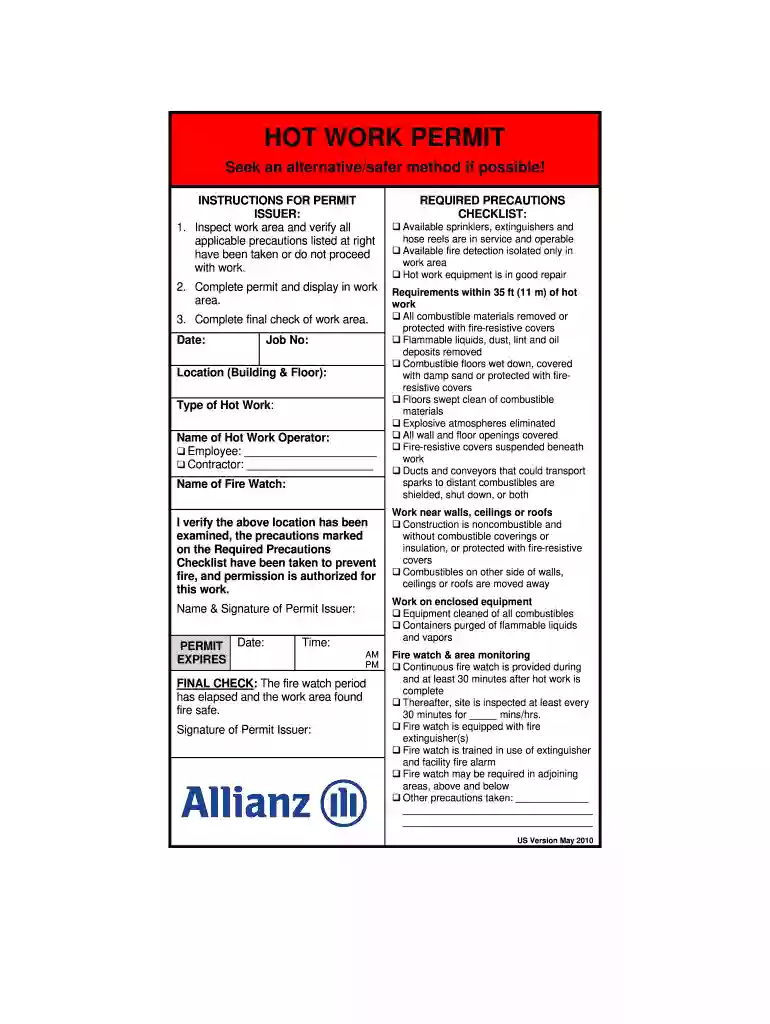
ARCN Hot Work Permit English US May 2010.doc-2026

Get Form
ARCN Hot Work Permit English US May 2010.doc Preview on Page 1

Here's how it works

01. Edit your form online
Type text, add images, blackout confidential details, add comments, highlights and more.

02. Sign it in a few clicks
Draw your signature, type it, upload its image, or use your mobile device as a signature pad.

03. Share your form with others
Send it via email, link, or fax. You can also download it, export it or print it out.

How to use or fill out ARCN Hot Work Permit English US May 2010.doc with our platform

Form edit decoration
9.5
Ease of Setup
DocHub User Ratings on G2
9.0
Ease of Use
DocHub User Ratings on G2
  1. Click ‘Get Form’ to open the ARCN Hot Work Permit in the editor.
  2. Begin by filling in the 'Date', 'Job No', and 'Location (Building & Floor)' fields. Ensure accuracy as this information is crucial for tracking purposes.
  3. Specify the 'Type of Hot Work' being performed, and enter the names of both the 'Hot Work Operator' and 'Fire Watch'. Indicate whether the operator is an employee or contractor by checking the appropriate box.
  4. Review the 'Required Precautions Checklist' section carefully. Check off each precaution that has been taken to ensure safety before proceeding with hot work.
  5. Once all fields are completed, display the permit in the work area as instructed. After work completion, conduct a final check and sign off on the permit issuer's signature line.

Start using our platform today to streamline your document editing and ensure a safe working environment!

See more ARCN Hot Work Permit English US May 2010.doc versions

We've got more versions of the ARCN Hot Work Permit English US May 2010.doc form. Select the right ARCN Hot Work Permit English US May 2010.doc version from the list and start editing it straight away!
Versions Form popularity Fillable & printable
2018 4.8 Satisfied (100 Votes)
2012 4.1 Satisfied (27 Votes)
2010 4.7 Satisfied (49 Votes)
be ready to get more

Complete this form in 5 minutes or less

Get form

Got questions?

We have answers to the most popular questions from our customers. If you can't find an answer to your question, please contact us.
Contact us

Upload your ARCN Hot Work Permit English US May 2010.doc to DocHub (once you’ve set up an account for this). If you need to complete fields in it, use appropriate tools from the top pane. For instance, drop Signature Fields, assign each to specific party, and click on Sign → Request signatures from others. Change your message for your recipients and click Send Request. You can also send your paperwork by fax or as a Signing link instead of using email (you’ll locate these options by navigating to the Menu → Send)

If you edit your ARCN Hot Work Permit English US May 2010.doc with DocHub, you simply will not need to look for other software or services to eSign it. An electronic signature is a component of DocHub’s substantial editing toolset, which enables you to apply changes in your form without jumping between platforms. Just complete your form, double-check the correctness of your data and put your electronic signature at the end to make it submission-ready within minutes.

The permit to work helps to reduce the risk of safety incidents by ensuring the people involved are aware of the specific hazards, take the necessary precautions and are competent for the work.
A Hot Work Permit authorised by the Premise Responsible Person or their nominated representative and the Contractor/Person in control of the Hot Work will be required. You should use this Hot Work Permit when maintenance work is being undertaken, and you are the individual authorised to issue Hot Work Permits. 1.
HOT WORK PERMIT PROCEDURES A. This program establishes the minimum safe working procedures and guidelines for the operation cutting, welding, brazing, grinding and soldering or any other similar operation throughout the Columbia University Medical Center.

Security and compliance

At DocHub, your data security is our priority. We follow HIPAA, SOC2, GDPR, and other standards, so you can work on your documents with confidence.

Learn more
ccpa2
pci-dss
gdpr-compliance
hipaa
soc-compliance

People also ask

A permit to work form typically contains these items. The work to be done, the equipment to be used and personnel involved. Precautions to be taken when performing the task. Other workgroups to be informed of work being performed in their area. Authorisation for work to commence. Duration that the permit is valid.
Hot work means work involving electric or gas welding, cutting, brazing, or similar flame or spark-producing operations (§68.3). Facilities that perform hot work operations conducted on or near a covered process shall issue a hot work permit, and it must be kept on file until hot work operations are completed.
Managing the hot work permit process Check worker qualifications including membership of trade organisations, details of their public liability insurance and whether any conditions apply to hot work. Carry out a specific work area risk assessment before work starts including photographs.
4 Types of Safe Work Permits Hot Work Permit. ... Cold Work Permit. ... Confined Space Entry Permit. ... Special Permits.
A Hot Work Permit authorised by the Premise Responsible Person or their nominated representative and the Contractor/Person in control of the Hot Work will be required. You should use this Hot Work Permit when maintenance work is being undertaken, and you are the individual authorised to issue Hot Work Permits. 1.

Related links