Inf 1100 form-2026

Get Form
inf 1100 Preview on Page 1

Here's how it works

01. Edit your inf 1100 online
Type text, add images, blackout confidential details, add comments, highlights and more.
02. Sign it in a few clicks
Draw your signature, type it, upload its image, or use your mobile device as a signature pad.
03. Share your form with others
Send inf 1100 form via email, link, or fax. You can also download it, export it or print it out.

How to use or fill out inf 1100 form with our platform

Form edit decoration
9.5
Ease of Setup
DocHub User Ratings on G2
9.0
Ease of Use
DocHub User Ratings on G2
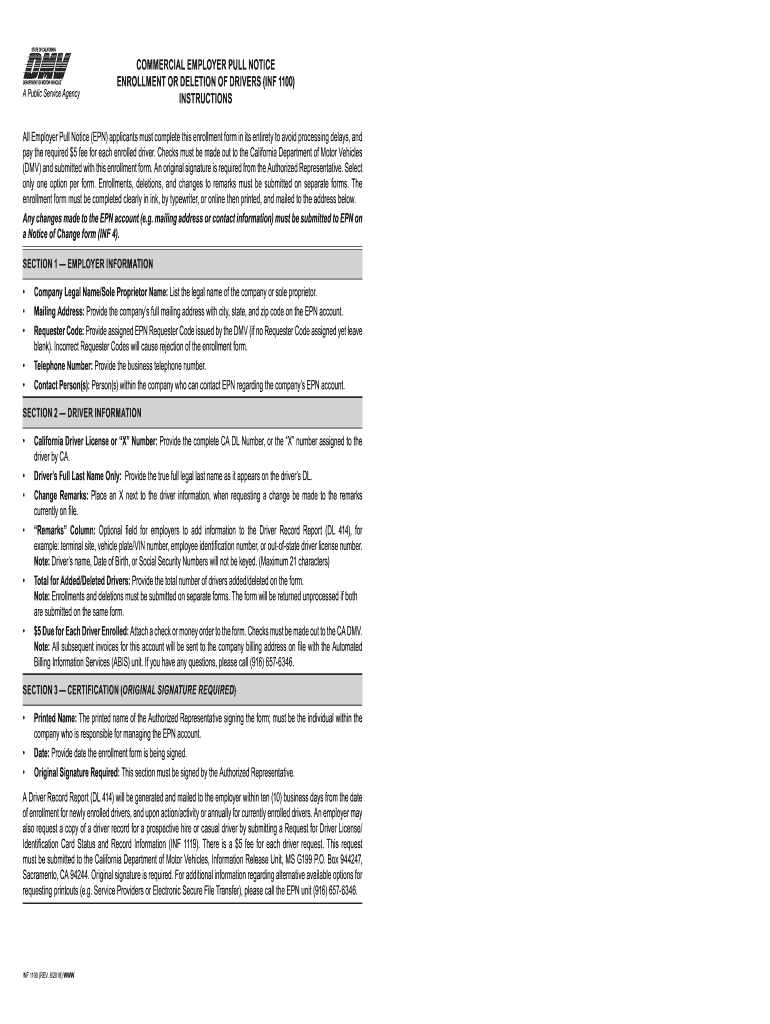
  1. Click ‘Get Form’ to open the inf 1100 form in the editor.
  2. In Section 1, enter your Company Legal Name or Sole Proprietor Name, followed by the full Mailing Address including city, state, and zip code. Make sure to provide your EPN Requester Code if available; otherwise, leave it blank.
  3. Next, provide your business Telephone Number and the Contact Person(s) who can be reached regarding the EPN account.
  4. Move to Section 2 and fill in the California Driver License or 'X' Number for each driver you are enrolling. Include their Full Last Name as it appears on their license.
  5. If applicable, mark any Change Remarks next to the driver information. Use the optional 'Remarks' column for additional notes about each driver.
  6. Indicate the total number of drivers added or deleted on this form. Remember that a $5 fee is due for each driver enrolled.
  7. In Section 3, ensure that an Authorized Representative prints their name, signs the form, and dates it. An original signature is required.

Start filling out your inf 1100 form online for free today!

See more inf 1100 form versions

We've got more versions of the inf 1100 form form. Select the right inf 1100 form version from the list and start editing it straight away!
Versions Form popularity Fillable & printable
2018 4.8 Satisfied (121 Votes)
be ready to get more

Complete this form in 5 minutes or less

Get form

Got questions?

We have answers to the most popular questions from our customers. If you can't find an answer to your question, please contact us.
Contact us

Upload your inf1100 to DocHub (once you’ve created an account for this). If you need to fill out fields in it, use appropriate tools from the upper pane. For instance, add Signature Fields, assign each to specific party, and click on Sign → Request signatures from others. Change your message for your recipients and click Send Request. You can also send your form by fax or as a Signing link instead of using email (you’ll locate these options by navigating to the Menu → Send)

If you edit your inf 1100 form with DocHub, you only need a steady internet connection and virtually any browser installed on your device. No need to set up any third-party applications or research tutorials. Simply open a tab with DocHub, drag and drop your file, and edit it immediately.

Form INF 1125, Request for Own Driver License/Identification Card (DL/ID) and Vehicle/Vessel Registration (VR) Record, is used to obtain personal driving and vehicle records from the DMV. It is important to fill out this form to access your own records for verification or legal purposes.
Streamline the driver record review MVR release forms are essential documents that provide authorization to obtain an individuals Motor Vehicle Record. Whether for employment screening or insurance purposes, these forms play a vital role in promoting safety, compliance, and liability protection.
The Employer Pull Notice (EPN) program enables commercial and government organizations to monitor the driving records of employees who drive for them. By monitoring their employees driving records, organizations can: Ensure that each driver has a valid drivers license. Recognize problem drivers or driving behavior.

Security and compliance

At DocHub, your data security is our priority. We follow HIPAA, SOC2, GDPR, and other standards, so you can work on your documents with confidence.

Learn more
ccpa2
pci-dss
gdpr-compliance
hipaa
soc-compliance
be ready to get more

Complete this form in 5 minutes or less

Get form