Type text, add images, blackout confidential details, add comments, highlights and more.
02. Sign it in a few clicks
Draw your signature, type it, upload its image, or use your mobile device as a signature pad.
03. Share your form with others
Send nc 200 via email, link, or fax. You can also download it, export it or print it out.
How to use or fill out nc 200 with our platform
Ease of Setup
DocHub User Ratings on G2
Ease of Use
DocHub User Ratings on G2
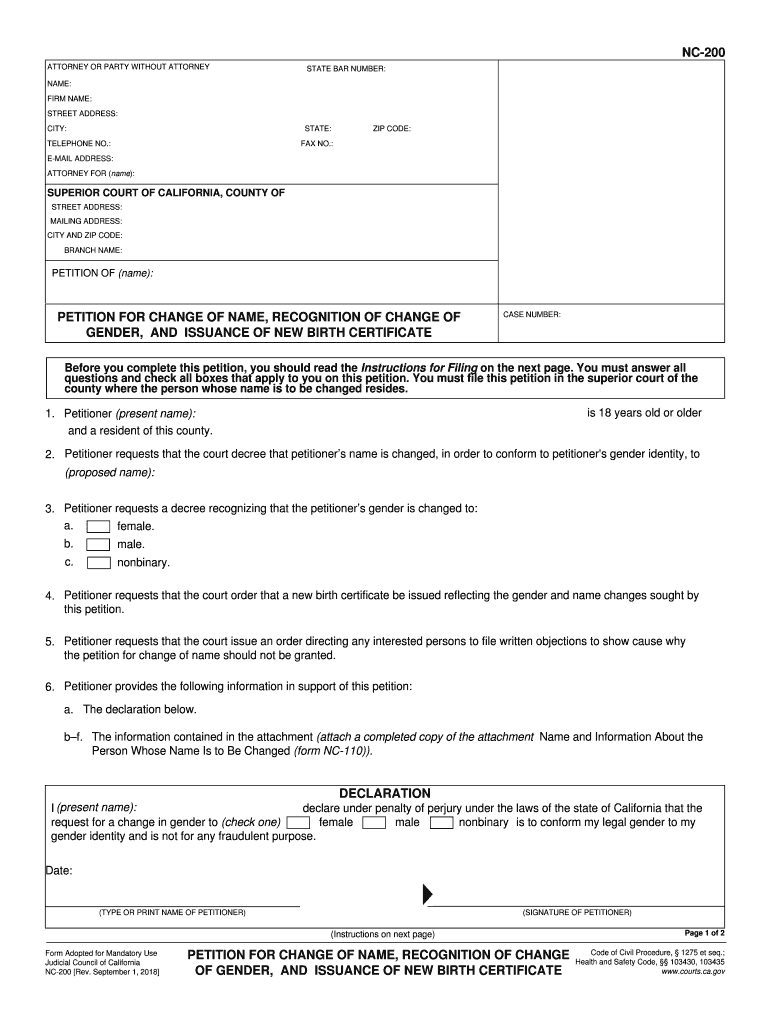
Click ‘Get Form’ to open the NC-200 in the editor.
Begin by filling in your personal information. Enter your name, firm name, address, city, state, telephone number, and email address in the designated fields.
In the section labeled 'Petitioner (present name):', input your current legal name. Then, specify the proposed name you wish to adopt.
Indicate your gender identity by checking the appropriate box: female, male, or nonbinary.
Complete the declaration section by typing or printing your name and signing it under penalty of perjury.
Attach any required documents as specified in the instructions, such as form NC-110 for additional information about the person whose name is being changed.
Start using our platform today to easily complete your NC-200 form online for free!
Whose Name May Be Changed. The petition may be used to change your name and to obtain a court order recognizing a change of gender and for issuanceRead more
NC 200: Preparation for Academic Success Citrus College
This course is designed to teach effective college study skills. Topics include time management, textbook study, lecture note-taking, test-taking strategies,Read more
Cookie consent notice
This site uses cookies to enhance site navigation and personalize your experience.
By using this site you agree to our use of cookies as described in our Privacy Notice.
You can modify your selections by visiting our Cookie and Advertising Notice.