Type text, add images, blackout confidential details, add comments, highlights and more.
02. Sign it in a few clicks
Draw your signature, type it, upload its image, or use your mobile device as a signature pad.
03. Share your form with others
Send ds 117 instructions via email, link, or fax. You can also download it, export it or print it out.
How to use or fill out ds 117 with our platform
Ease of Setup
DocHub User Ratings on G2
Ease of Use
DocHub User Ratings on G2
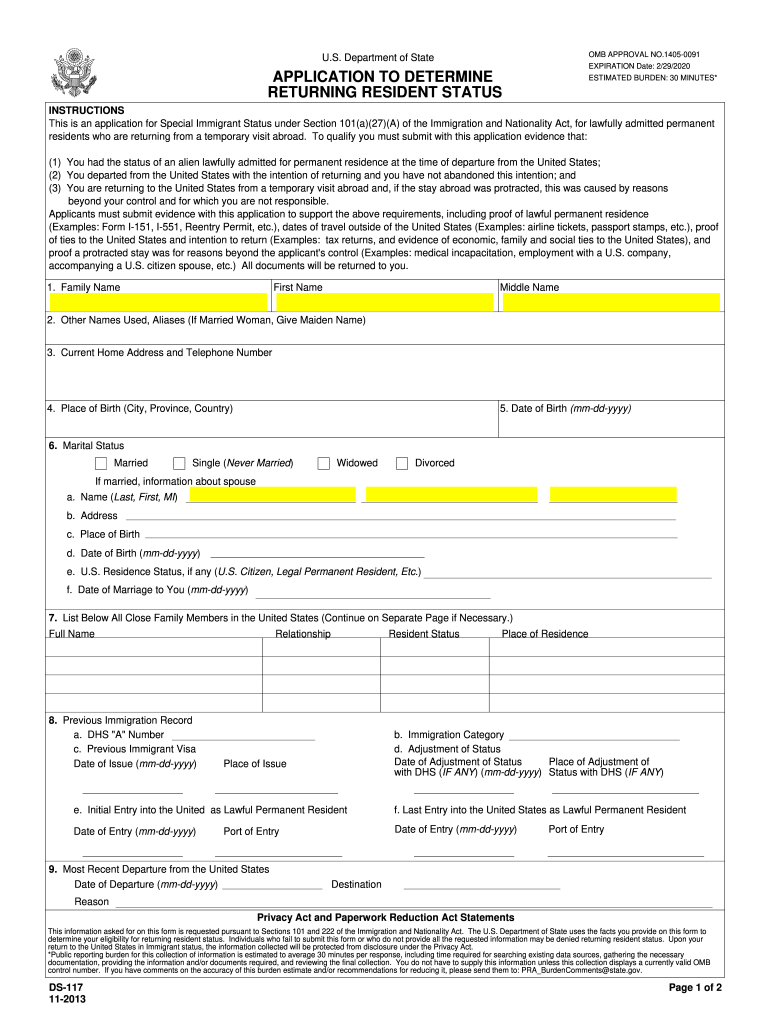
Click ‘Get Form’ to open the ds 117 in the editor.
Begin by filling in your family name, first name, and middle name in the designated fields. Ensure accuracy as this information is crucial for identification.
Provide any other names used or aliases, including your maiden name if applicable. This helps maintain a complete record of your identity.
Enter your current home address and telephone number. This information is essential for communication regarding your application.
Fill in your place of birth, date of birth, and marital status. If married, include details about your spouse such as their name and U.S. residence status.
List all close family members residing in the United States. You can continue on a separate page if necessary.
Complete sections regarding your previous immigration record and most recent departure from the U.S., ensuring all dates are accurate.
Finally, affirm that all statements are true by signing and dating the application before submission.
Start using our platform today to fill out your ds 117 form easily and for free!
May 29, 2007 Re: ECMWF ds117.1 data reading latitude order. Does it really matter? if so does a simple reverse of the data solve the problem? Read more
DS-117. 10-2019. Page 1 of 3. INSTRUCTIONS. This is an application for Special Immigrant Status under Section 101(a)(27)(A) of the Immigration and DS-117.Read more
Feb 21, 2022 SVE is a common and typically effective physical treatment process for remediation of volatile contaminants in vadose zone (unsaturated) soils.Read more
Cookie consent notice
This site uses cookies to enhance site navigation and personalize your experience.
By using this site you agree to our use of cookies as described in our Privacy Notice.
You can modify your selections by visiting our Cookie and Advertising Notice.