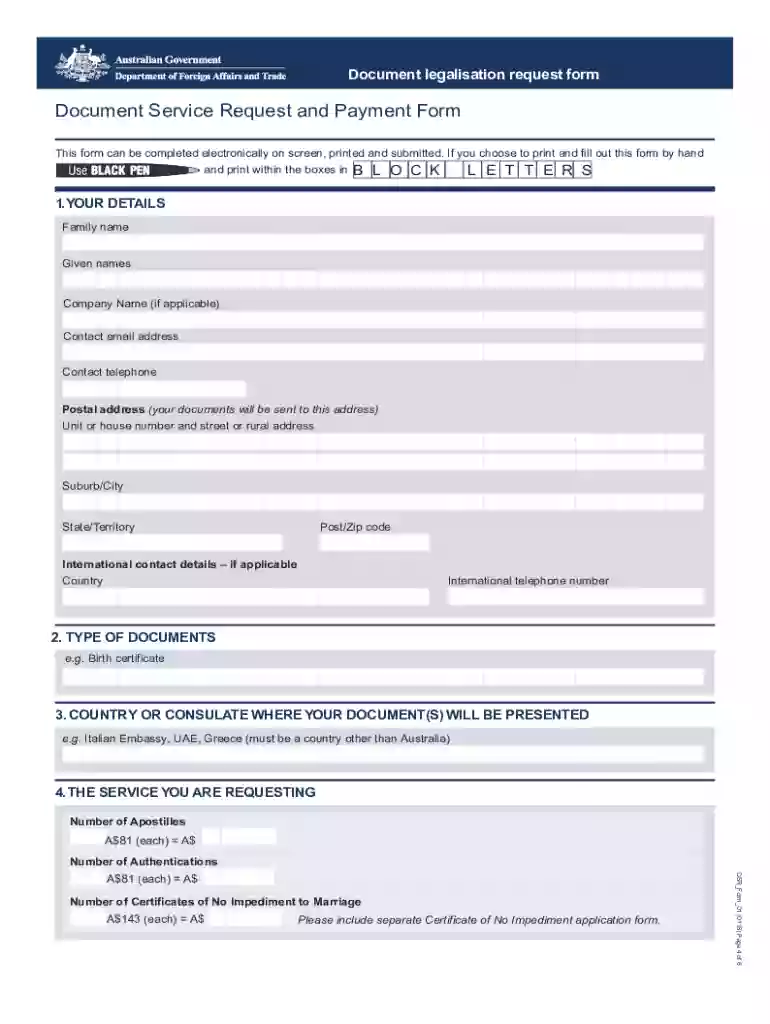
Document legalisation request form effective 1 january 2022-2026

Get Form
document legalisation request form 2023 Preview on Page 1

Here's how it works

01. Edit your document legalisation request form 2023 online
Type text, add images, blackout confidential details, add comments, highlights and more.

02. Sign it in a few clicks
Draw your signature, type it, upload its image, or use your mobile device as a signature pad.

03. Share your form with others
Send document legalisation request form 2024 via email, link, or fax. You can also download it, export it or print it out.

How to use or fill out document legalisation request form effective 1 January 2022

Form edit decoration
9.5
Ease of Setup
DocHub User Ratings on G2
9.0
Ease of Use
DocHub User Ratings on G2
  1. Click ‘Get Form’ to open it in the editor.
  2. Begin by entering your personal details in Section 1. Fill in your family name, given names, and contact information accurately to ensure smooth communication.
  3. In Section 2, specify the type of documents you are submitting, such as a birth certificate or marriage certificate.
  4. Section 3 requires you to indicate the country or consulate where your documents will be presented. Ensure this is correct to avoid delays.
  5. In Section 4, select the services you are requesting: Apostilles, Authentications, or Certificates of No Impediment. Calculate the total fees based on your selections.
  6. Decide how you want your documents returned in Section 5. Choose from options like collection in person or postal delivery.
  7. Complete the credit card authorization section if submitting by mail. Ensure all details are accurate for processing.
  8. Finally, read and sign the declaration in Section 7 to confirm that all information provided is true and correct before submitting your form.

Start using our platform today for free and streamline your document legalisation process!

See more document legalisation request form effective 1 january 2022 versions

We've got more versions of the document legalisation request form effective 1 january 2022 form. Select the right document legalisation request form effective 1 january 2022 version from the list and start editing it straight away!
Versions Form popularity Fillable & printable
2019 4.8 Satisfied (30 Votes)
2018 4.3 Satisfied (62 Votes)
be ready to get more

Complete this form in 5 minutes or less

Get form

Got questions?

We have answers to the most popular questions from our customers. If you can't find an answer to your question, please contact us.
Contact us

Electronic document signing requires a software solution that works in compliance with data security and eSignature regulations. DocHub is an excellent tool for that, since it fulfills all the above mentioned requirements. Whatever method you like to sign your document legalisation request form in DocHub, your eSignature will be legally binding and court-admissible.

If you store your paperwork in Google Drive, there is no need to download your dfat document legalisation request form 2023 on your computer and upload it back to our editor. A much simpler way is to install a browser extension created by DocHub to simplify this flow. The extension allows editing PDFs in your internet browser. Alternatively, you may integrate your DocHub and Gmail accounts for more efficient modifying.

As what is being legalized is actually the signature and stamp or seal of a public official, the first step for a private document is to docHub an individuals signature on the document. Since a notary is a public official, their signature and seal can then be authenticated and legalized.
Confirm the documents are eligible for legalising by DFAT. Find out if youll need either an apostille or an authentication for your documents. Gather your documents. If your document is not an original Australian public document, take it to an Australian Notary Public to be notarised.
PROCESS OF LEGALISATION The original documents must be docHubd by a Notary Public before it can be authenticated by the Ministry of Foreign Affairs in Abuja. All scanned documents must be submitted for legalization to some embassies in readable PDF format.

Security and compliance

At DocHub, your data security is our priority. We follow HIPAA, SOC2, GDPR, and other standards, so you can work on your documents with confidence.

Learn more
ccpa2
pci-dss
gdpr-compliance
hipaa
soc-compliance
be ready to get more

Complete this form in 5 minutes or less

Get form

People also ask

Legalization is the process of removing a legal prohibition against something which is currently not legal. Legalization is a process often applied to what are regarded, by those working towards legalization, as victimless crimes, of which one example is the consumption of illegal drugs (see drug legalization).

dfat authentication form 2023