Birth Certificate Request Form - Fiji High Commission 2026

Get Form
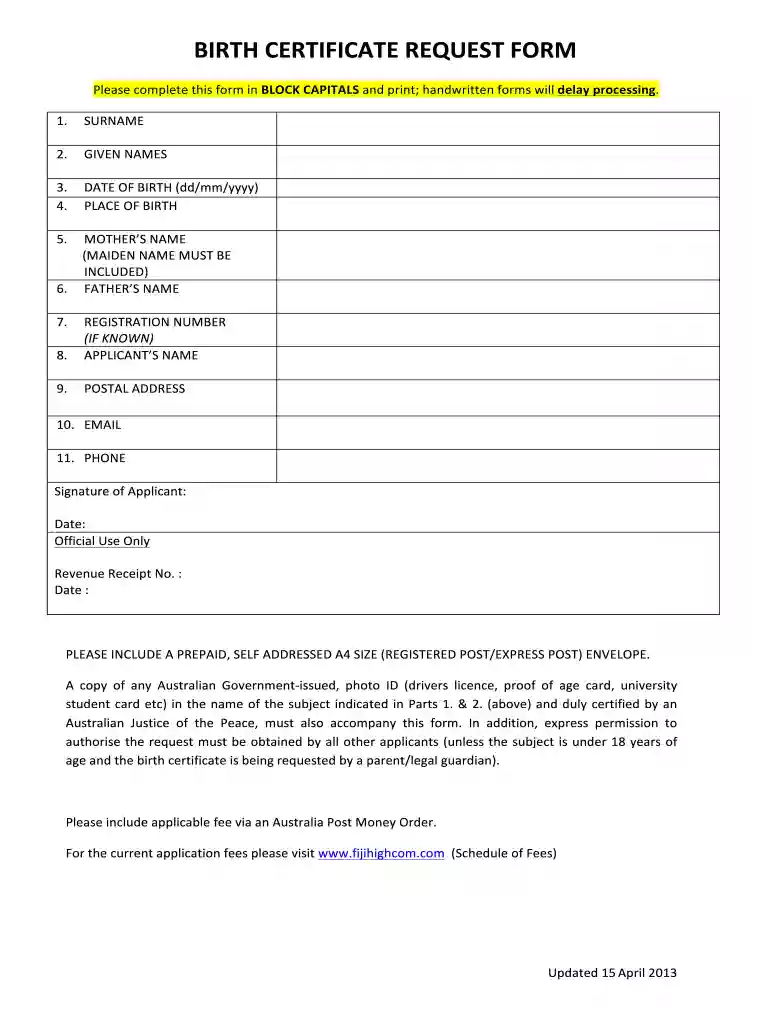
fiji birth certificate replacement Preview on Page 1

Here's how it works

01. Edit your fiji birth certificate replacement online
Type text, add images, blackout confidential details, add comments, highlights and more.

02. Sign it in a few clicks
Draw your signature, type it, upload its image, or use your mobile device as a signature pad.

03. Share your form with others
Send fiji birth certificate via email, link, or fax. You can also download it, export it or print it out.

How to use or fill out Birth Certificate Request Form - Fiji High Commission with our platform

Form edit decoration
9.5
Ease of Setup
DocHub User Ratings on G2
9.0
Ease of Use
DocHub User Ratings on G2
  1. Click ‘Get Form’ to open it in the editor.
  2. Begin by filling in your SURNAME and GIVEN NAMES in BLOCK CAPITALS. This ensures clarity and prevents processing delays.
  3. Next, enter your DATE OF BIRTH in the format dd/mm/yyyy, followed by the PLACE OF BIRTH. Accuracy is crucial for proper identification.
  4. Provide your MOTHER’S NAME, including her MAIDEN NAME, and FATHER’S NAME. This information is essential for verification purposes.
  5. If known, include the REGISTRATION NUMBER. Then, fill in the APPLICANT’S NAME as it appears on your ID.
  6. Complete your POSTAL ADDRESS, EMAIL, and PHONE number to ensure you can be contacted regarding your request.
  7. Finally, sign and date the form at the bottom. Ensure all required documents are attached before submission.

Start using our platform today to easily complete your Birth Certificate Request Form!

See more Birth Certificate Request Form - Fiji High Commission versions

We've got more versions of the Birth Certificate Request Form - Fiji High Commission form. Select the right Birth Certificate Request Form - Fiji High Commission version from the list and start editing it straight away!
Versions Form popularity Fillable & printable
2013 4.2 Satisfied (57 Votes)
be ready to get more

Complete this form in 5 minutes or less

Get form

Got questions?

We have answers to the most popular questions from our customers. If you can't find an answer to your question, please contact us.
Contact us
Convenient, secure, and fast. You may now request for a digital copy of your PSA certificates for the updating of your living status at the AFPPGMC. Easily request a DFA paper Apostille or e-Apostille for your PSA birth certificate, marriage certificate, CENOMAR, or CENODEATH.
There are different categories of birthing procedures, so a normal birth starts at around $3500 and can go up to $5000 depending on the length of stay. Mr Pillay said cesarean procedures would be the most costly at between $7000 to $10,000.
Steps to request the copy docHubd, completed Form DS-5542. Fill out the form on your computer. Photocopy of the front and back of your valid photo ID. Examples include: Check or money order. The cost is $50 for each record you request. Mail Form DS-5542, a photocopy of the ID, and payment to:
bring your ID along, and. bring a copy of your marriage certificate. Remember that your fingerprints will be used as part of the registration process. The palm, foot or fingerprint of the child whose birth is being registered is required.
Births, Deaths Marriage Office Service Fee (1st August 2023) ACTIVITYVEPVAT(15%) Birth Certificate $10.00 $6.88 Death Certificate $10.00 $6.88 Marriage Certificate $20.00 $8.13 Late Birth registration $20.00 $2.5011 more rows

Security and compliance

At DocHub, your data security is our priority. We follow HIPAA, SOC2, GDPR, and other standards, so you can work on your documents with confidence.

Learn more
ccpa2
pci-dss
gdpr-compliance
hipaa
soc-compliance
be ready to get more

Complete this form in 5 minutes or less

Get form