Canada visa application form 2026

Get Form
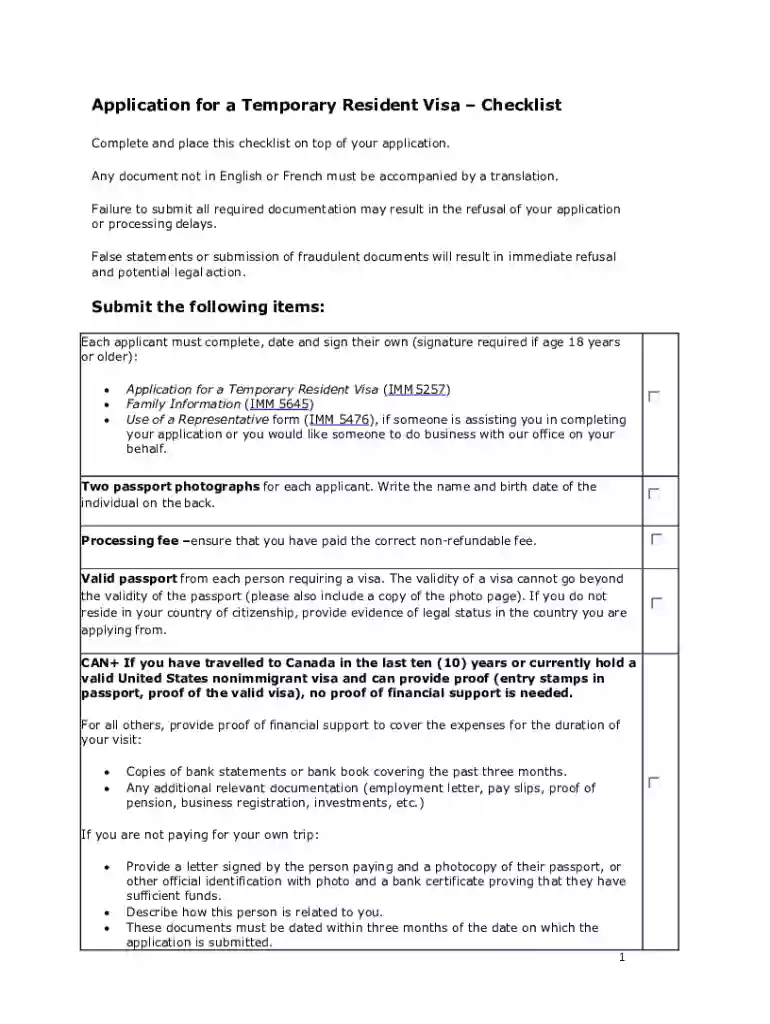
application for visitor visa temporary resident visa pdf Preview on Page 1

Here's how it works

01. Edit your application for visitor visa temporary resident visa pdf online
Type text, add images, blackout confidential details, add comments, highlights and more.

02. Sign it in a few clicks
Draw your signature, type it, upload its image, or use your mobile device as a signature pad.

03. Share your form with others
Send canada visa application form via email, link, or fax. You can also download it, export it or print it out.

How to use or fill out the Canada visa application form with DocHub

Form edit decoration
9.5
Ease of Setup
DocHub User Ratings on G2
9.0
Ease of Use
DocHub User Ratings on G2
  1. Click ‘Get Form’ to open the Canada visa application form in our editor.
  2. Begin by completing the Application for a Temporary Resident Visa (IMM 5257). Ensure all personal information is accurate and up-to-date.
  3. Next, fill out the Family Information form (IMM 5645). This section requires details about your family members, including their names and relationships.
  4. If applicable, complete the Use of a Representative form (IMM 5476) if someone is assisting you with your application.
  5. Upload two passport photographs for each applicant. Remember to write the name and birth date on the back of each photo.
  6. Ensure you have paid the correct processing fee and include proof of payment with your application.
  7. Attach a valid passport for each applicant, along with a copy of the photo page. If residing outside your country of citizenship, provide evidence of legal status.
  8. If required, submit proof of financial support through bank statements or other relevant documentation to cover your visit expenses.

Start using our platform today to easily fill out your Canada visa application form for free!

See more canada visa application form versions

We've got more versions of the canada visa application form form. Select the right canada visa application form version from the list and start editing it straight away!
Versions Form popularity Fillable & printable
2017 4.8 Satisfied (197 Votes)
2016 4.4 Satisfied (53 Votes)
be ready to get more

Complete this form in 5 minutes or less

Get form

Got questions?

We have answers to the most popular questions from our customers. If you can't find an answer to your question, please contact us.
Contact us
Yes, you can reprint the confirmation page of an application that has already been submitted. In order to do so, go into the Consular Electronic Application Center website and select the Embassy or Consulate at which you are applying.
You may download them from the USCIS forms page.
Access the online DS-160 by clicking: Consular Electronic Application Center website.
In order to print a visa application you will have to fill in the form completely and answer all relevant questions. Printing includes: the application form (please remember to sign the form)
Step 1: Go back to the Consular Electronic Application Center (CEAC) website page for the DS-160. Step 2: Click the Retrieve an Application. You will be asked to enter your application ID number from the DS-160 you submitted earlier. This number can be found on the top right of your application.

Security and compliance

At DocHub, your data security is our priority. We follow HIPAA, SOC2, GDPR, and other standards, so you can work on your documents with confidence.

Learn more
ccpa2
pci-dss
gdpr-compliance
hipaa
soc-compliance

People also ask

Requirements of Canada tourist visa for Indians Valid passport: Your passport must be valid for at least six months from the date of your intended departure from Canada. Visa application form: You need to fill out and submit a visa application form. Photographs: You should attach two recent passport-sized photographs.
Guide 5256 - Applying for a visitor visa (temporary resident visa) - paper application - Canada.ca.

work visa application form canada