Baycorp client portal 2026

Get Form
0800800712 Preview on Page 1

Here's how it works

01. Edit your 0800800712 online
Type text, add images, blackout confidential details, add comments, highlights and more.

02. Sign it in a few clicks
Draw your signature, type it, upload its image, or use your mobile device as a signature pad.

03. Share your form with others
Send 0800 800 712 via email, link, or fax. You can also download it, export it or print it out.

How to use or fill out baycorp client portal with our platform

Form edit decoration
9.5
Ease of Setup
DocHub User Ratings on G2
9.0
Ease of Use
DocHub User Ratings on G2
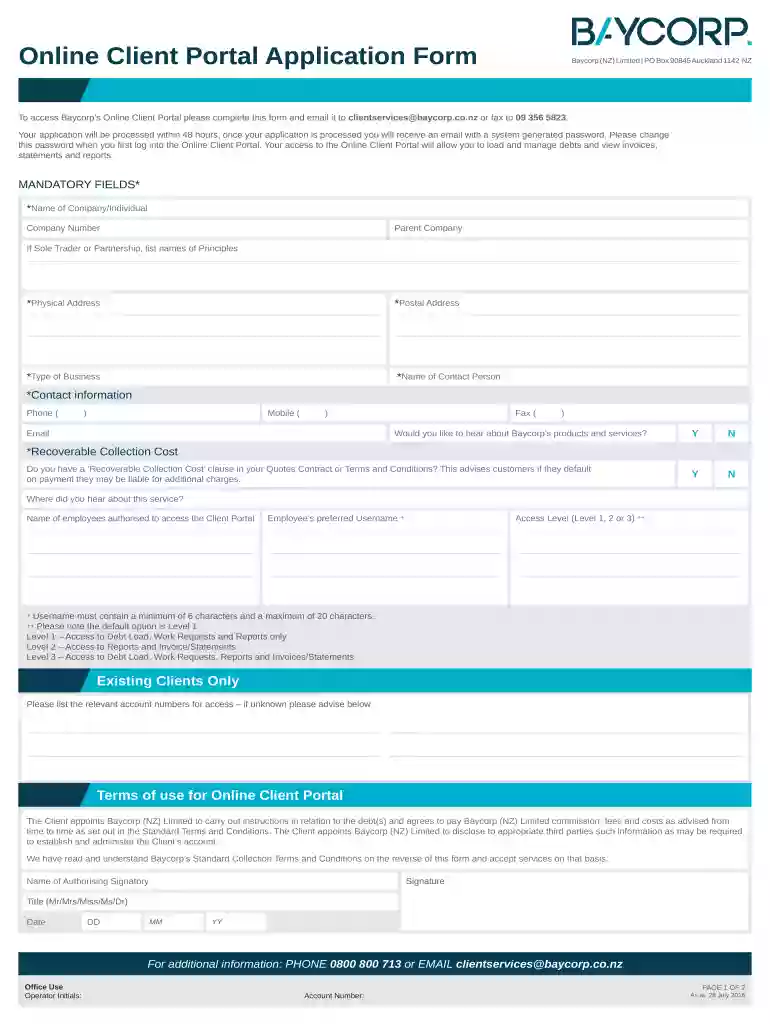
  1. Click ‘Get Form’ to open the baycorp client portal application form in the editor.
  2. Begin by filling in the mandatory fields marked with an asterisk. Enter the name of your company or individual, company number, and physical address.
  3. Provide your contact information including phone, mobile, email, and fax numbers. Ensure accuracy for effective communication.
  4. Indicate whether you would like to hear about Baycorp’s products and services by selecting 'Y' for yes or 'N' for no.
  5. Specify if you have a ‘Recoverable Collection Cost’ clause in your quotes contract. This is important for informing customers about potential additional charges.
  6. List the names of employees authorized to access the client portal along with their preferred usernames and access levels (Level 1, 2, or 3).
  7. Review the terms of use for the Online Client Portal and ensure you understand them before signing. Include your name, title, and date.

Start using our platform today to streamline your document editing and submission process!

See more baycorp client portal versions

We've got more versions of the baycorp client portal form. Select the right baycorp client portal version from the list and start editing it straight away!
Versions Form popularity Fillable & printable
2016 4.8 Satisfied (67 Votes)
be ready to get more

Complete this form in 5 minutes or less

Get form

Got questions?

We have answers to the most popular questions from our customers. If you can't find an answer to your question, please contact us.
Contact us

Of course, you’ll find many different apps for this on the web. Nonetheless, if you need to eSign your baycorp login without installing extra software, DocHub is the optimum choice you can make. This robust editor works on mobile devices just as on desktops. Open our editor in any internet browser, register or log in to your account, and start managing your paperwork.

If you edit your motochek login with DocHub, you will not need to look for other applications or solutions to eSign it. An electronic signature is part of DocHub’s substantial editing toolset, which enables you to implement changes in your form without jumping between platforms. Simply complete your form, double-check the correctness of the information and place your electronic signature at the end to make it submission-ready within minutes.

If the payment methods listed above arent suitable or you would like to discuss a payment arrangement please call us on 0800 800 712 or email customerservice@baycorp.co.nz. Contact: If you are calling from overseas, please call +64 (9) 356 2809. Alternatively you can email us on collections.nz@baycorp.co.nz.
Available on both iOS Android. The Karbon for Clients mobile app extends the capabilities of your client portal to your iOS or Android device, enabling you to stay connected with your accounting firm, manage tasks, sign documents, and share files on the go.
Yes. Karbon takes our responsibility for our customers and their clients data security seriously. The client portal is a Karbon platform feature that allows trusted advisors to engage with their clients and share information in a manner that is more secure than email.

Security and compliance

At DocHub, your data security is our priority. We follow HIPAA, SOC2, GDPR, and other standards, so you can work on your documents with confidence.

Learn more
ccpa2
pci-dss
gdpr-compliance
hipaa
soc-compliance
be ready to get more

Complete this form in 5 minutes or less

Get form

People also ask

Karbon for Clients is a modern, branded client portal that enhances collaboration between accounting firms and their clients. Accessible via web and mobile, it streamlines communication, document management, and approvals, providing a secure and professional experience.
Here are six simple steps to creating a custom client portal: Determine Your Tech Stack. Use a No-Code Portal Builder Like Copilot. Customize Your Portal. Integrate Your Apps and Payment Methods. Invite Clients. Integrate Your Portal With Your Website.
The resulting company became the Baycorp that exists today and maintains a strong market leadership position across the region.
If payment is not arranged, Baycorp can also report the debt to the credit bureau. Certain debts reported to the bureau and defaults will remain on your credit report and affect your credit score for anywhere between two to five years, even after payment has been made in full.

baycorp pay now