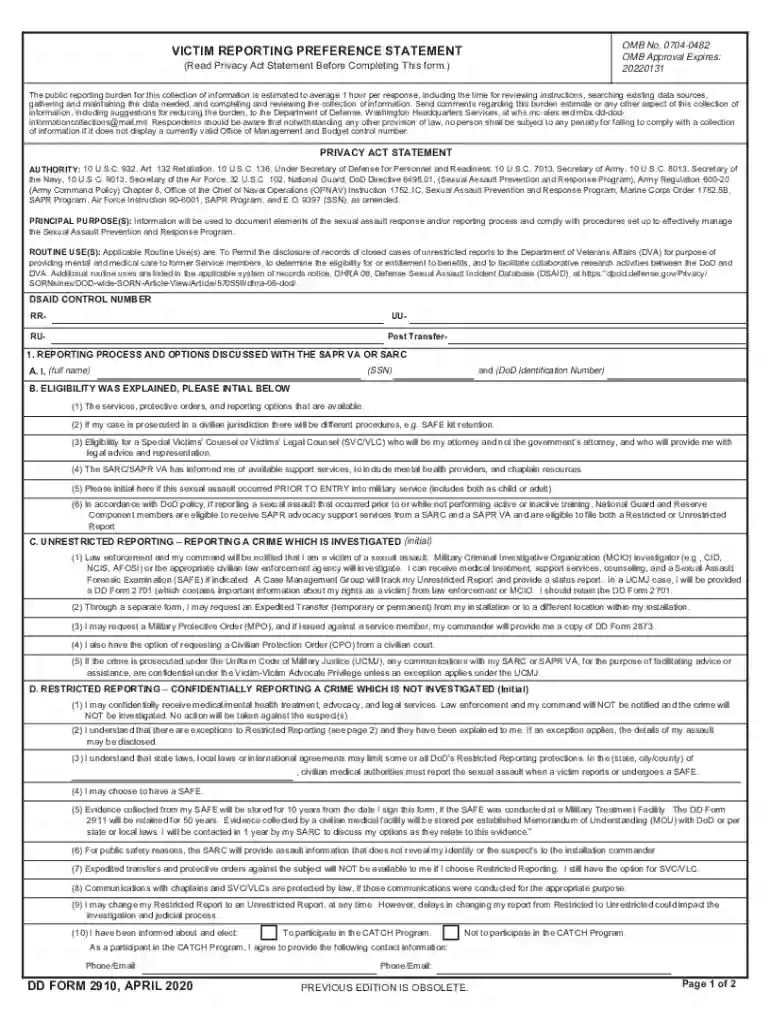
dd form 2910 Preview on Page 1

Dd form 2910-2026

Here's how it works

  • 01. Edit your dd form 2910 online

    Type text, add images, blackout confidential details, add comments, highlights and more.

  • 02. Sign it in a few clicks

    Draw your signature, type it, upload its image, or use your mobile device as a signature pad.

  • 03. Share your form with others

    Send dd 2910 via email, link, or fax. You can also download it, export it or print it out.

How to use or fill out dd form 2910 with our platform

Form edit decoration
9.5
Ease of Setup
DocHub User Ratings on G2
9.0
Ease of Use
DocHub User Ratings on G2
  1. Click ‘Get Form’ to open the DD Form 2910 in the editor.
  2. Begin by entering your full name and DoD Identification Number in Section A. Ensure accuracy as this information is crucial for processing.
  3. In Section B, initial next to each eligibility explanation provided. This confirms that you understand the services and options available to you.
  4. Choose your reporting option in Section 2 by initialing either A (Unrestricted Reporting) or B (Restricted Reporting). Make sure you fully comprehend the implications of your choice.
  5. Sign and date the form in Section 3. This step is essential as it validates your report and consent for processing.
  6. Review all sections for completeness before submitting. Utilize our platform’s features to save a copy for your records.

Start using our platform today to fill out DD Form 2910 easily and securely, all online and for free!

See more dd form 2910 versions

We've got more versions of the dd form 2910 form. Select the right dd form 2910 version from the list and start editing it straight away!

VersionsForm popularityFillable & printable
20204.8 Satisfied (76 Votes)
20144.1 Satisfied (56 Votes)
20134.1 Satisfied (32 Votes)

be ready to get more

Complete this form in 5 minutes or less

Security and compliance

At DocHub, your data security is our priority. We follow HIPAA, SOC2, GDPR, and other standards, so you can work on your documents with confidence.

2910

2910al Management and Configuration Guide

No part of this document may be photocopied, reproduced, or translated into another language without the prior written consent of Hewlett-. Packard. PublicationRead more

Learn more
Reporting a sexual assault

To officially make a restricted report, you must sign DD Form 2910. The SAPR office will assist with this, providing complete information and a full explanationRead more

Learn more
DD Form 2910, VICTIM REPORTING PREFERENCE

Please proceed to page 3 -- to provide sexual assault victims with information regarding Veterans Affairs services and the Catch a Serial Offender Program. PageRead more

Learn more
If you believe that this page should be taken down, please follow our DMCA take down process here