ppr report official Preview on Page 1

Ppr report official 2026

Here's how it works

  • 01. Edit your form online

    Type text, add images, blackout confidential details, add comments, highlights and more.

  • 02. Sign it in a few clicks

    Draw your signature, type it, upload its image, or use your mobile device as a signature pad.

  • 03. Share your form with others

    Send it via email, link, or fax. You can also download it, export it or print it out.

How to use or fill out ppr report official with our platform

Form edit decoration
9.5
Ease of Setup
DocHub User Ratings on G2
9.0
Ease of Use
DocHub User Ratings on G2
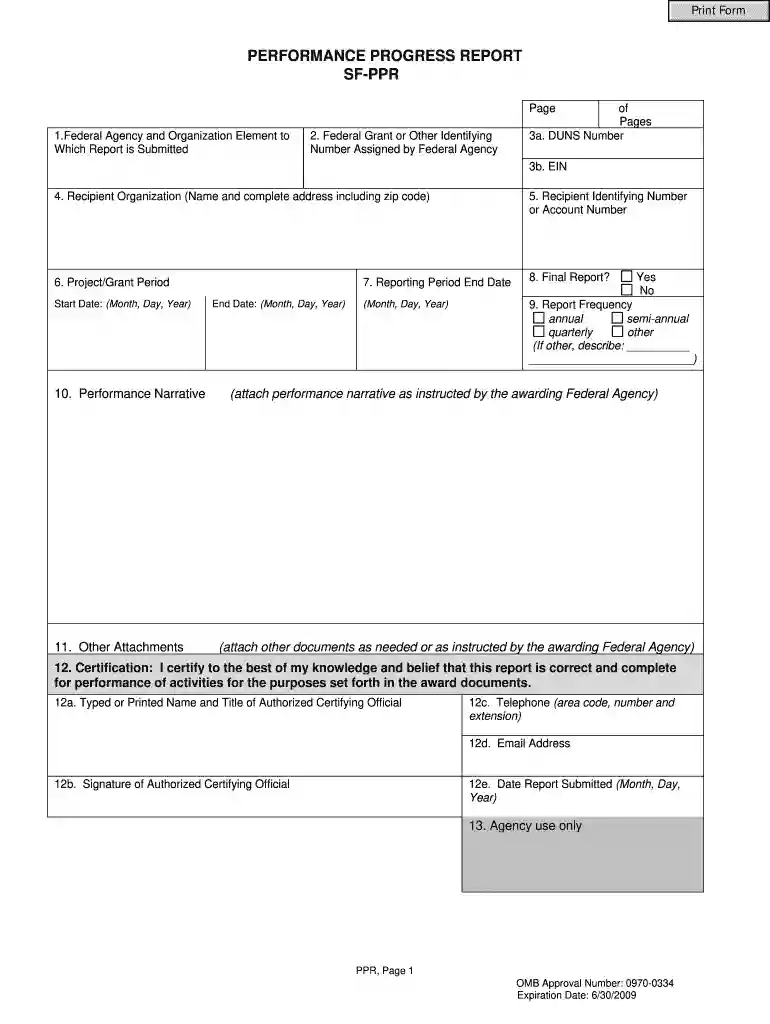
  1. Click ‘Get Form’ to open the PPR Report in the editor.
  2. Begin by entering the name of the Federal Agency and Organization Element in the first field. This identifies where your report is submitted.
  3. In the second field, input the Federal Grant or Other Identifying Number assigned by the Federal Agency for tracking purposes.
  4. Provide your DUNS Number and EIN in fields 3a and 3b respectively, ensuring accurate identification of your organization.
  5. Fill in your Recipient Organization's name and complete address, including zip code, in section 4.
  6. Indicate your Recipient Identifying Number or Account Number if applicable, followed by the Project/Grant Period start and end dates.
  7. Select whether this is a Final Report by checking 'Yes' or 'No' in section 8. Specify the Reporting Period End Date as per your project timeline.
  8. Attach any required Performance Narrative and other documents as instructed by the awarding Federal Agency in sections 10 and 11.
  9. Complete certification details including Typed Name, Signature, Telephone, Email Address, and Date Submitted in section 12.

Start using our platform today to streamline your PPR Report completion for free!

See more ppr report official versions

We've got more versions of the ppr report official form. Select the right ppr report official version from the list and start editing it straight away!

VersionsForm popularityFillable & printable
20094.9 Satisfied (49 Votes)

be ready to get more

Complete this form in 5 minutes or less

Security and compliance

At DocHub, your data security is our priority. We follow HIPAA, SOC2, GDPR, and other standards, so you can work on your documents with confidence.

Related links

CED Data Collection and Performance Progress Report

The PPR is due semi-annually according to the schedule below, and it is submitted online through the On-line Data Collection System (OLDC). Review the materialsRead more

Learn more
PERFORMANCE PROGRESS REPORT SF-PPR

Performance Progress Report (PPR) Instructions. The Performance Progress Report (PPR) is a standard, government-wide performance progress reporting format

Learn more
If you believe that this page should be taken down, please follow our DMCA take down process here