Mv 82 2025

Get Form
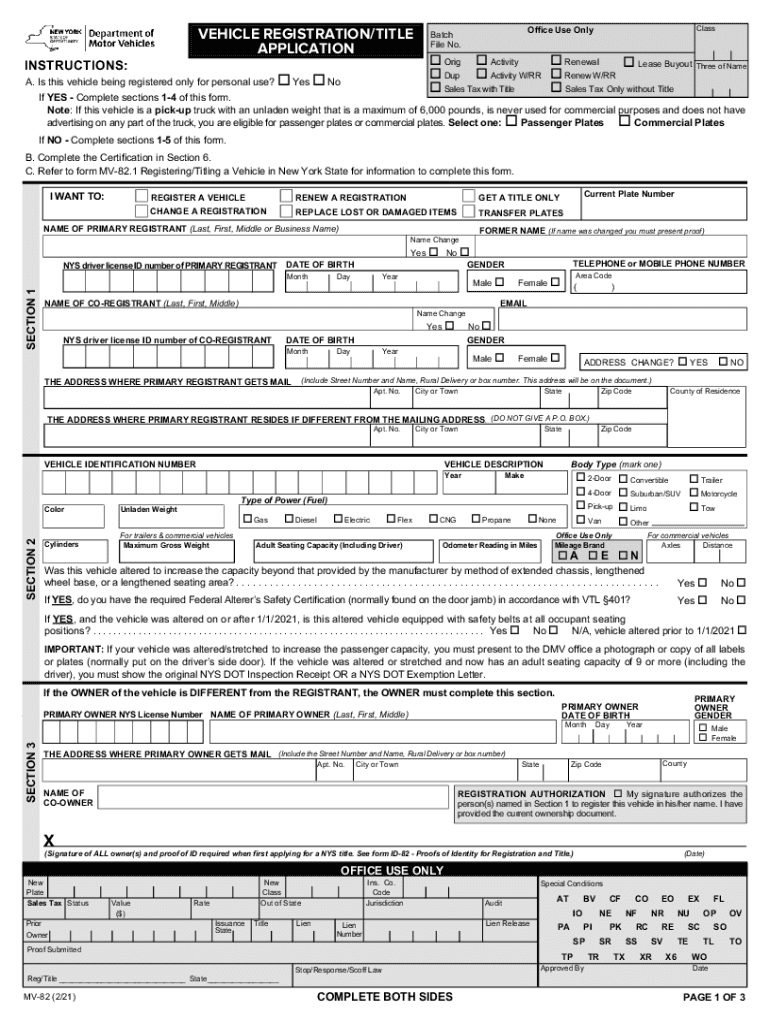
mv 82 form Preview on Page 1

Here's how it works

01. Edit your mv 82 form online
Type text, add images, blackout confidential details, add comments, highlights and more.
02. Sign it in a few clicks
Draw your signature, type it, upload its image, or use your mobile device as a signature pad.
03. Share your form with others
Send ny dmv registration form mv 82 via email, link, or fax. You can also download it, export it or print it out.

How to use or fill out mv 82 with our platform

Form edit decoration
9.5
Ease of Setup
DocHub User Ratings on G2
9.0
Ease of Use
DocHub User Ratings on G2
  1. Click ‘Get Form’ to open the mv 82 in the editor.
  2. Begin by filling out your personal information in Section 1, including your name, date of birth, and contact details. Ensure accuracy as this information is crucial for registration.
  3. In Section 2, provide detailed vehicle information such as make, model, year, and Vehicle Identification Number (VIN). Select the appropriate body type and fuel type from the options provided.
  4. Proceed to Section 3 if the owner differs from the registrant. Fill in their details accurately to avoid any discrepancies.
  5. Complete Section 4 regarding damage disclosure. Answer truthfully about any past damages to ensure compliance with regulations.
  6. Finally, review all sections for completeness and accuracy before signing in Section 6. This certification confirms that all provided information is true.

Start using our platform today for free to streamline your mv 82 form completion!

See more mv 82 versions

We've got more versions of the mv 82 form. Select the right mv 82 version from the list and start editing it straight away!
Versions Form popularity Fillable & printable
2021 4.9 Satisfied (46 Votes)
2016 4.1 Satisfied (52 Votes)
2015 4.4 Satisfied (584 Votes)
2012 4.3 Satisfied (30 Votes)
2004 4.4 Satisfied (271 Votes)
1999 4.1 Satisfied (57 Votes)
1997 4.8 Satisfied (26 Votes)
be ready to get more

Complete this form in 5 minutes or less

Get form

Got questions?

We have answers to the most popular questions from our customers. If you can't find an answer to your question, please contact us.
Contact us
Complete the DMV Document Guide for license, permit, non-driver ID, or registration transactions. We strongly encourage making a reservation. If an office is experiencing long wait times when you arrive, ONLY those with a reservation will be permitted to enter.
MV-82: Vehicle Registration/Title Application (PDF)
How to fill out Form MV-82? Enter vehicle details: VIN, make, model, year, color, and weight. Choose transaction type: Original, Renewal, Transfer. Fill in owners information: Full legal name, mailing, and physical address. Provide proof of ownership and lienholder information if applicable.
To renew your registration, you will need to: Complete a Vehicle Registration/Title Application (PDF) (MV-82) in its entirety. Section 2 of the MV-82 captures additional information required to process your renewal. This includes the vehicles Adult Seating Capacity (including the driver) and altered vehicle questions.
Use the form Vehicle Registration/Title Application (PDF) (MV-82), available at any motor vehicle office, by request from a DMV Contact Center or by download from the DMV internet site. You must pay the registration and license plate fees, any appropriate sales tax, and the fee for a title certificate of $50.00.