2014 form dd 2977 fillable-2026

Get Form
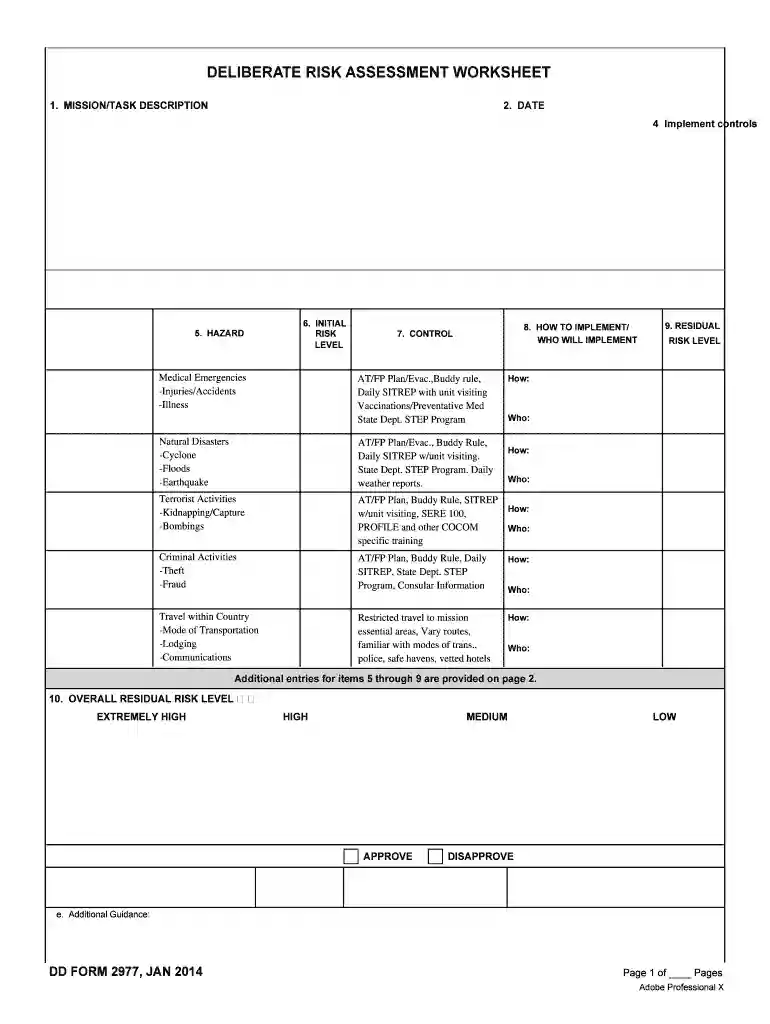
dd form 2977 fillable army pubs Preview on Page 1

Here's how it works

01. Edit your dd form 2977 fillable army pubs online
Type text, add images, blackout confidential details, add comments, highlights and more.

02. Sign it in a few clicks
Draw your signature, type it, upload its image, or use your mobile device as a signature pad.

03. Share your form with others
Send dd form 2977 army pubs via email, link, or fax. You can also download it, export it or print it out.

How to use or fill out 2014 form dd 2977 fillable with our platform

Form edit decoration
9.5
Ease of Setup
DocHub User Ratings on G2
9.0
Ease of Use
DocHub User Ratings on G2
  1. Click ‘Get Form’ to open the 2014 form DD 2977 in the editor.
  2. Begin with the 'Mission/Task Description' section. Clearly outline the mission or task for which you are conducting the risk assessment.
  3. Enter the date in the format DD/MM/YYYY. This is essential for tracking and documentation purposes.
  4. In the 'Prepared By' section, fill in your name, rank/grade, duty title, telephone number, unit, work email, and UIC/CIN if required. Ensure all information is accurate.
  5. Proceed to identify hazards related to your mission in the 'Hazard' section. Specify each hazard clearly.
  6. Assess initial risk levels by determining probability and severity using the provided matrix. Document these levels accordingly.
  7. List controls that will mitigate identified risks in the 'Control' section. Be specific about how these controls will be implemented and who is responsible.
  8. Finally, review all entries for accuracy before saving or exporting your completed form for submission.

Start using our platform today to streamline your document editing and form completion process for free!

See more 2014 form dd 2977 fillable versions

We've got more versions of the 2014 form dd 2977 fillable form. Select the right 2014 form dd 2977 fillable version from the list and start editing it straight away!
Versions Form popularity Fillable & printable
2014 4.8 Satisfied (274 Votes)
be ready to get more

Complete this form in 5 minutes or less

Get form

Got questions?

We have answers to the most popular questions from our customers. If you can't find an answer to your question, please contact us.
Contact us

You need to use only trusted software solutions with strong data protection compliance to sign your documents electronically. DocHub is just the type of software you need! It stores data on Amazon Web Servers and complies with all required security criteria and eSignature laws, so it’s a reliable way to eSign your dd 2977 army pubs or other documents using this tool.

When you edit your deliberate risk assessment worksheet army pubs with DocHub, you only need a stable web connection and virtually any browser installed on your device. No need to install any third-party applications or study guides. Simply open a tab with DocHub, drag and drop your file, and edit it on the spot.

0:00 1:36 How to fill out a risk assessment worksheet - YouTube YouTube Start of suggested clip End of suggested clip Yes the hazard the consequence the likelihood. And then using the matrix above. Figure out your riskMoreYes the hazard the consequence the likelihood. And then using the matrix above. Figure out your risk rating. The residual risk is once the control measures have been applied.
Soldiers use this cyclical process (illustrated in figure 1-1) to identify and assess hazards; develop, choose, implement, and supervise controls; and evaluate outcomes as conditions change.
The five steps of RM\u2014identify the hazards, assess the hazards, develop controls and make risk decisions, implement controls, and supervise and evaluate\u2014are used across the Services to help them operate as a joint force. RM must be embedded in Army culture.

Security and compliance

At DocHub, your data security is our priority. We follow HIPAA, SOC2, GDPR, and other standards, so you can work on your documents with confidence.

Learn more
ccpa2
pci-dss
gdpr-compliance
hipaa
soc-compliance

People also ask

How to Fill out DD Form 2977? Fill in the Mission/Task description Field. Briefly describe the overall Mission or Task for which the deliberate risk assessment is being conducted. List the date in the appropriate field.
1:06 5:03 How to write a Risk Assessment - YouTube YouTube Start of suggested clip End of suggested clip At the top of the form we put the company name and the name of the project we're working on forMoreAt the top of the form we put the company name and the name of the project we're working on for example it may be a school a local authority a building site or a swimming baths.
Most companies use the following five categories to determine the likelihood of a risk event: 1: Highly Likely. Risks in the highly likely category are almost certain to occur. ... 2: Likely. A likely risk has a 61-90 percent chance of occurring. ... 3: Possible. ... 4: Unlikely. ... 5: Highly Unlikely.
The levels are Low, Medium, High, and Extremely High. To have a low level of risk, we must have a somewhat limited probability and level of severity. Notice that a Hazard with Negligible Accident Severity is usually Low Risk, but it could become a Medium Risk if it occurs frequently.
Form DD 2977 is a fillable deliberate risk assessment worksheet that is used in the U.S. army as the standard form for documenting risk management proceedings for mission tasks and related requirements.

army pubs 2977